How to Add Hashtags to Instagram for Better Reach
12 min readinstagram hashtagsinstagram strategysocial media tipsinstagram reach
The old advice is simple: add as many hashtags as Instagram allows, paste the same block under every post, and hope reach follows. That workflow is no longer a reliable default. In 2026, relevance matters more than volume, and some recent performance data suggests hashtags can even correlate with lower views and interactions when creators overuse them.
Learning how to add hashtags to Instagram still matters, but the technical step is the easy part. What requires real skill is deciding whether a post needs hashtags at all, choosing a small set that accurately describes the content, and adapting those tags for feed posts, Reels, Stories, and scheduled publishing.
Table of Contents
- The Changing Role of Instagram Hashtags
- Adding Hashtags to Feed Posts and Reels
- Using Hashtags in Stories and Scheduled Workflows
- Building a Targeted Hashtag Strategy
- Common Hashtag Mistakes and How to Fix Them
- Measuring Hashtag Performance and Next Steps
The Changing Role of Instagram Hashtags
Instagram hashtags still provide context. A tag can help classify a post around a topic, content theme, audience interest, campaign, or branded conversation. But that doesn't mean every post benefits from a long list of tags. The platform now gives creators more ways to communicate relevance, including the image or video itself, the caption, spoken language, and on-screen text.
The old “use the maximum” approach treats hashtags as extra distribution slots. A better approach treats them as metadata for classification. A cooking Reel about vegetarian meal preparation may benefit from focused tags related to the recipe and audience. Adding unrelated high-volume tags about travel, fashion, or generic motivation only makes the post harder to categorize accurately.
Research into Instagram posting practices found that more than half of posts across the analyzed datasets used at least one hashtag, while roughly 30% used between one and three hashtags. That pattern shows hashtags became a mainstream publishing habit, but it doesn't prove that every tag improves performance. The underlying Instagram hashtag research is useful context for understanding adoption, not a reason to fill every caption with tags.
Practical rule: Use hashtags to clarify a post's topic, not to compensate for weak creative, vague captions, or an unclear audience.
HubSpot's 2026 Instagram report cites a 2024 survey in which 62% of marketers used four to nine hashtags in a feed post, while only 1% used the full 30-hashtag maximum. The same report says Instagram users add an average of seven hashtags per post and that 82% of marketers use hashtags in their Instagram strategy. HubSpot's report also cites a separate dataset where hashtag overuse was associated with 32% fewer views and 34% fewer interactions.
That evidence creates a more useful question than “How many hashtags should I use?” Ask instead: Does this post need additional topic signals, and are these the clearest signals available? If the answer is no, a clean caption with strong wording and visible on-screen keywords may be the better choice.
Adding Hashtags to Feed Posts and Reels
Adding a hashtag is technically straightforward. In an Instagram caption or comment, type the # symbol directly before a word or phrase. Don't add spaces, punctuation, or special characters inside the tag. For example, #contentstrategy works as one hashtag, while #content strategy creates a tag for only the first word.

Before publishing a feed post or Reel, use this workflow:
- Write the caption first. Make the post understandable without hashtags. A hashtag should reinforce the subject, not carry the entire explanation.
- Add a focused group. Start with a compact set of highly relevant tags. Independent guidance generally favors three to five targeted hashtags, while some workflows test a somewhat larger group for feed content. SocialPilot's Instagram hashtag guidance explains the syntax, placement options, and relevance-first approach.
- Check Instagram's suggestions. Type
#followed by the topic and review the autocomplete suggestions. Use them as prompts, not as automatic recommendations. A suggested tag still needs to match the actual post. - Inspect the final preview. Look for broken phrases, accidental punctuation, duplicated tags, and tags that change the meaning of the caption.
- Publish or schedule the post. If you're preparing several posts, save the approved groups by topic rather than copying one universal block.
Caption or first comment
Putting hashtags in the caption keeps them attached to the main post text and makes the setup easy to audit before publishing. This is useful when the tags are part of the post's public message, such as a branded campaign, event, product category, or community prompt.
The first comment can produce a cleaner-looking caption. It works well when the tags support discovery but aren't part of the reader's intended experience. The trade-off is operational: you need to publish the comment reliably, and your scheduling workflow must support it. If your publishing tool can't create the comment automatically, placing the tags in the caption may be safer than risking a missed step.
The same principle applies to Reels. Add tags in the Reel caption, keep them tied to the video's actual subject, and avoid treating a Reel as a container for generic trend labels. If you need to confirm the wider publishing constraints before preparing a batch, review the Instagram post limit guidance.
A short visual demonstration can help teams standardize the mechanics across mobile publishing and scheduled drafts.
Using Hashtags in Stories and Scheduled Workflows
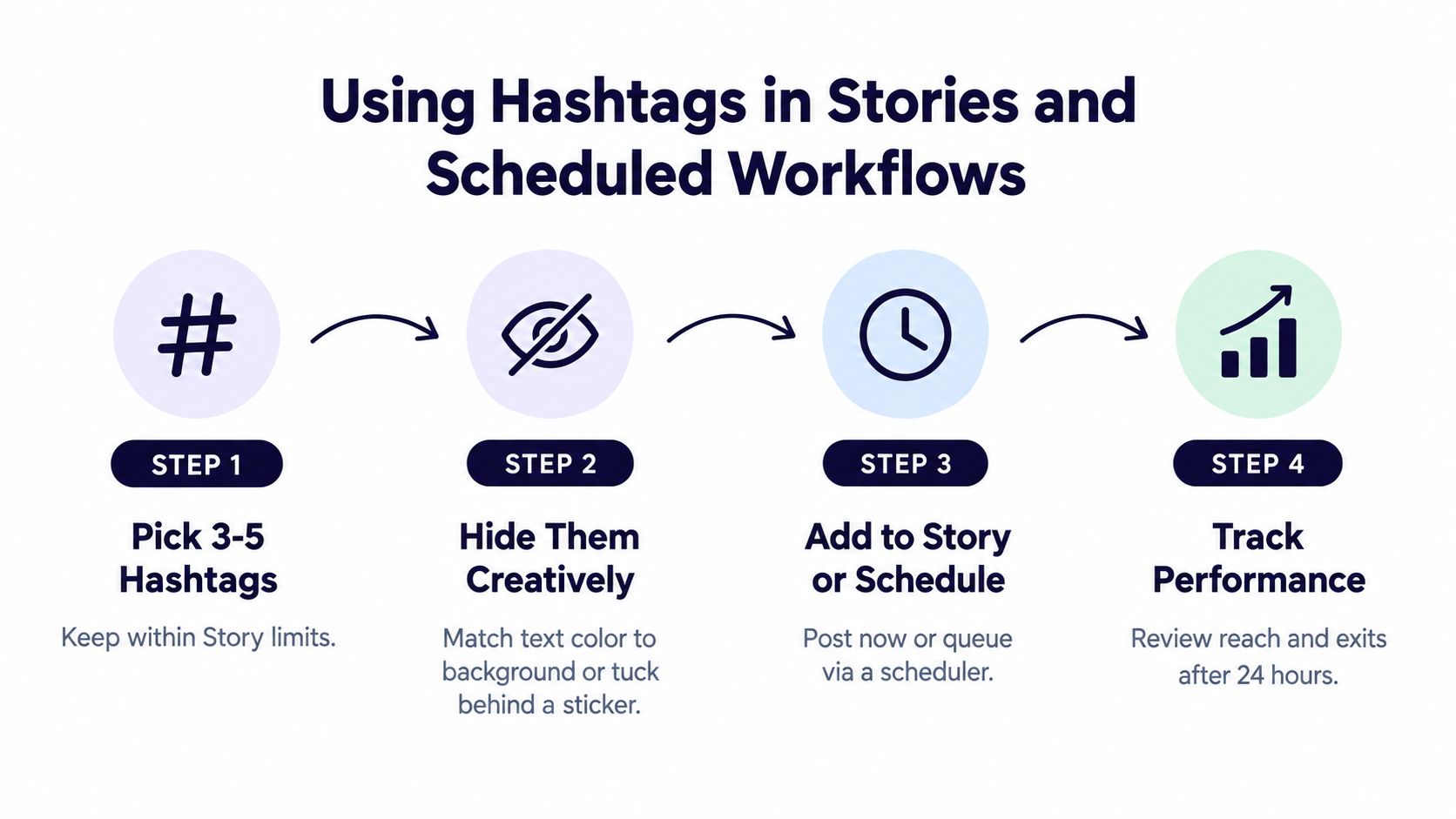
Stories need a lighter touch because hashtags compete with the visual message, stickers, polls, links, and other interactive elements. Instagram Stories support up to 10 hashtags, according to the long-running Instagram hashtag research referenced earlier. That limit isn't a recommendation to use all of them. A smaller, more targeted group is usually easier to manage and less distracting.
Start with the Story's purpose. A local event Story might use a location or event tag. A tutorial sequence might use a topic tag that describes the lesson. A branded Story may need a campaign tag so user-generated posts are easier to find. If the tag doesn't help someone understand or discover the Story, leave it out.
Keeping Story hashtags unobtrusive
You can type hashtags into a Story's text element, then reduce their visual prominence without making them unreadable to the platform. Match the text color to a background area, reduce the text size, or place the text behind a sticker when the design still remains accessible and intentional. Don't cover important content or create a cluttered layout just to hide a tag.
A practical Story workflow looks like this:
- Choose the format first: Decide whether the tag belongs in a text layer, caption-style copy, or a visible campaign treatment.
- Keep the group narrow: Use only tags connected to the Story's subject, audience, or campaign.
- Preview on a phone: Check contrast, legibility, sticker placement, and whether the tag distracts from the first frame.
- Record the test: Note which Story format and hashtag group accompanied the post so later performance comparisons have meaning.
Scheduling without losing platform context
Cross-platform scheduling makes hashtag errors more likely when one caption is copied everywhere. A phrase that works on Instagram may look awkward on LinkedIn, TikTok, or another network, so build a separate Instagram version rather than treating the Instagram caption as the master copy.
A reliable scheduler workflow separates content idea, platform caption, media format, and hashtag group. Save reusable groups by content pillar, then edit the group for the individual post. A Reel about a product demonstration may need different tags from a customer education carousel, even when both support the same campaign.
Use a platform that provides a visual preview and per-platform caption editing, then check that hashtags remain attached to the Instagram version. For Stories, confirm whether the tool supports direct publishing, alerts, or a manual completion step. The Instagram Stories scheduling workflow can help teams document those handoffs before they queue a campaign.
Building a Targeted Hashtag Strategy
Hashtag selection works better as a constrained keyword problem than as a brainstorming exercise. Every tag should describe something specific about the post, such as the subject, format, audience, use case, location, or campaign. The group should be broad enough to provide context but narrow enough that the platform can understand who might care.
Create libraries around your content pillars. If your account publishes social media education, for example, separate groups for caption writing, content planning, short-form video, and creator workflows. The purpose isn't to create a huge archive. It's to make the right starting set available when a post is ready.
For each pillar, classify tags by role:
- Core topic: The central subject of the post.
- Audience or use case: The people or problem the content addresses.
- Format: A tag describing a tutorial, Reel, checklist, interview, or another content type when relevant.
- Brand or campaign: A proprietary tag used consistently for a specific initiative.
- Context: A location, industry, event, or seasonal theme that genuinely applies.
Broad mega-tags can expose a post to a large, poorly defined pool, but they may dilute topical specificity. Niche tags give the post a clearer context and can attract people with a stronger connection to the subject. Recent third-party analysis cited by Hootsuite suggests the modern approach is moving toward fewer, more targeted hashtags, with niche tags outperforming broad mega-tags on engagement per impression in that analysis. Hootsuite's hashtag guide provides additional practical context on tailoring tags by format and audience.
Rotate by theme, not randomly
Rotation doesn't mean changing every tag for the sake of appearing different. It means selecting the set that matches the post in front of you. Keep a small number of dependable tags for a pillar, then replace those that are too broad, inactive, ambiguous, or consistently weak in your own data.
Use content pillars to connect the hashtag library to the publishing calendar. The content pillars guide offers a useful structure for grouping recurring topics before you create reusable tag sets. For creators who need starting ideas rather than a blank page, ClipCreator.ai viral hashtag sets can provide inspiration, but copy-and-paste lists still need editing for the specific post.
A tag library should also include exclusions. Remove tags that attract the wrong audience, overlap with unrelated meanings, or no longer fit the account's positioning. Review branded and campaign tags separately, since consistency matters more for tracking participation than for discovering a general topic.
Selection test: If you can't explain why a person interested in the post would search for or follow the tag, it probably doesn't belong in the group.
Common Hashtag Mistakes and How to Fix Them
Most hashtag problems come from treating implementation as a one-time task. A creator finds a long list, pastes it into every caption, and stops checking whether the tags still describe the content. That workflow saves seconds during publishing but makes performance harder to interpret.
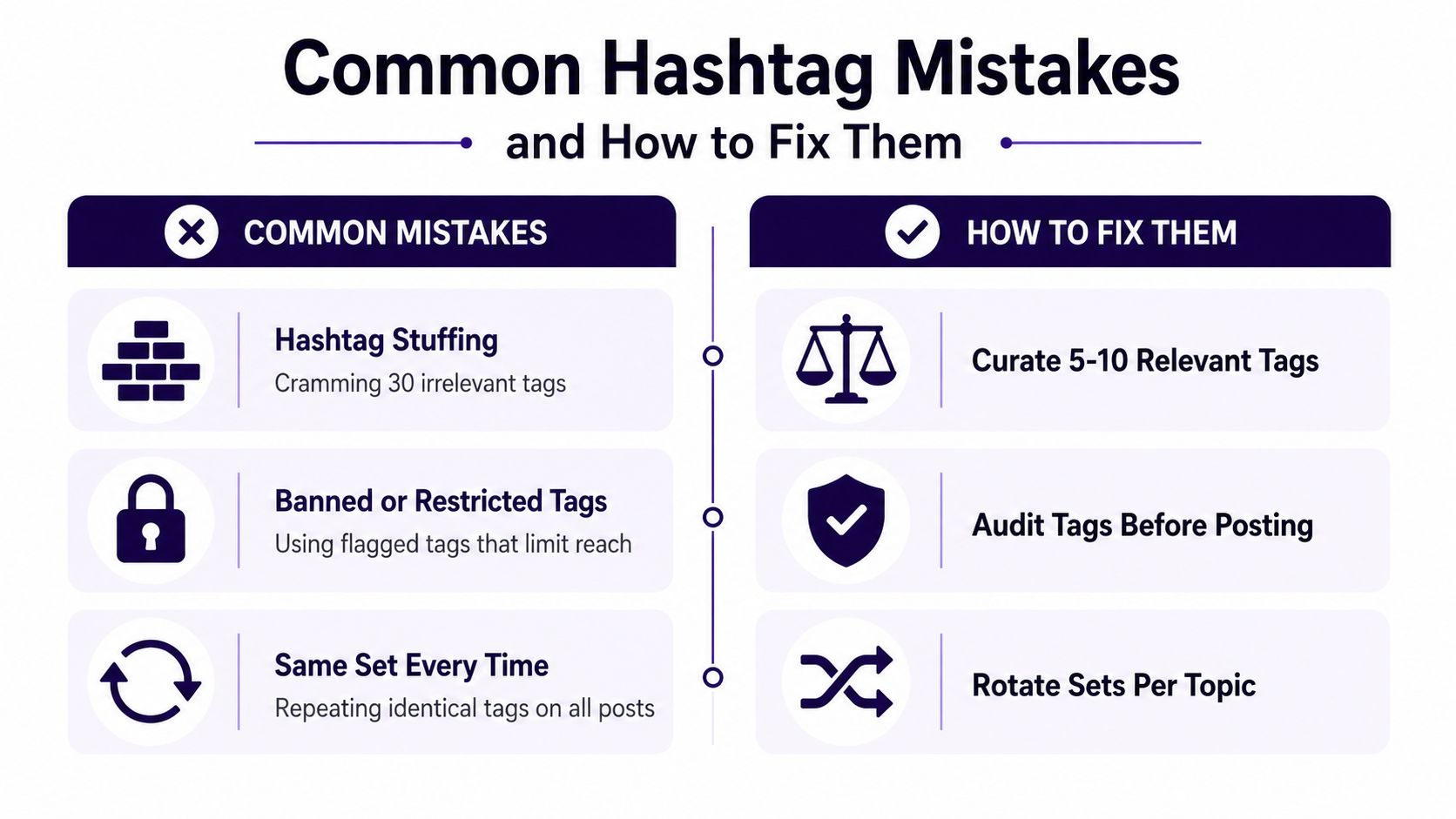
Compare the common failure modes with their practical fixes:
- Hashtag stuffing: A caption filled with irrelevant or repetitive tags looks untargeted and can weaken classification. Replace the block with a compact, relevant group tied to the post's actual subject.
- Restricted or problematic tags: A tag may carry associations that don't fit your account or may have limited visibility. Search each unfamiliar tag on Instagram before using it, and remove tags that produce questionable or unrelated results.
- The same set every time: Identical tags make every post look interchangeable and prevent clean testing. Keep pillar-based libraries, then rotate the group according to topic, format, and audience.
- Keyword mismatch: A post about editing Reels shouldn't use a tag that only describes photography, even if both audiences overlap. Choose the narrower term when it better represents the content.
- Caption clutter: A dense block can compete with the hook and reduce readability. Test first-comment placement or omit tags when the caption and on-screen language already provide strong context.
The performance risk of overuse isn't theoretical. A 2026 dataset cited by Metricool reported that posts with hashtags received 31% fewer views and about one-third fewer interactions than posts without hashtags. Metricool's hashtag tracking coverage presents that finding as a reason to test omission, not as proof that hashtags are always harmful.
A clean workflow also includes a draft review. Check each tag for relevance, spelling, accidental spaces, and duplication before publishing. If you manage multiple collaborators, use Instagram draft post guidance to keep unpublished captions and hashtag groups organized instead of relying on scattered notes.
Measuring Hashtag Performance and Next Steps
Measure hashtag groups, not just individual tags in isolation. In Instagram Insights or comparable analytics, record reach, impressions, engagement, saves, and shares for posts using each group. Keep the creative and audience context visible, because a strong or weak post may owe more to the content itself than to the tags.
One benchmark study reported that posts using at least one hashtag had 12.6% more engagement than posts without hashtags, while another 2026 study reported 31% fewer views and about one-third fewer interactions for posts with at least one hashtag. Sprout Social's hashtag analysis sets those conflicting results side by side, reinforcing the practical conclusion: hashtag inclusion alone doesn't predict success.
A simple decision rule
Keep a tag when it matches the post, reaches the intended audience, and appears in groups associated with useful results. Replace it when it repeatedly underperforms or attracts irrelevant engagement. For a broader framework on choosing meaningful metrics, review these tracking content performance insights.
Should you prioritize hashtags or cleaner captions and on-screen keywords? Use hashtags when they add clear topic or campaign context. Skip them when they make the caption harder to read and the post already communicates its subject effectively. Timing can affect the wider publishing result too, so compare your findings with the best time to post Instagram Reels, rather than treating hashtag performance as a separate system.
iHatePosting helps creators and teams plan Instagram captions, save reusable hashtag groups, preview platform-specific posts, and schedule content alongside other social networks. Visit iHatePosting to organize your hashtag workflow, tailor each post before publishing, and test relevance with a clearer content calendar.