What Are Content Pillars and How to Build Them
18 min readcontent pillarscontent strategysocial media planningeditorial calendar
Content pillars are 3 to 5 recurring themes your brand returns to, each broad enough to support many posts and tied to an audience need and a business goal. Define them with a three-column audit, tag every post by pillar, give each a calendar slot, and review performance by pillar.
Key takeaways
- Expert guidance usually converges on 3 to 5 recurring themes, with some frameworks stretching to 3 to 7.
- One source describes a pillar as needing room for 15 to 40 supporting pieces (Brandwatch content pillar overview).
- A pillar is not a single post topic: "Instagram caption tips" is a topic, while "social media education for service businesses" could be a pillar.
- A candidate theme that can't produce four to six distinct post ideas will clog the calendar by week two.
Monday morning. Your calendar has empty slots, your notes app has scraps of half-ideas, Canva has drafts you forgot to finish, and someone on your team wants to know why last week's post didn't land. You open Instagram, LinkedIn, and maybe TikTok looking for inspiration, then end up rewriting the same product point in three different ways.
That's the point where teams start asking, what are content pillars, really, and why do people keep saying they matter?
The practical answer is simple. Content pillars give your ideas a home before you write the post. Instead of deciding from scratch what to publish every day, you work from a short list of repeatable themes. That shifts content from reactive posting to a schedule you can run.
Table of Contents
- The Calendar Chaos Most Creators Start With
- What are content pillars, exactly?
- Why Pillars Change How a Strategy Performs
- How do you find the content pillars that fit your brand?
- Mapping Pillars to Cadence and Campaigns
- What are examples of content pillars?
- Running a Pillar System That Actually Compounds
The Calendar Chaos Most Creators Start With
Most creators don't begin with a strategy problem. They begin with a workflow problem.
A solo marketer might spend the morning bouncing between drafts, comments, product updates, and campaign notes. One post is educational. The next is a rushed promotion. Then a trend appears, so the whole plan gets tossed aside. By Friday, the feed looks busy, but not coherent.

That kind of chaos shows up in familiar ways:
- Captions get written from scratch: Every post feels like a fresh assignment instead of part of a system.
- The same angle gets repeated: Teams keep talking about the product, but from only one narrow viewpoint.
- Brand voice drifts: One day the brand sounds sharp and helpful, the next day it sounds vague or overly salesy.
- Campaigns collide: A product launch goes live next to an unrelated promo because nobody planned the bigger rhythm.
The issue usually isn't effort. It's the lack of a planning layer sitting above individual posts.
A good calendar helps, but only if the calendar has structure. That's why many teams pair scheduling with a recurring theme system instead of relying on a blank grid. If your current process is mostly drag, drop, rewrite, and hope, a social media content calendar tool can help only after you've decided what categories belong on that calendar in the first place.
Content pillars work best when they stop being abstract branding language and start acting like labels your team can schedule against.
That's the shift. A small set of recurring themes turns random output into a publishing rhythm. Once those themes are named and tagged, the week stops feeling improvised.
What are content pillars, exactly?
Content pillars are recurring strategic themes your brand returns to again and again. Think of them like the main sections in a library. The library is your total content output. Each shelf is a pillar. Each post is a book filed into the right section.
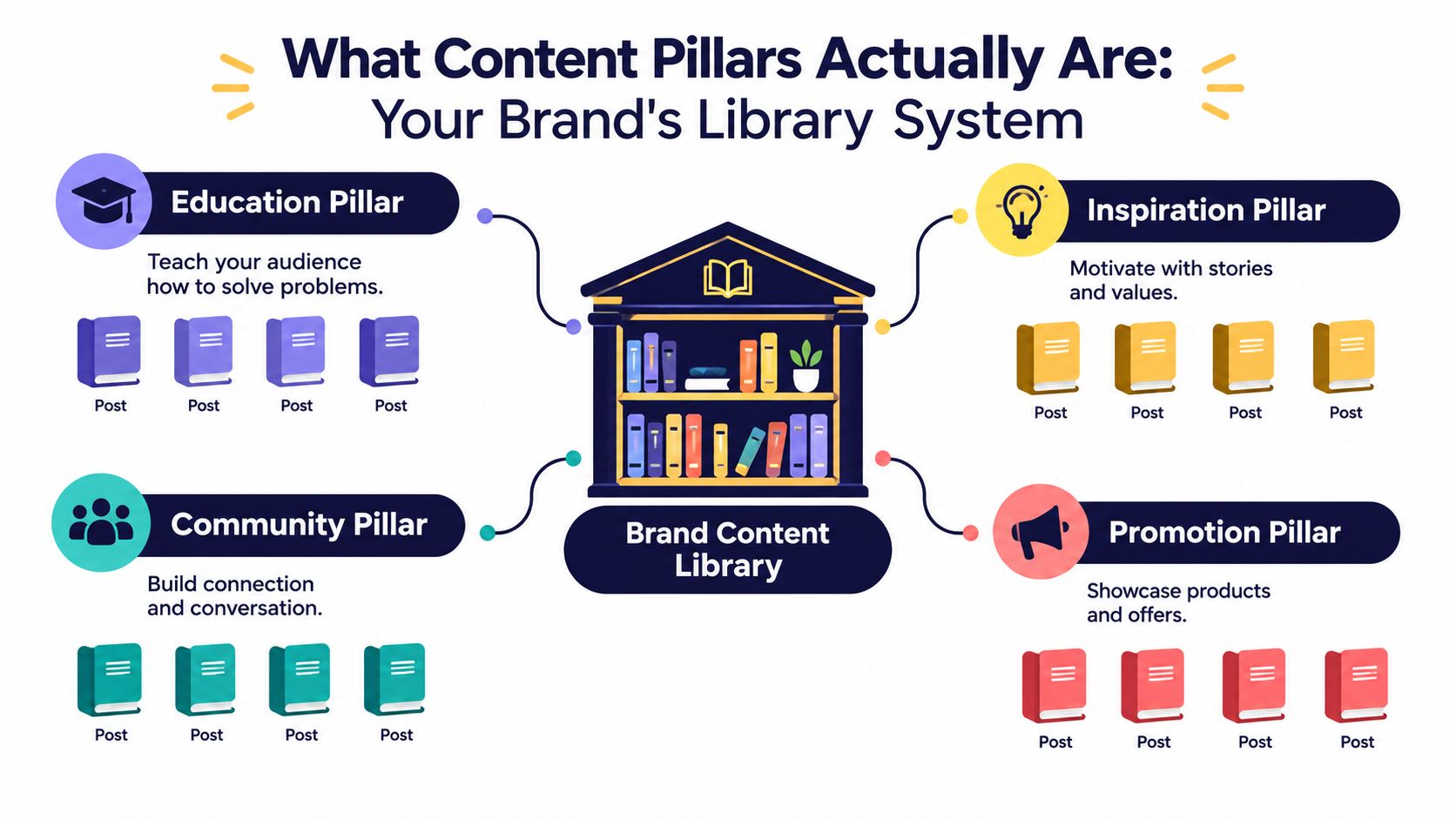
If you're still asking what are content pillars, the easiest mistake to avoid is this one: a pillar is not a single post topic.
“Instagram caption tips” is a post topic. “Social media education for service businesses” could be a pillar. The pillar is broad enough to support many posts, but focused enough to mean something.
What a workable pillar includes
A pillar gets useful when it has a few concrete parts attached to it:
- A clear name: Something short enough to tag in a calendar.
- A one-sentence purpose: Why this pillar exists and what audience need it serves.
- A bank of subtopics: These are the repeatable angles that generate posts.
- A format fit: Maybe this pillar works well in Reels, carousels, blog posts, newsletters, or short text posts.
- An audience job: The role it plays, such as teaching, building trust, starting conversation, or supporting a buying decision.
For example, a B2B consultant might have a pillar called Client Education. Its purpose could be: “We help operations leaders understand the systems problems slowing down their team.” Subtopics might include onboarding friction, reporting mistakes, workflow bottlenecks, and delegation habits.
How many pillars should you have
Expert guidance usually converges on 3 to 5 recurring themes, with some frameworks stretching that to 3 to 7 as long as each theme is broad enough to support substantial follow-on content. One source describes a pillar as needing room for 15 to 40 supporting pieces, which is why pillars work as planning units rather than labels alone, according to Brandwatch's content pillar overview.
That range matters because too few themes can make a feed repetitive, while too many make the calendar hard to steer.
For a practical example of how strategic themes can shape one channel without turning generic, RedactAI's LinkedIn branding tips are useful because they show how positioning and repeatable content angles reinforce each other on LinkedIn.
Later in the process, it helps to see the concept explained visually:
Working definition: A content pillar is a repeatable theme tied to audience interest and business intent, with enough depth to support ongoing publishing.
That's why pillars belong in the calendar setup phase, not just in a brainstorming doc.
Why Pillars Change How a Strategy Performs
Monday arrives, and the content calendar looks full. By Thursday, the team has posted three unrelated topics, skipped one channel, and delayed a campaign asset because no one could agree on what should go live first. The problem is rarely a lack of ideas. The problem is that ideas are not sorted into a system the calendar can use.
Content pillars fix that by giving every post a home before production starts.
Independent strategy guidance describes pillars as a planning layer above individual posts, a finite set of recurring themes that keep content tied to business goals and reduce topic drift, as explained in Content Technologist's overview of content pillars. In practice, that means your team is no longer asking, "What should we post tomorrow?" The better question becomes, "Which pillar is due this week, and which subtopic fits the campaign, offer, or audience question attached to it?"
That shift changes execution.
Ad-Hoc Posting vs. Pillar-Based Posting
Ad-hoc posting versus pillar-based posting (checked November 2026)
| Operational Dimension | Ad-Hoc Posting | Pillar-Based Posting |
|---|---|---|
| Idea generation | Starts from a blank page | Starts from a known theme and subtopic bank |
| Topic control | Content drifts based on urgency or mood | Content stays inside a defined taxonomy |
| Team handoff | Writers need full context each time | Briefs can reference a pillar and goal |
| Measurement | Results are tied to isolated posts | Results can be reviewed by theme |
| Calendar balance | Easy to overpost one angle | Easier to spot neglected themes |
A good way to understand the difference is to compare a pantry with a meal plan. Ad-hoc posting is opening the fridge every day and hoping something comes together. Pillar-based posting is deciding in advance that Tuesday is tutorials, Thursday is proof, and Friday is brand perspective. The team still has creative room, but the calendar no longer depends on last-minute inspiration.
The performance gain is operational before it is creative.
- Less topic drift: Posts support a repeatable narrative instead of reacting to whatever feels timely.
- Faster planning: A draft begins with a category, goal, and audience angle already attached.
- Cleaner reporting: You can review how one pillar performs against another and adjust cadence based on patterns.
- Easier delegation: Writers, designers, and social managers can work from tagged briefs instead of chasing context in Slack.
This also makes campaign planning more concrete. If a launch belongs to one pillar and customer proof belongs to another, you can spread them across the month instead of bunching them into one noisy week. A social media campaign planner built around recurring themes gives you something you can tag, schedule, and hand off the same day, including inside iHatePosting.
Teams do not usually need a bigger idea bank. They need a smaller set of categories that makes scheduling decisions easier.
That is why pillars improve strategy performance. They turn strategy from a set of intentions into a posting system the calendar can run.
How do you find the content pillars that fit your brand?
A pillar workshop goes off track fast when the team starts tossing out broad labels like "education," "culture," or "inspiration" without asking whether any of them can hold up on an actual posting calendar. A useful pillar has to do more than sound right in a meeting. It has to produce repeatable post ideas, support a business goal, and earn a slot on the schedule.
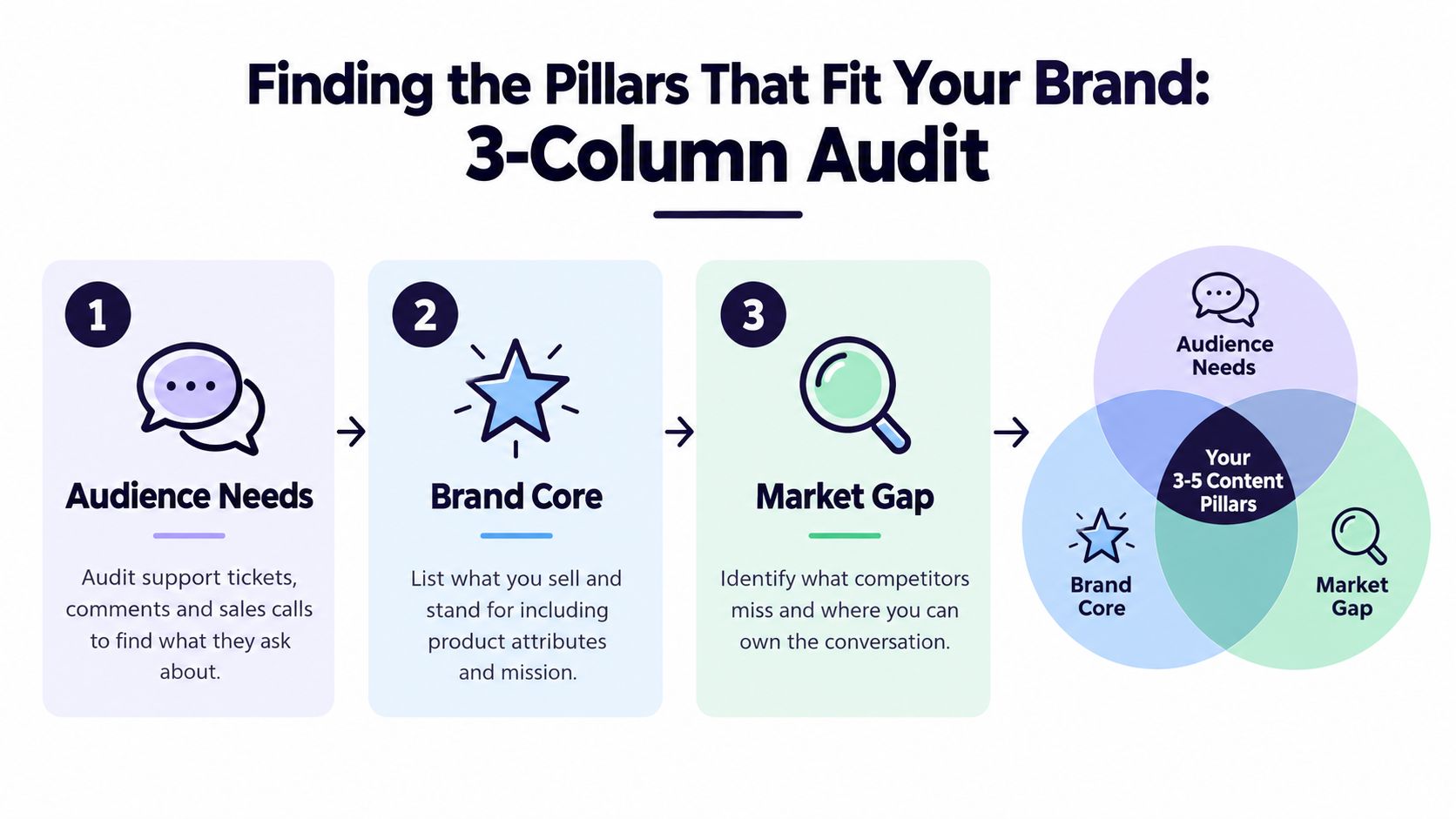
Start with a simple audit using three columns. This works well because it turns a fuzzy brand discussion into something your team can sort, tag, and schedule.
Build the three-column audit
In the first column, write down what your audience asks about. Pull from support tickets, sales calls, comment threads, DMs, onboarding questions, and recurring objections.
In the second column, list what your brand needs to be known for. Include product strengths, service angles, category expertise, point of view, and the offers you need content to support.
In the third column, note what already gets a response. Look for patterns across posts, not one lucky spike. Saves, replies, shares, qualified traffic, and follow-up questions all count if they repeat around the same topic.
Now you have raw material, not pillars yet.
Mark the themes that can survive contact with the calendar
Look across the three columns and highlight themes that show up in at least two places. Those are your candidates. A theme that appears in all three is usually strong because it connects audience interest, brand direction, and visible traction.
This is also the right moment to get concrete. If a candidate cannot turn into four to six distinct post ideas without strain, it will clog the calendar by week two. A social media scheduler template helps here because you can test each theme against real publishing slots instead of keeping it at the naming stage.
For example, "productivity" is too loose to schedule well. "Workflow systems for small client-service teams" gives your team somewhere to go. It can produce how-to posts, mistakes to avoid, tool comparisons, client examples, and process breakdowns without drifting.
Stress-test each candidate before you name the final set
Good pillar sets are usually small. Three to five is enough for variety and still tight enough to manage. More than that often creates overlap, weakens repetition, and makes the calendar harder to balance.
Use a simple sentence for each candidate:
We help [audience] get [outcome] through [angle].
Then check each one against three filters:
- Can the team generate multiple post formats from it? A strong pillar works in short posts, carousels, videos, email, and campaign support.
- Is it distinct from the others? If two candidates lead to the same kinds of posts, merge them or rename them.
- Does it deserve recurring calendar space? If the topic is interesting but does not support a clear audience or business outcome, keep it as an occasional post, not a pillar.
A pillar works like a shelf label in a stockroom. Once the label is clear, everyone knows where new ideas belong. If the label is vague, the shelf fills with random items and retrieval gets slow.
That is why vague labels create trouble. "Inspiration" often turns into a junk drawer. "Client decision-making lessons" gives the team a tighter category with a clear audience use case. Storyflow makes a similar point in its guide to content pillars, which emphasizes themes tied to audience intent and measurable content planning.
The final check is practical. If your social lead cannot tag a draft with the pillar name and know where it belongs in the month, the pillar is still too abstract. Rewrite it until it guides a real posting decision.
Mapping Pillars to Cadence and Campaigns
Once your pillars are named, they need a place to live. If they never reach the calendar, they stay theoretical.
A useful starting move is to assign each pillar a recurring slot. Not because every week must be rigid, but because repetition reduces decision fatigue. When Tuesday already belongs to a certain theme, your team starts the week with fewer open loops.
Give each pillar a predictable home
A simple weekly rhythm might look like this:
- Monday: Educational content
- Tuesday: Behind-the-scenes or process
- Wednesday: Product or service story
- Thursday: Proof, results, or client perspective
- Friday: Community prompt or opinion post
This doesn't mean every business needs those exact labels. It means each pillar should have a visible home in the week.

Tag posts so the calendar can tell you something
The operational layer matters most. If posts are tagged by pillar, you can glance at the month and see whether one theme is swallowing the schedule.
In SEO-oriented strategy, pillars also map to a hub-and-spoke structure, where a central topic connects to supporting content. That same logic works inside a social calendar. A durable theme anchors the month, and smaller posts branch off it in multiple formats, as explained in The Stacc's content pillar glossary.
A scheduling app becomes more useful when it supports that tagging and grouping behavior. For example, iHatePosting's scheduler app includes calendar planning, campaign organization, and per-platform tailoring, which makes it possible to group posts by launch, theme, or series rather than treat every post as a one-off.
Build around campaigns, not isolated posts
Try naming campaigns in a way that combines timeframe and pillar. For example:
- Q1 Authority Build, Education
- Spring Launch, Product Story
- Founder Visibility, Industry POV
That naming structure helps when multiple initiatives overlap. Instead of asking, “What should we post Wednesday?” the team asks, “Which scheduled slot and campaign does Wednesday belong to?”
A pillar becomes real when it controls placement, not just naming.
One more useful habit is assigning each pillar one long-form anchor piece each month. That could be a blog post, newsletter essay, webinar recap, or in-depth LinkedIn post. Shorter posts then pull clips, carousels, quotes, and summaries from that anchor. The calendar stops looking like a flat list and starts acting like a connected system.
What are examples of content pillars?
Abstract definitions help. Real examples help more.
The easiest way to start is to borrow a structure close to your business, then rename the pillars in your own voice.
Three Sample Pillar Sets by Brand Type
Sample content pillar sets by brand type (checked November 2026)
| Brand Type | Pillar 1 | Pillar 2 | Pillar 3 | Pillar 4 | Pillar 5 | Recommended Cadence |
|---|---|---|---|---|---|---|
| Freelance designer | Process Walkthroughs | Client Wins | Pricing and Business | Design Inspiration | Tools and Templates | Mix of weekly and biweekly |
| DTC skincare brand | Founder Story | Ingredient Science | Routine How-Tos | Customer Transformations | Sustainability Practices | Mix of weekly and biweekly |
| B2B SaaS company | Problem Diagnosis | Product Demos | Customer Outcomes | Industry POV | Team and Culture | Mix of weekly and biweekly |
How the same pillar changes by network
Take Process Walkthroughs for a freelance designer.
On Instagram (see how to schedule Instagram posts and Reels), that might become a carousel breaking down a homepage redesign. On TikTok (schedule TikTok videos), it could be a short screen-recorded before-and-after. On LinkedIn (schedule LinkedIn posts), it might be a text post about the business reasoning behind the design choices. Same pillar, different format, same job.
For a skincare brand using Ingredient Science, the formats shift again:
- A Reel explaining what one ingredient does in plain language
- A carousel comparing when to use it in a routine
- A short Threads post clearing up a common misconception
- A newsletter segment answering a buyer question
For a SaaS company with Problem Diagnosis, LinkedIn might carry most of the weight. One post could call out a workflow issue. Another could show the hidden cost of handling it manually. A product demo then fits later under a separate pillar, which keeps the sales message from overwhelming the educational one.
Cadence should match the job of the pillar
Not every pillar needs the same frequency.
Customer outcomes might appear less often because those assets take time to gather. Education or industry POV may run more regularly because the team can produce them faster. Team and culture content might be occasional, but still scheduled, so it doesn't vanish during busy periods.
That's the practical lesson in these examples. Don't just copy the names. Copy the logic, then adapt the labels to fit your audience, your offer, and the channels you use.
Running a Pillar System That Actually Compounds
A pillar system isn't a one-time workshop file. It's a recurring operating loop.
The first part of that loop is measurement. Each pillar should connect to a clear objective, because a theme without a job is hard to evaluate. Newer guidance increasingly treats pillars as a data-informed system with review, ownership, and governance rather than a static brainstorming exercise, as discussed in The 7 Eagles overview of content pillars.
Review the system, not just the posts
Pick a small set of KPIs for each pillar. Keep them tied to the pillar's job.
Examples might include:
- Education pillar: saves, shares, qualified site visits
- Community pillar: replies, comments, conversation quality
- Product pillar: clicks to offer pages, demo interest, sales conversations
- Thought leadership pillar: profile visits, newsletter signups, reposts
You don't need a huge reporting stack. You need consistency.
A practical tool for sharpening LinkedIn-specific review is a LinkedIn content intelligence platform, especially if one of your pillars relies heavily on founder-led or B2B social publishing.
Set a review rhythm that forces decisions
A pillar should be reviewed often enough that your team can still remember what it tried, but not so often that every minor fluctuation causes panic.
A planner built for small teams helps because you can compare tagged content, watch patterns over time, and rebalance future slots rather than relying on memory. A social media planner for small business is useful when the same person is often handling planning, writing, scheduling, and review.
Use a simple loop:
- Publish the post under a tagged pillar.
- Check performance by pillar, not only by individual post.
- Notice which themes are earning attention or supporting business goals.
- Adjust cadence, formats, or subtopics for the next cycle.
- Retire, refresh, or expand pillars based on that evidence.
The compounding effect comes from repeating a good theme long enough to learn from it, then improving the next round on purpose.
If you want one practical action today, do this: name four pillars, assign one KPI to each, and queue the first post under the correct tag before the week ends. That's enough to turn content pillars from a concept into a working system.
If you want a place to run this system, iHatePosting, an AI social media scheduler for 15 networks with unlimited accounts for $15/month (billed annually), gives you a visual calendar, campaign organization, and cross-platform scheduling in one workflow. That makes it easier to tag posts by pillar, balance your weekly mix, and keep your content plan aligned with the story your brand is trying to tell. See the pricing page or the guide to posting to all social media at once.
Frequently asked questions
What are content pillars?
Content pillars are recurring strategic themes a brand returns to, each broad enough to support many posts and tied to an audience need and a business goal.
How many content pillars should I have?
Three to five is the usual range, and some frameworks allow up to seven if each theme can support substantial follow-on content.
What is the difference between a content pillar and a topic?
A topic is a single post idea, while a pillar is a broad theme that generates many posts, formats and subtopics.
How do I know if a pillar is working?
Give each pillar one or two KPIs tied to its job, such as saves for education or replies for community, and review performance by pillar on a regular rhythm.