Instagram Post Limit Guide for 2026
16 min readinstagram post limitinstagram limitsinstagram api limitsinstagram scheduler

You've queued a launch, the captions are approved, the carousel assets are ready, and the scheduler says everything will go live on time. Then Instagram rejects the next job. A new calendar day has started, but the account is still out of publishing capacity because the relevant quota doesn't reset at midnight.
That failure usually gets described as “hitting the Instagram post limit.” That phrase is too vague to help. Instagram limits form a stack: what each asset can contain, what one post can contain, how fast an account can publish through the API, and how each format behaves in distribution. Treating those as separate controls is the difference between a campaign that runs cleanly and one that collapses during its busiest window.
Table of Contents
- Why Instagram Post Limits Are a Stack, Not a Single Number
- Caption, Username, Bio, and Hashtag Caps
- Feed Carousel Limits and the 20-Slide Ceiling
- Reels, Stories, and Feed Video Specs and Durations
- API Publishing Quotas and the Rolling 24-Hour Window
- In-App Posting Versus API Publishing Limit Differences
- Designing a Scheduler Around Instagram's Rolling Quota
- Practical Scheduling Tips to Avoid Hitting the Limit
- The Shift From Posting Volume to Format Efficiency
- Quick Reference Table of Every Instagram Post Limit
- Common Myths About Instagram Posting Limits
- Instagram Post Limit FAQ
Why Instagram Post Limits Are a Stack, Not a Single Number
Instagram does not enforce one universal post counter. A campaign can fail because the file is invalid, the media bundle is too large, the account has exhausted its publishing capacity, or the format and account standing trigger separate restrictions.
Start with per-asset caps. Each image or video must meet its own file, duration, and format requirements. Then apply per-post caps, which control how many media items one publication can contain. A carousel may fail even when every image passes its individual checks.
The next layer is the account-level publishing quota. Meta-facing documentation and independent tracking have described a rolling 24-hour API limit that has changed over time, with published levels of 25, 50, and, in some documentation, 100 API-published posts. Treat those figures as operating references, not permanent settings. A carousel counts as one published post in this quota, not one post per slide.
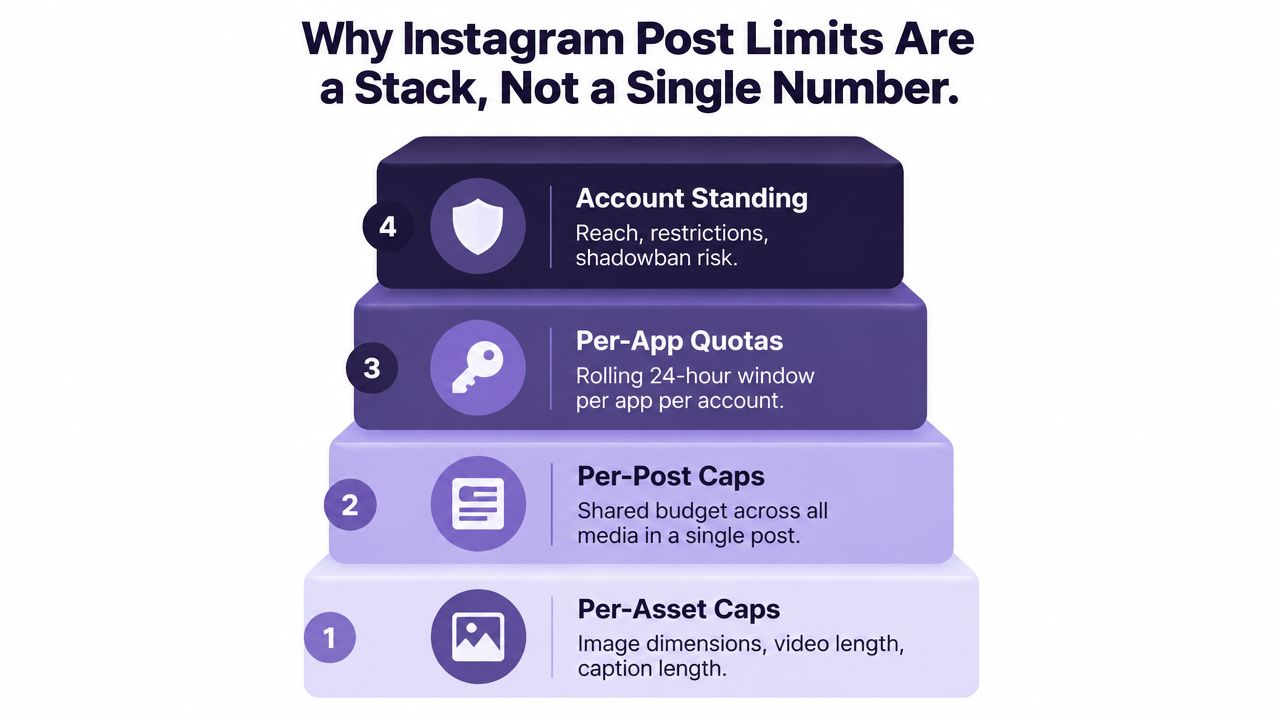
The four layers operators need to track
- Per-asset limits: Validate file type, dimensions, size, and media properties before queuing.
- Per-post limits: Count the complete media bundle, especially when photos and videos share a carousel allowance.
- Rolling account quotas: Record API publications across a moving 24-hour window, never only by calendar date.
- Format and account standing: Track format-specific restrictions and account health separately from technical publishing capacity.
Build the scheduler around all four layers. Caption validation alone will not prevent an exhausted quota, and quota tracking will not catch an invalid video. Preflight every asset, count each publication, reserve quota for priority posts, and test the exact publishing path before launch.
Caption, Username, Bio, and Hashtag Caps
Text limits sit beside the publishing quota, not inside it. A caption can fit Instagram's text rules and still fail to publish because the account has used its available API capacity.
| Field | Cap | Unit |
|---|---|---|
| Caption | 2,200 characters | Per caption |
| Username | 30 characters | Per username |
| Bio | 150 characters | Per profile |
| Hashtags | 30 hashtags in the long-standing documented limit | Per post |
The 2,200-character caption ceiling and the 30-character username limit are documented in Instagram character-limit guidance collected by ShareThis. The bio cap is separate, so shortening a username won't create extra room in the profile bio.
Legal maximum versus useful operating range
The hashtag limit is the messy one. Meta's older documentation has long described up to 30 hashtags, while current platform behavior and newer coverage have moved toward a much smaller practical allowance. Instagram has also reduced hashtag use on regular posts and Reels to a maximum of three in one reported 2026 update, which means teams must test the composer and publishing path they use rather than blindly copying a legacy checklist. That shift is discussed in how many hashtags on Instagram.
Treat the old 30 figure as a historical ceiling, not a reach strategy. Use only relevant tags, and keep the opening of the caption strong because the feed truncates longer copy before the reader taps to expand it.
Practical rule: Put the topic, audience, and action in the first sentence. A character counter protects delivery, but it can't rescue a caption that hides its point.
Hashtags also consume caption characters when placed in the caption. They don't create a second text field with unlimited space. Your pre-flight checker should validate both the total character count and the currently available hashtag allowance for the publishing surface.
Feed Carousel Limits and the 20-Slide Ceiling
Instagram's feed carousel limit is now up to 20 photos and videos combined in one post, as documented by Instagram posting limits by platform. Photos and videos draw from the same shared budget. There isn't one pool for images and another for video slides.
That changes how teams should package content. A tutorial can use a sequence of screenshots, a product launch can combine stills and clips, and a campaign recap can gather mixed assets into one narrative. The post still counts as one publication event against the account's rolling publishing quota, so carousel density can improve the amount of material delivered per quota unit.
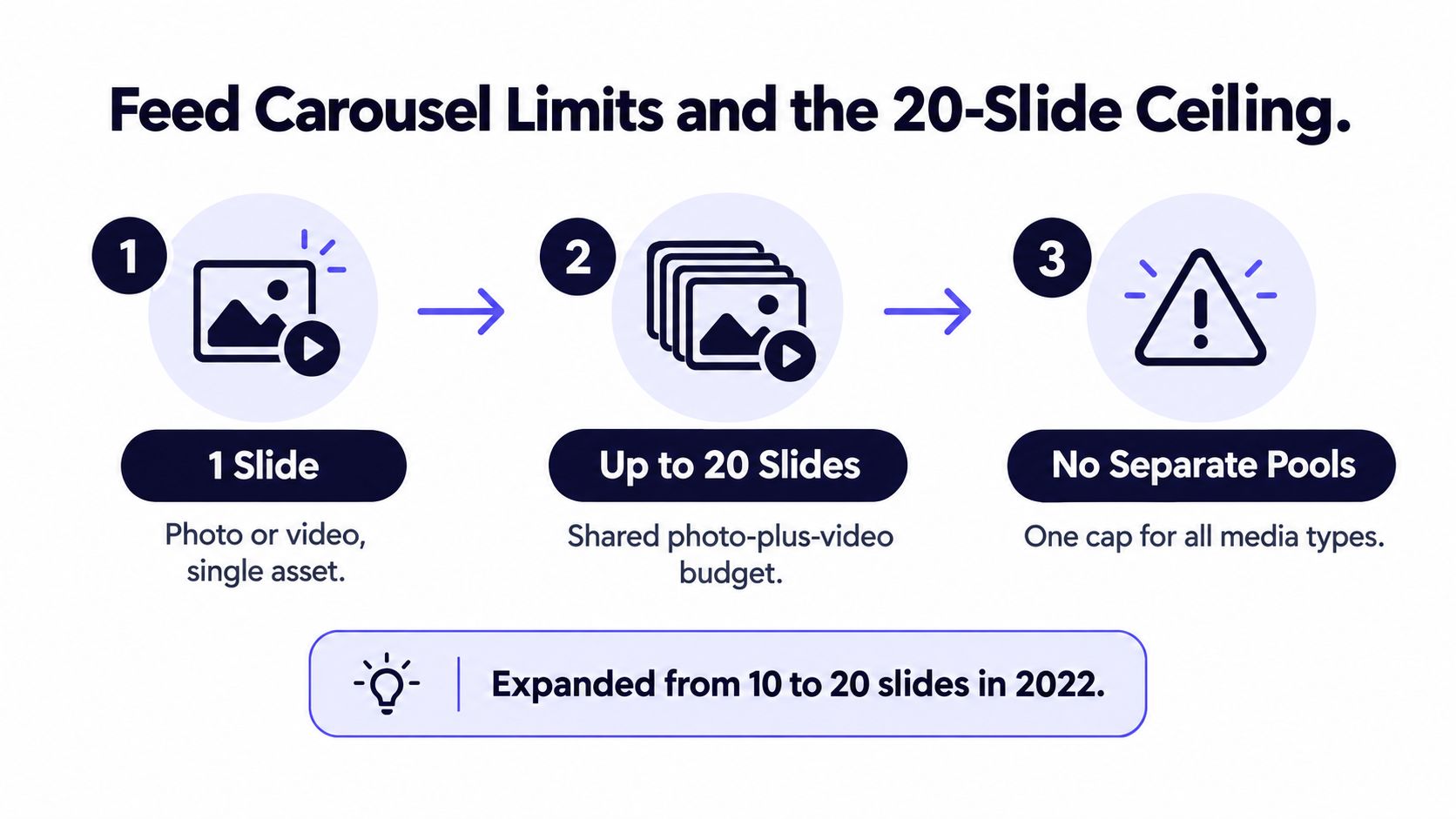
Design the bundle, not just the slides
Start with the story, then assign media to the available slots. Don't add filler merely because the carousel has room. Every slide should advance the explanation, show a meaningful product detail, answer a question, or give the viewer a reason to continue.
The 20-item cap applies to the combined photo and video set, so a plan containing twelve images and eight videos reaches the ceiling. Individual assets still need to pass their own validation checks, and a technically valid slide can weaken the whole post if it disrupts the sequence.
For a practical production workflow, use this guide to making an Instagram carousel to structure the narrative before uploading the media bundle. The operational principle is simple: one strong carousel is one quota unit, regardless of how many slides it contains. Schedule around the quality of the package, not the maximum number of slots.
Reels, Stories, and Feed Video Specs and Durations
Video limits vary by surface, and that makes one universal “Instagram video limit” useless for production planning. Reels, Stories, and feed video can follow different duration and presentation rules, while each uploaded file still needs to pass Instagram's media validation.
Don't move a video from one surface to another without checking its treatment. A vertical clip prepared for Stories may need a different crop for feed, and a longer edit may need a different publishing path. The practical distinctions are summarized below.
| Surface | Max Length | Aspect Ratio | File Size | Min Resolution |
|---|---|---|---|---|
| Feed video | Varies by upload path | Portrait or landscape | Varies by path | Validate before upload |
| Reels | Varies by account and rollout | Vertical is usually the safer design choice | Validate before upload | Prepare for vertical viewing |
| Stories | Segmented story format | Vertical | Validate before upload | Prepare for full-screen viewing |
The table deliberately avoids treating older surface rules as permanent guarantees. Meta changes composer behavior, account eligibility, and rollout states, so your scheduler should validate the live response rather than rely on a static spreadsheet.
Build separate presets
Create a preset for each publishing surface. Each preset should store the intended aspect ratio, duration target, file container, and cover treatment. Keep the source edit separate from the publish-ready derivative so one crop doesn't become the default everywhere.
A music creator working with vertical performance footage can use the AI video for musicians guide for production ideas, but the final export still needs to pass the destination's current validation rules. Likewise, understanding the difference between a Reel and a Story helps editors choose the right surface before they render.
Don't confuse a media rejection with a quota rejection. A malformed file needs re-encoding or resizing. A quota error needs a scheduling decision. Your error logs should classify those outcomes separately.
API Publishing Quotas and the Rolling 24-Hour Window
The most important operational fact about API publishing is the rolling 24-hour window. It isn't a midnight-reset counter. If an account publishes heavily during a morning launch, capacity returns as those earlier publications age out of the window, not only when the date changes.
Published documentation has described different quota levels over time. The historical progression included 25 API-published posts per day, then 50, while some Meta-facing documentation and independent trackers have reported 100 posts per moving 24-hour period for certain states. Other references still report 50, which is why a scheduler must read the live account-level limit instead of hardcoding one answer. The API limit history and operational explanation lays out this inconsistency clearly.
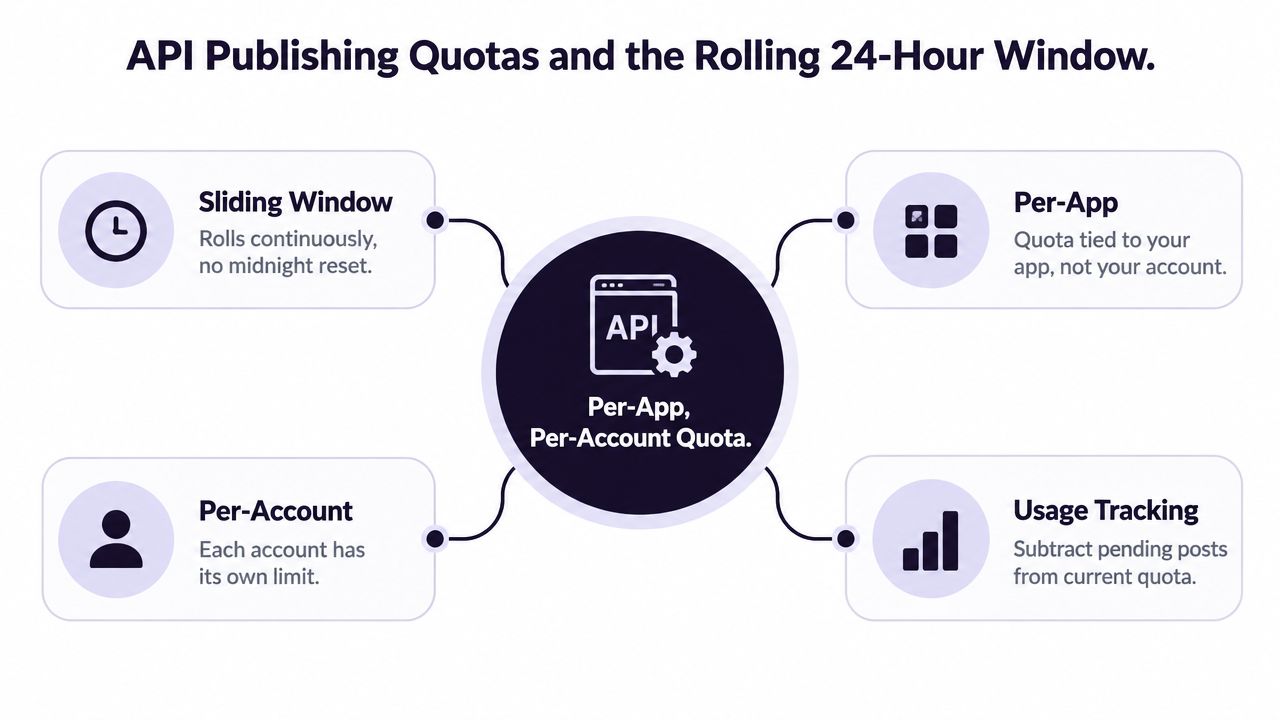
What counts against the quota
For API workflows, the relevant unit is the publishing action or container tracked by the account's publishing-limit endpoint. A carousel is counted as one post, even though it contains multiple media items. The quota is associated with the app and account relationship, so two connected accounts shouldn't be assumed to share one identical allowance.
The endpoint matters because Meta's documentation hasn't always been consistent across references and account states. A scheduler should query the live value, record the response, and retain the timestamp used for the decision.
The calendar date is not the recovery mechanism. The moving window is.
Retries deserve special attention. If the system creates containers repeatedly after an error, it can consume capacity or create duplicate work even when the original post never appeared as intended. Use idempotency, reservation records, and a clear retry policy instead of allowing every failed job to start from zero.
In-App Posting Versus API Publishing Limit Differences
The publishing path determines which constraints your team feels first. Manual posting gives an operator direct control and immediate visibility into the composer. API publishing gives you scale, but it introduces rolling quota management, media-state errors, and recovery logic.
| Publishing Path | Rate Ceiling | Caption Length | Recovery | Best For |
|---|---|---|---|---|
| In-app composer | Governed by product behavior and operator capacity | Use the live composer limit | Operator can correct immediately | Small batches and hands-on publishing |
| API publishing | Rolling account quota that varies by live state | Validate against the endpoint | Requires queue recovery and error handling | High-volume, repeatable workflows |
| Meta Business Suite scheduling | Uses connected scheduling infrastructure | Check preview and publish validation | Reschedule through the suite | Teams wanting scheduling with platform previews |
Choose the path that matches the workload
Use the app when the campaign needs judgment at the point of publishing, such as a sensitive announcement or a post requiring a last-minute visual check. Use the API when multiple accounts, repeated campaigns, or coordinated content make manual work the bottleneck.
Meta Business Suite sits between those approaches. It offers scheduling and native previews, but teams still need to understand that connected publishing can be subject to account-level constraints. A platform preview doesn't guarantee that a later API call will succeed if the account state changes.
For a practical way to review queued content before it goes live, use this guide on how to see scheduled posts on Instagram. My rule is blunt: don't adopt API publishing for prestige. Adopt it when volume and repeatability justify building quota-aware recovery.
Designing a Scheduler Around Instagram's Rolling Quota
A reliable scheduler treats quota as live account state. It checks the current value at job start, reserves capacity before enqueueing, and reconciles actual usage after the request completes.
Use three control layers
- Pre-flight check: Query the account's publishing-limit endpoint before the job enters execution.
- Reservation layer: Reserve one unit for each queued publish, with a carousel treated as one unit rather than one unit per slide.
- Reconciliation: Release the reservation when a job fails validation, is cancelled, or is moved outside the current window.
This prevents two editors from seeing the same remaining capacity and both spending it. Store the response timestamp, account identifier, app identifier, and job identifier so support staff can reconstruct the decision after a failure.
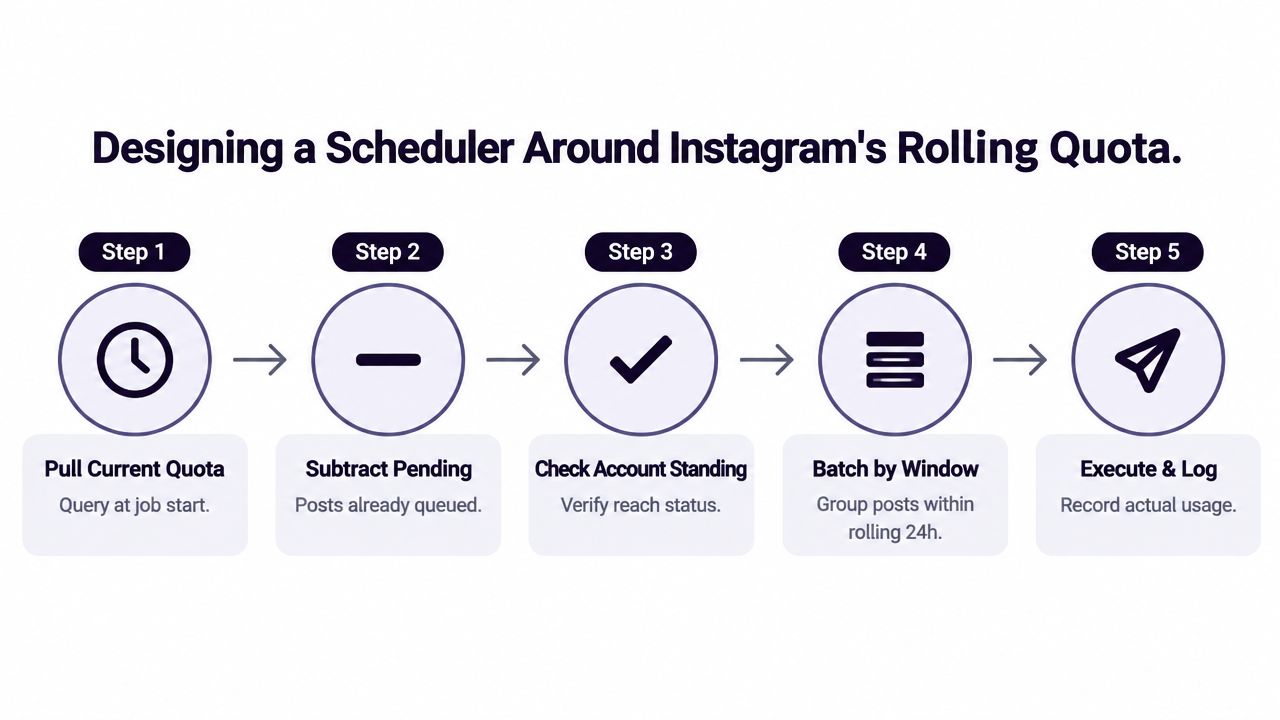
Make the queue visible
A token-bucket approach works well for bursts because it separates available capacity from scheduled demand. The dashboard should show remaining capacity, reserved capacity, and the next expected release time. Don't hide those values behind a generic “scheduled” status.
Cross-platform teams can also benefit from a guide to cross-platform posting for streamers, especially when one campaign feeds several networks with different validation rules. Keep Instagram's quota ledger distinct from the other platforms' queues.
For implementation details around planning and execution, see this guide to scheduling Instagram posts and Reels. The key design decision is to fail early. If no quota is available, hold the job with a clear reason instead of sending requests that will predictably return an error.
Practical Scheduling Tips to Avoid Hitting the Limit
Schedule around the quota, not around instinct. A calendar that looks balanced by date can still create a dangerous burst inside one moving 24-hour window.
Start with the posts that have the most production dependencies. A campaign recap with a large carousel may take longer to validate than a simple image, so place it early enough to leave recovery room. Keep a smaller fallback queue of approved posts that can fill a slot if a planned item fails media validation.
Add guardrails to the workflow
- Use soft and hard alerts: Warn editors before the account approaches its live allowance, then block new API jobs when the remaining buffer becomes unsafe.
- Space requests: Avoid clustering API calls tightly during a launch. Controlled pacing gives the system time to process responses and makes failures easier to diagnose.
- Log response codes: Separate quota exhaustion, authentication failures, and invalid media. Each error needs a different fix.
- Stagger account checks: Query connected accounts in a controlled sequence instead of creating a simultaneous polling spike.
- Keep fallback drafts ready: Reclaimed slots are useful only when approved content is available to take them.
- Review token health: Authentication problems can look like publishing-limit problems when the queue reports only a generic failure.
A scheduling platform with social media scheduling tools can centralize these checks, but software won't replace an operating policy. Assign someone to own the queue during launches, define who can override a hold, and require a reason for manual retries.
The best alert is the one that arrives before the campaign is blocked. Once Instagram starts rejecting jobs, the team is already operating too late.
The Shift From Posting Volume to Format Efficiency
The useful question isn't “How many posts can we force through?” It's “How much audience value can each publishing unit carry?”
A carousel lets one post package several related assets, which makes it more efficient for tutorials, product sequences, and campaign recaps. That doesn't mean every carousel should be filled to its maximum. It means the quota should be treated as a scarce publishing budget, and each unit should earn its place through clarity, saves, shares, or another defined objective.
Hashtag strategy belongs in the same conversation. Coverage that documents Instagram's newer hashtag restrictions, such as Instagram's limits discussion, points toward a broader change in how teams think about distribution. Relevance and format quality matter more than mechanically adding more publishing elements.
Operator's view: Build fewer, stronger publishing units when the story benefits from bundling. Don't split one coherent lesson into several posts just to make the calendar look busy.
Format efficiency isn't a license to publish less thoughtfully. It's a reason to measure the output of each post against its production cost and quota cost.
Quick Reference Table of Every Instagram Post Limit
Use this table as a campaign pre-flight checklist. Instagram limits form a stack: per-post media, per-asset text, account-level rolling quotas, and format-specific caps. Validate all four before a campaign enters the queue.
| Limit | Cap | Unit | Source |
|---|---|---|---|
| Carousel media | 20 combined photos and videos | Per feed post | As noted earlier |
| API publishing quota | Varies by account and app state, with reported levels of 50 or 100 | Rolling 24-hour period | API publishing reference |
| API quota window | 24 hours | Moving account window | API publishing workflow |
| Carousel counting | 1 | API publish unit | As noted earlier |
| Caption | 2,200 characters | Per caption | Instagram character limits |
Common Myths About Instagram Posting Limits
Myth one: the highest hashtag count is the best strategy. A documented ceiling is not a reach target. Hashtag behavior can be tighter in practice, so use relevant tags and clear, searchable captions instead of filling every available slot.
Myth two: a carousel costs one quota unit per slide. It does not. The API workflow treats the carousel as one published post, so bundling related assets can conserve publishing capacity.
Myth three: a new calendar day restores the quota. The quota follows a rolling 24-hour window. Capacity returns only as earlier activity leaves that window, regardless of the date on the clock.
Myth four: every limit appears on one canonical Meta page. Product surfaces, endpoints, account states, and documentation updates can behave differently. Build the scheduler around the limit returned by the relevant workflow, then record changes.
Myth five: a failed request is harmless. Retries can create duplicate containers, consume capacity, or obscure the original error. Log every attempt and separate media failures from quota responses before retrying.
The operator takeaway is direct: posting volume is only one variable. A scheduler must also control format, per-asset validation, queue state, and account-level capacity. That is how it avoids treating one visible cap as the whole system.
Instagram Post Limit FAQ
Does Instagram publish one definitive list of limits?
No. Limits appear across product documentation, API references, and live composer behavior. Use static guidance for planning, then validate the actual account and endpoint before a campaign goes live.
Do hashtags count toward the caption limit?
Yes. Hashtags placed in the caption occupy characters within the caption field. Your counter should include spaces, punctuation, and tags in the same total.
What should a scheduler do if the endpoint returns an unexpected quota?
Trust the live response for that account, record it, and pause jobs that would exceed the returned allowance. Don't force the scheduler to use a hardcoded fallback when Meta reports a different state.
Do Reels and Stories use the same quota as feed posts?
Don't assume that every surface shares one identical counter. The API publishing quota discussed here applies to the publishing workflow and should be checked for the endpoint and media type your integration uses.
How often do these limits change?
Meta can revise limits or roll out behavior unevenly across accounts and surfaces. Re-test after product changes, API-version changes, and unexplained validation responses.
Which limits need testing?
Test carousel size, media duration, caption handling, hashtag acceptance, quota response, retries, and rescheduling. A staging account or controlled production window is safer than discovering a changed cap during a launch.
iHatePosting brings Instagram posts and Reels into a wider scheduling workflow with a visual calendar, platform-specific caption tools, previews, and pre-publish checks. If you want to manage Instagram alongside other networks while tracking campaign queues, visit iHatePosting and test the workflow before your next launch.