If your assistant already writes a decent caption, why does someone still have to log into four dashboards to get it published?
The writing was never the bottleneck. The missing pieces were a standard way for the assistant to see your connected accounts, a way to check each network's rules, and a defined moment where a human says yes. An MCP server is a program that supplies exactly that: it exposes tools, resources and prompts to an AI application through the Model Context Protocol, so an assistant can read from and act on outside systems in a standard way. Anthropic published the protocol on November 25, 2024, as an open standard built around three primitives any server can offer.
People who ask what is an MCP server are usually asking a sharper question: which parts of publishing can be handed to software, and which should stay with a person. The answer splits four ways. The model writes the words. The application decides when to call a tool. The server holds the accounts and the rules. The human keeps the final yes before anything goes live.
What an MCP Server Is in Plain Terms
Think of a wall socket. A lamp, a kettle and a laptop charger have nothing in common inside, but each one plugs into the same fitting, and the building's wiring never changes. An MCP server is that socket for software. A service describes what it can do once, in the shape the protocol expects, and any compatible AI application can use it without a bespoke connector.
For publishing, that's a bigger deal than it sounds. Without a shared standard, every assistant needs its own hand-built connector to each scheduler's publishing logic, and every connector needs its own maintenance. With one, a scheduler builds a single server and any compatible assistant can draft, check and schedule posts through it. Most servers in use follow that pattern already: a 2025 survey by Zuplo found that 58% of MCP builders were wrapping existing APIs rather than building servers from scratch, while 23% were creating new APIs specifically for MCP.
Anthropic introduced the standard as an open way to connect AI assistants with content repositories, business tools and development environments, and shipped example servers for Google Drive, Slack, GitHub, Git, Postgres and Puppeteer on day one (Anthropic's announcement). That set the pattern for everything since: the server is a translation layer, not a new channel.
An MCP server is the adapter that turns a tool's capabilities into a menu an AI can read and use.
It is not an AI model, not a chatbot, and not the scheduler itself. It sits in front of the scheduler, passing requests through and enforcing what the assistant is allowed to ask for. Here's the shape of it:

So there's a simple test. If an assistant can list your accounts, draft a post and schedule it through one standard connection, an MCP server is probably behind that connection. When the assistant does that work on its own, how social media agents work explains the loop on the other side of the call.
How Hosts, Clients and Servers Work Together
Every MCP setup has three parts, and the fastest way to stop guessing at error messages is to learn which part owns which failure.
The host is the AI application where you type. In publishing terms that might be Claude, ChatGPT or an agent workspace running in the background. The host opens connections and stays responsible for permissions, consent and what the assistant may attempt. The client is the connector inside the host, one per server, and it's the piece the assistant uses to reach your scheduler. You almost never see it, which is why "the connector won't appear" is nearly always a client problem.
The server is the program on the other side, and it supplies the capabilities. A scheduler's server might expose list_accounts to read your connected channels and create_post to build a draft. Each capability arrives with a name, a description and a defined set of inputs, so the model knows what's available before it asks for anything.
| Part | Role | Publishing example |
|---|---|---|
| Host | The AI application that starts and manages connections | A chat assistant or agent workspace where the user works |
| Client | The connector inside the host, one per server | The connector the assistant uses to reach a scheduler |
| Server | Exposes tools, resources and prompts to the client | A scheduler server offering list_accounts and create_post |
| Model | Chooses which exposed capability to call | The assistant deciding to draft a caption before scheduling |
What Happens on the First Call
The client asks the server what it can do. The server replies with a list of named capabilities and the input rules for each. The model reads that list, picks the one that fits the request, fills in the arguments and sends it.
Requests and responses travel as JSON-RPC 2.0, a compact message format both sides already understand. The direction is one-way in a subtle but important sense: the server answers requests, it doesn't start them. Nothing in a well-built server wakes up and decides to publish a post on its own.
Practical rule: write each capability description as what it does and when to call it. That description is the only briefing the model gets, and a vague one gets skipped.
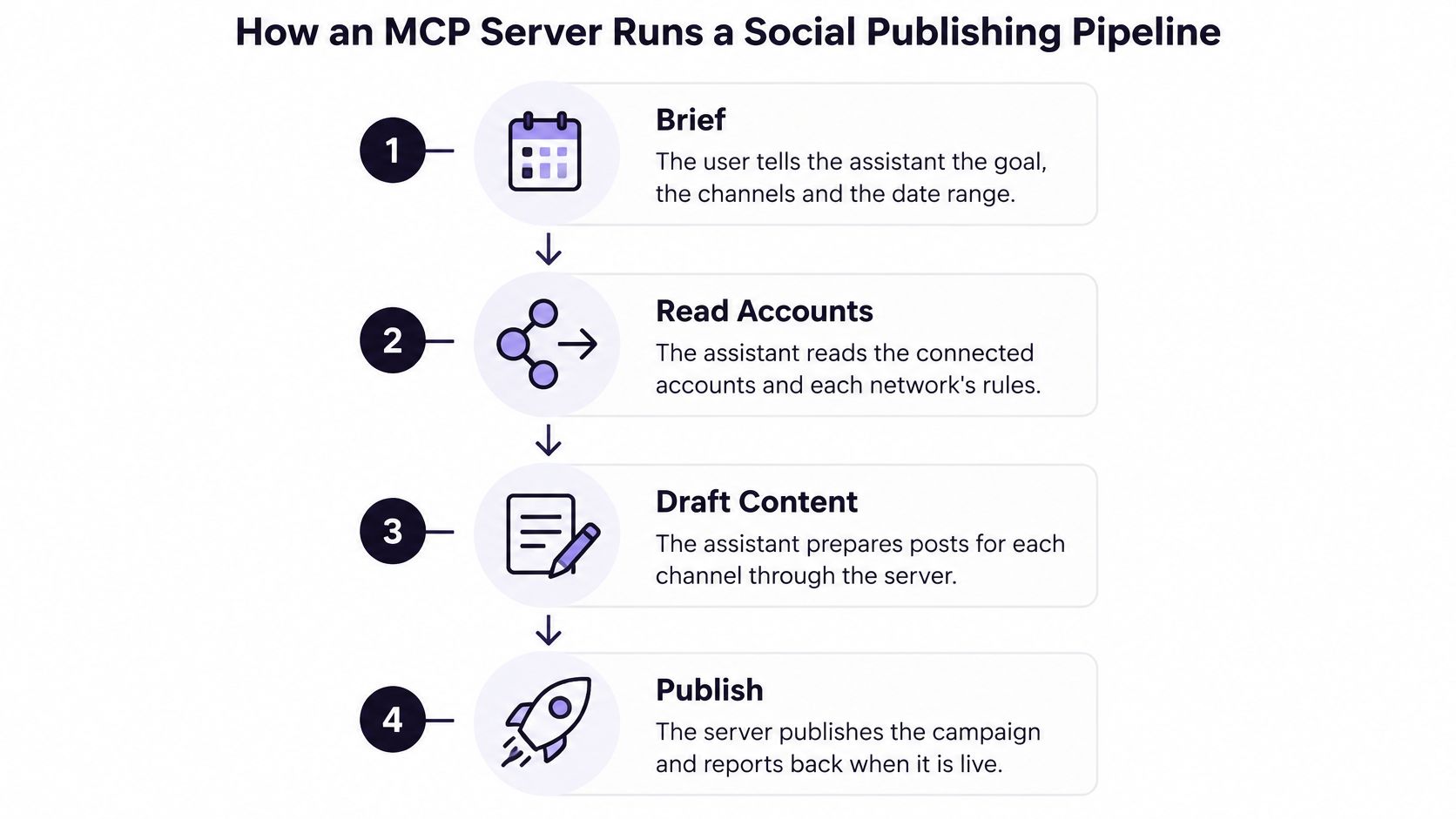
Here's how those parts line up once a campaign is in motion:
One host can hold several clients at once, so a single assistant might read a brand style guide from one server and schedule the resulting posts through another. That's how teams wire an automation stack without teaching the model a new trick every time, and it's the same logic behind the guide to Connect Ihateposting To Zapier Make N8n.
Troubleshooting follows the same split. If a server never shows up in the host, the client connection broke. If the capability appears but fails the moment it runs, look at the server's permissions or the arguments it received.
Tools, Resources and Prompts Explained
A restaurant gets through a busy night because three decisions stay separate. A guest picks from the set menus. The kitchen reads its own prep sheet and allergy notes. A waiter carries the order to the pass. Muddle those up and service collapses.
MCP divides the work the same way, and the division is the reason the protocol holds up under real use. Tools are the orders sent to the kitchen: executable functions the model may choose to call, such as querying a database, reading an analytics endpoint or creating a scheduled post. Resources are the prep sheet and the menu, structured context the application decides to bring into the conversation, like a brand style guide, a network's posting rules or a calendar export. Prompts are the set menus a guest selects, reusable instruction templates such as a weekly planning template or a launch checklist.
| Primitive | Who controls it | What it provides | Publishing example |
|---|---|---|---|
| Tools | The model decides to call them | Executable functions that read data or act | Listing accounts, or creating a draft |
| Resources | The application decides what enters context | Contextual data such as files or records | A brand style guide or a network's rules |
| Prompts | The user picks them | Reusable instruction templates | A weekly content-planning template |
Who Decides What Runs
The controller matters more than the label. A resource can't change anything, because the application chooses whether it enters the conversation at all. A prompt can't change anything either, since a person has to select it. A tool can, which is why the specification treats tools as security-sensitive and recommends access controls, rate limits, output sanitization, input validation and user visibility before execution (MCP specification, basic index).
A tool is a promise that something outside the conversation will change. Treat every one that edits or publishes a post as a decision, not a keystroke.
Well-built servers separate the lookups from the actions. Reading the calendar is one thing; scheduling over a slot a colleague reserved is another, and the second deserves a human in the loop. Which leaves questions worth asking of any workflow you build: which decisions belong to the model, which to the application, which to the server, and which to the person who signs off.
How an MCP Server Runs a Social Publishing Pipeline
Take one campaign: posts across LinkedIn, Instagram and X going out next week. Here's the route it travels when the assistant is connected properly.
- Brief. You tell the assistant the goal, the channels and the date range. Nothing else is needed to start.
- Read the accounts and the rules. Through read-only tools, it checks which accounts you've connected and what each network allows. Character limits, hashtag conventions and media rules differ, and the server hands over the current version of them.
- Draft a version per network. A LinkedIn caption and an Instagram caption aren't the same text with a trim. Hooks, hashtags and media differ, so each one gets written for its channel.
- Check before saving. Each draft is validated against the rules it just read. An over-length caption comes back as an error the model can fix, not as a failed post at nine in the morning.
- Save or schedule. The result lands in the calendar as a draft or a scheduled post, which is the point where a person can see the week at a glance.
- Publish only after approval. In Manual mode, the default, Claude Cowork asks before running tools that change things, such as creating or publishing a post, unless you set them to Always allow.
- Read the results back. Analytics arrive through a read tool, so the next brief starts from what worked.
It's the shape we run at iHatePosting: the hosted MCP server exposes the accounts you've connected as tools, so an assistant can draft, check and schedule without you opening a dashboard.
Two Additions That Change the Work
Two capabilities do most of the heavy lifting here. AI-powered content generation produces platform-specific captions, hooks, hashtags, images and short videos on request, which takes the blank page out of the way and shortens production time. AI agents then carry the adapting, scheduling and publishing across several networks, so the repetitive tasks and the fragmented handoffs stop consuming the week.
If you'd rather watch the flow than read it, this walkthrough covers the same route from the user's side:
The lesson worth keeping is placement. Approval belongs between drafting and publishing, not after publishing, because a post that's already live can't be unapproved. Move that gate to the end and you've built a faster way to make mistakes, and if you want the mechanics of the last step, this guide explains how to publish social posts from an AI agent.
Local Versus Remote Deployment for Schedulers
The protocol defines two transports, and choosing between them is really a question about where the server runs and who needs to reach it. Local servers commonly use stdio, communicating through the operating system's standard input and output with no network overhead. Remote servers use Streamable HTTP, so many clients can connect through ordinary web infrastructure, with authentication through bearer tokens, API keys, custom headers or OAuth-based access tokens (MCP architecture documentation).
| Transport | Where it runs | Clients served | Authentication | Best fit |
|---|---|---|---|---|
| Stdio | Same machine as the host | One local client | Local process trust, no network login | One person testing on a desktop |
| Streamable HTTP | Remote hosted server over HTTP | Many clients and team members | Bearer tokens, API keys, custom headers or OAuth | Shared calendars and team publishing |
For a scheduler, the remote model usually wins. Teams need one shared calendar, one set of connected accounts and one place where approvals are recorded, and a per-user local process gives you none of that. There's a practical wrinkle too: Cowork runs its tasks in the cloud by default, and servers from the desktop app's claude_desktop_config.json aren't available to it. A hosted endpoint is the path that works across devices.
The decision rule is short. Choose stdio when a single person is testing something locally on their own machine. Choose Streamable HTTP for any setup that shares accounts, approvals or analytics across people or tools. If you're wiring Claude in, the Claude MCP server setup guide walks through the remote path.
Security and Webhook Risks to Plan For
A 2025 report on MCP server security found the gap you'd hope not to see: 88% of open-source MCP server implementations required credentials, while only 8.5% used modern authentication methods such as OAuth (state of MCP server security report). Loose credentials are the norm, not the exception, in a young ecosystem: as of June 1, 2025, a security and maintainability analysis examined 343 servers from the official MCP collection plus 1,556 mined from open-source GitHub repositories, for a combined dataset of 1,899 servers.
Authentication is the first check, and it's only half the job. These controls cover the rest:
- Scope every credential to one brand, one channel and one action, so a leaked key can't reach every client account you manage.
- Validate inputs on the server side. An argument that arrives from a model gets the same scrutiny as one from a stranger.
- Split read tools from publishing tools, so a routine calendar check never sits behind the same permission as a live post.
- Require explicit approval before immediate publication. Irreversible actions deserve a named human.
- Use idempotency keys so a retried request doesn't produce a second post on the same account.
- Keep audit logs that record the requesting agent, the approving user, the target account, the payload and the result.
What a Webhook Doesn't Prove
An incoming event can look genuine and still be forged or replayed. Verify the sender with a shared secret or signature, accept only the event types you expect, reject stale or repeated deliveries, and hold off on acting until a payload passes those checks. A webhook that triggers publishing is an unauthenticated door into your calendar until you close it.
Before you go live: can you name which credential publishes to each account, which tool can delete a post, and where the approval gets recorded? If any answer is a shrug, the connection isn't ready.
Decide Whether an MCP Connection Fits Your Publishing Stack
Here's a straight answer. An MCP connection pays off when several AI tools, several people or several client accounts share one calendar. For one person posting through a scheduler's own interface, a second layer adds complexity without adding reach.
The case grows when the publishing decision splits across four actors: the model that drafts, the application that triggers, the server that enforces each network's rules, and the human who approves.
The ecosystem is broad enough that a connector probably exists for what you already use. Microsoft Research reported its catalog contained 1,470 MCP servers after removing empty or non-launching servers and deduplicating ones with identical features.
Four questions settle it: which networks you publish to (X is the only metered network, capped at 30 posts a month without links), whether more than one person approves posts, whether an assistant should only draft or also schedule and publish, and whether webhooks must trigger publishing when something else happens. Two or more yes answers, and the connection earns its keep. Cowork needs a paid plan: Pro, Max, Team or Enterprise. On Team and Enterprise, only an Owner can add the connector, and the key inside its URL is shared by every member.
Then start small:
- Connect your accounts first. A connector can only see what already exists. If it can't see any accounts, connect them in iHatePosting and ask it to list them again.
- Add the hosted endpoint as a custom connector. Where a Request headers section appears in the Add custom connector dialog, paste https://ihateposting.com/mcp as the URL, choose No sign-in, and add a header named authorization whose value is Bearer, a space, and your key. That endpoint is the MCP connector for social media we host, so there's nothing to install locally.
- Ask for the account list. If nothing comes back, the connection isn't finished.
- Start with read-only requests, such as checking what's already scheduled for the week.
- Approve one draft by hand before you let the assistant schedule anything. Manual mode, the default, already asks before tools that create or publish a post.
If you're still weighing the big scheduling suites, this side-by-side look at Hootsuite and Sprout Social compared covers the differences worth checking before you commit to one.
iHatePosting runs a hosted MCP server so the assistant you already use can list your connected accounts, draft a version for each network, check it against that network's rules, and schedule it with your approval on a shared calendar. Visit iHatePosting's MCP connector setup to add the connector and keep approval exactly where it belongs, before anything publishes.