Social Media Agent Explained: What It Does and Doesn't
15 min readsocial media agentAI agentssocial media automationsocial media scheduling
It's Monday morning. You have a finished blog post, a launch deadline, and five social networks waiting for something that doesn't look copied and pasted. The writing is only part of the job. You also need the right images, platform-specific captions, approval from your manager, and a calendar that won't accidentally publish before the announcement.
A social media agent can take on much of that coordination. The useful question isn't whether it can write a polished caption. It's whether you can delegate a clearly defined job, give it appropriate permissions, and check its work before mistakes become public.
Table of Contents
- What a Social Media Agent Actually Is
- How a Social Media Agent Compares to Schedulers and Staff
- What Social Media Agents Handle Day to Day
- Where Social Media Agents Need a Human
- Account Access and Data Checks Before You Connect
- How Social Media Agents Fit Into a Weekly Workflow
- Start With One Low-Risk Task This Week
What a Social Media Agent Actually Is
A scheduler works like a conveyor belt. You place finished posts on it, choose departure times, and it moves them toward publication.
An agent works more like a junior coordinator with graded permissions. You hand it the launch brief and approved article, and it prepares versions for different networks, checks requirements, and brings the work back for sign-off. It can act only through the accounts, tools, and permissions available to it. The practical question is not how fluent its captions sound, but which doors you have opened: read source material, draft captions, propose times, schedule after approval, publish within limits, or report results.

A social media agent is software that works through a multi-step publishing task. It takes a brief and source material, plans what each network needs, drafts suitable content, and may schedule, publish, or report results when authorized.
You can inspect its job through three components:
- Intake: the ideas, assets, campaign objectives, and brand rules it receives.
- Adaptation: the captions, lengths, formats, and hashtags it prepares for each destination.
- Action: the scheduling, publishing, and reporting operations it is permitted to perform.
The word agent describes the connection between those steps. Instead of returning a caption and stopping, it can pursue an assigned outcome through connected tools. RedactAI's guide to building agentic AI workflows gives useful context for that difference between generating text and coordinating actions. A good setup still leaves a person responsible for the brief, the permission level, and the final check before anything public moves.
Why platform differences matter
DataReportal reported 5.66 billion active social-media user identities worldwide in October 2025. Those are identities, not necessarily unique people, and worldwide reach does not show which networks your own audience prefers.
The U.S. Adult Reach and Use by Network, 2025 table below draws on the Pew Research Center survey of 5,022 U.S. adults conducted February 5 through June 18, 2025.
| Network | U.S. adults who use it | Frequent use |
|---|---|---|
| YouTube | 84% | 33% several times a day |
| 71% | 37% several times a day | |
| TikTok | 37%, compared with 21% in 2021 | 24% daily |
That uneven mix calls for deliberate channel choices. An agent can adapt one message for each destination, but the marketer still decides which destinations deserve attention and how much autonomy each one gets.
How a Social Media Agent Compares to Schedulers and Staff
Social Media Agent, Scheduler and Human Manager Compared
| Criterion | Social media agent | Scheduling tool | Human manager |
|---|---|---|---|
| Starts work without a prompt | Yes, with a standing brief or trigger and granted permissions | No, runs queued posts | Yes |
| Writes or adapts captions per network | Yes, from one brief | Not in its basic scheduling role | Yes, with hands-on writing time |
| Picks posting times | Yes, when account data is connected | You set slots; some tools recommend times | Yes, from experience and analytics |
| Replies to comments or DMs | Only if you grant that access | Not in its basic scheduling role | Yes |
| Judges a sensitive or crisis post | Weak, needs human sign-off | No | Yes |
| Checks platform rules before posting | Yes, when rule checks are connected | Basic format checks; coverage differs by tool | Yes, if trained on them |
| Typical cost pattern | Software subscription plus usage limits | Software subscription | Salary or retainer |
| Best fit | Repetitive multi-channel work | Finished content on a calendar | Strategy, relationships, accountability |
These are functional roles, not rigid product categories. A scheduling product may include caption assistance, and a management platform may combine publishing, inbox tools, and analytics.
Who starts and who writes
A conventional scheduler waits for a finished asset and publishing instructions. An agent can begin with something less complete, such as a campaign brief, then assemble the drafts and identify missing information.
That doesn't mean it invents its own priorities. A recurring task needs a standing instruction or trigger, such as preparing drafts when an approved article enters a folder.
Caption adaptation is another deciding factor. A person can thoughtfully rewrite each version, while an agent can prepare alternatives for review from the same source material. The advantage is reduced repetitive preparation, not proof that every generated variation deserves publication.
A general chat assistant can help with wording, too. Without account connections and tools, however, it can't inspect your live publishing calendar or send a post to an account.
For straightforward publishing, a focused tool may be enough. ViralBrain's linkedin post scheduler is a relevant reference when evaluating a LinkedIn-specific workflow; a social media scheduler is the appropriate category when finished posts mainly need organized delivery.
Who handles the relationship
Audience replies create a different responsibility from caption preparation. Someone asking about a delayed order may need account-specific help, not a fluent restatement of your marketing copy.
Decision rule: Delegate preparation to software. Assign responsibility for promises, relationships, and sensitive judgments to a named person.
Choose an agent when your team repeatedly transforms approved material into channel-specific drafts. Choose scheduling when your content is already finished and the remaining job is calendar execution.
Keep people responsible for campaign direction, partnerships, and difficult conversations. Many groups benefit from combining these roles rather than treating them as competing replacements.
What Social Media Agents Handle Day to Day
The most suitable tasks repeat, cross network boundaries, and have checkable rules. Use this task list to define a handoff, including the review that must accompany it.
Common Agent Tasks and the Human Check Each Needs
| Task | What the agent does | What a person still checks |
|---|---|---|
| Drafting captions from a blog post | Turns an article into a version for each network | Angle, factual claims, and brand voice |
| Filling a week of posting slots | Proposes dates and times from the calendar and cadence | Campaign timing and launch dates |
| Repurposing a video | Drafts short captions and a hashtag set per network | Quoted text, names, and accuracy |
| Sorting comments | Groups replies by urgency and topic | Every public reply before it goes out |
| Spotting trending topics | Flags conversations matching your content pillars | Whether joining fits the brand |
| Summarising engagement | Writes trend notes from exported metrics | Which numbers matter for the goal |
| Checking limits and formats | Compares length, media, and connected platform rules | Exceptions and recent platform changes |
Follow the content through the handoff
Say a bakery publishes a guide to choosing celebration cakes. The agent receives the approved guide, product photographs, and an instruction not to promise availability without confirmation.
For LinkedIn, it might draft a post about the planning decisions behind custom orders. For Instagram, it could prepare alternatives emphasizing design details, ordering preparation, or the finished cake. For X, it might propose brief, link-led posts focused on a specific question the guide answers.
If TikTok belongs in the campaign, the agent should prepare a caption around an actual video asset. A caption isn't a substitute for the creative a network needs.
The reviewer checks every promise against the guide and removes unsupported details. A line about guaranteed collection dates must go unless the source material authorizes it.
Cyndra's resource on how to streamline social content planning can help you organize that handoff around a calendar rather than scattered chat messages. For the delivery stage, understanding how to schedule Instagram posts with third-party tools helps separate caption preparation from account setup and publishing requirements.
Test more than the writing
The SoMe benchmark evaluates capabilities including event detection, misinformation detection, emotion analysis, and social-media question answering. Its broader task coverage is a useful reminder that caption quality alone isn't an adequate agent evaluation.
Ask whether the agent flags missing assets, preserves approved facts, and routes uncertain comments correctly. A polished draft that changes an offer is still a failed handoff.
Agents are strongest at proposing a version of an approved idea. People must still decide whether that version is useful, appropriate, and worth adding to someone's feed.
Where Social Media Agents Need a Human
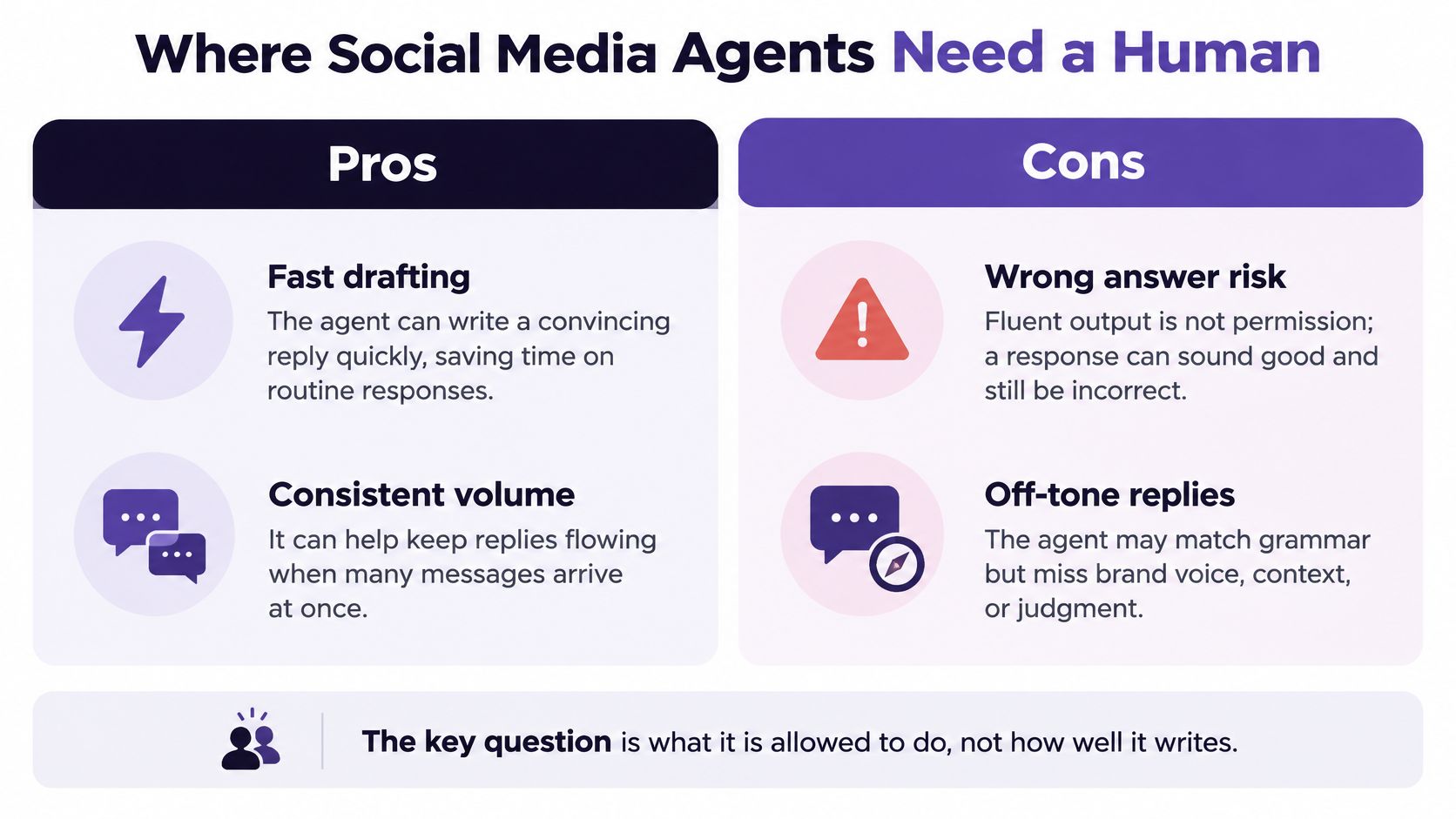
Fluent output is not permission. An agent can write a convincing response while misunderstanding the customer, the source material, or the consequences of sending it.
In LiveAgentBench, the strongest evaluated autonomous system achieved 35.29% task success, compared with 69.25% for humans, across realistic multi-step scenarios. This isn't a prediction of your posting error rate, but it is a reason to test end-to-end execution rather than trust articulate output.
The distinction between quick preparation and sound judgment is central to setting permissions.
Set authority by action
Use least privilege, meaning the smallest permission set needed for the assigned job. Start with narrowly scoped reading, allow draft creation when appropriate, then consider scheduling approved material; immediate publishing requires a separate decision.
Treat the following as recommended operating rules, not permissions every product necessarily supports.
Action Risk Levels and Approval Rules
| Action | Risk if wrong | Approval rule |
|---|---|---|
| Generating draft captions | Low public risk, nothing is live yet | Optional review before saving; review before promotion to publishing |
| Scheduling approved posts | Medium, errors go out on time | Batch approval |
| Publishing immediately | High, visible to audiences at once | A named person approves each post |
| Replying to customers | High, reputational and sometimes legal | A person writes or approves every reply |
| Deleting posts or changing campaign settings | High, often hard to undo | Human only, with a recovery plan |
Keep people in charge of crisis responses, sensitive news, political or health claims, and replies to individual customers. In those situations, deciding not to respond may be more valuable than producing a fast answer.
Make failures recoverable
Before publishing, run a policy check for prohibited claims, missing approvals, incorrect accounts, and unsuitable assets. Keep an audit log containing the draft, approving person, tool action, destination, and outcome.
Configure idempotent retries, which prevent a repeated request from creating duplicate posts. If a network times out, the system should establish whether publication succeeded before sending again.
A recovery plan should explain who pauses the queue, corrects a post, and communicates an error. Deleting content doesn't undo screenshots or audience reactions, so don't treat deletion as a complete rollback.
A connected workflow can distribute a mistake as efficiently as it distributes approved content.
Finally, monitor quality alongside engagement. When you prioritize social metrics with iHatePosting, keep operational records of incorrect destinations, missed approvals, and corrections as well. Reach alone won't tell you whether delegation is working safely.
Account Access and Data Checks Before You Connect
Write down the answers to this checklist before authorizing an account. If an answer is unclear, leave the relevant connection disabled until someone resolves it.
Name the allowed accounts. List the profiles the agent needs and explicitly exclude unrelated client, employee, and personal accounts. For an agency, keep each client's materials and access separate.
Separate read and write scopes. Confirm whether the connector can read analytics, create drafts, schedule, publish, or delete. If technical scopes are broader than your intended workflow, document that gap rather than assuming a prompt removes it.
Exclude unnecessary private information. Keep direct messages, customer records, employee details, and partner documents out of a public-content task. Use redacted examples when the agent only needs to understand a recurring question.
Document retention and model use. Record how prompts, drafts, uploaded files, and comments are stored, when they're deleted, and whether they're used to improve a shared model. Distinguish deleting a visible draft from deleting retained copies.
Identify subprocessors and locations. Establish which organizations process the information and where it is held. Have the appropriate privacy or legal owner review regional obligations and any required consent or disclosure.
Set a recurring permission review. Assign an owner to reassess access after staffing changes, campaign changes, or connector updates. Remove permissions that no longer serve an active task.
Prepare offboarding. Revoke tokens, remove the connector, inspect remaining integrations, and confirm whether scheduled posts need cancellation. Disconnecting a tool shouldn't be assumed to cancel an existing queue.
Approval doesn't equal privacy protection
A reviewer can approve a harmless public post after the system has already ingested confidential information. Content approval and data-access approval are separate controls.
Research on socially embedded conversational agents identified transparency and privacy as salient trust factors, including uncertainty about collection, storage, and use. Written answers give your team something concrete to evaluate.
When following Connect Ihateposting To Zapier Make N8n, map the entire route. Check what the automation platform receives, not just what reaches the final publishing tool.
How Social Media Agents Fit Into a Weekly Workflow
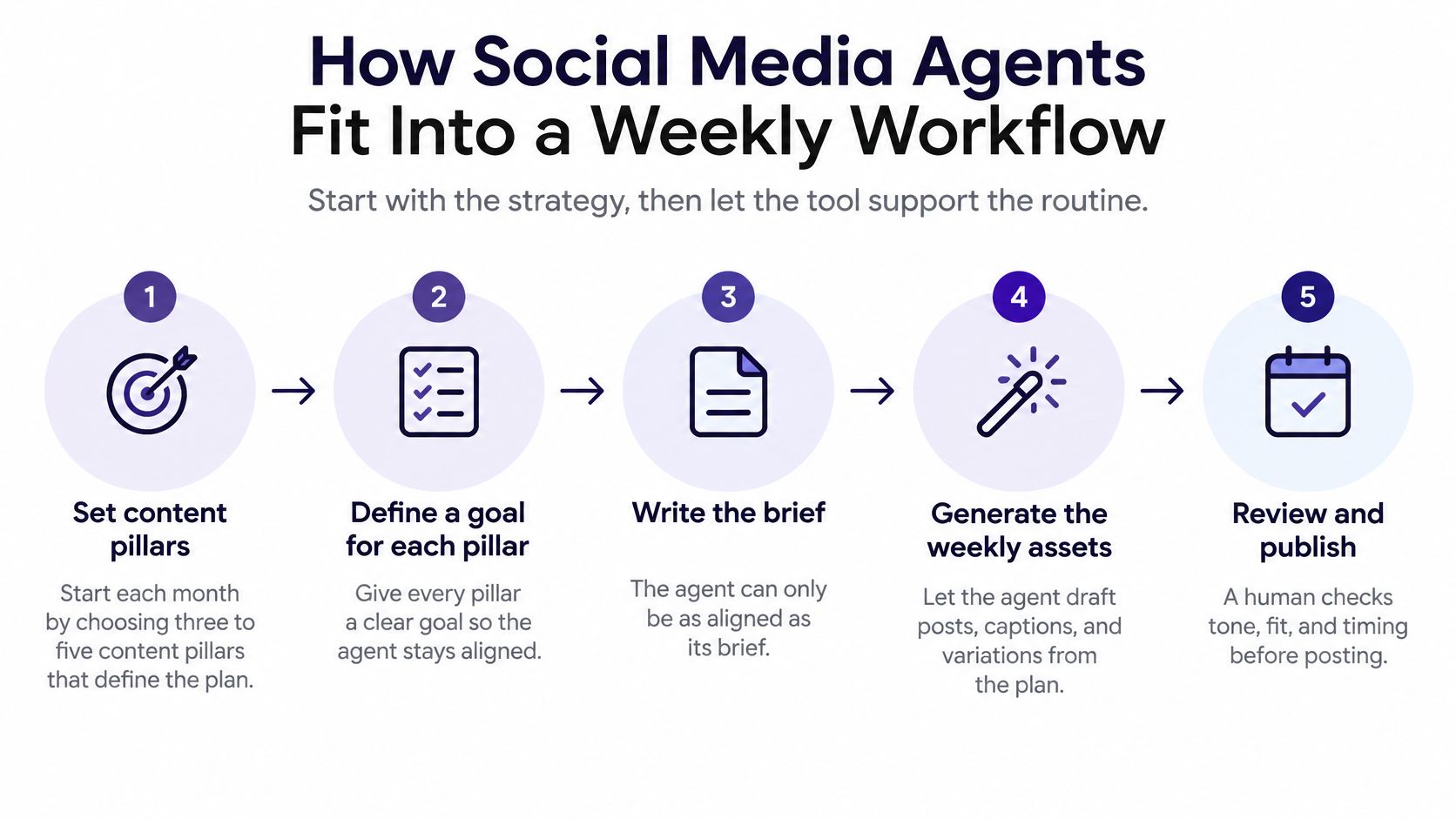
Begin with the editorial rhythm, not the connector. At the start of a planning cycle, choose content pillars and assign a clear purpose to each, such as answering buying questions, explaining product use, or supporting an upcoming launch.
The agent needs those decisions in its brief. Otherwise, it can produce plenty of plausible posts without helping your campaign.
This visual summarizes the planning rhythm before the operational handoffs.
Keep a person at each decision point
Gather approved source material. Collect the article, video, product notes, and cleared images under the campaign name, with links back to their originals. A person decides which material is authoritative and removes obsolete offers before the agent begins.
Assign the drafting brief. Specify the destination networks, intended audience, caption requirements, creative assets, and hashtag guidance. The campaign owner decides the boundaries, including prohibited claims and any announcement embargo.
Edit for purpose, not just grammar. Read each proposed post against its pillar and intended audience action, cutting anything that adds volume without value. A manager decides whether a draft belongs in the campaign, even when its wording is polished.
Apply the pre-publish questions. Our scheduler asks seven questions before publishing: content pillar, intent, platform fit, creative alignment, hashtag strategy, measurement, and campaign context. The reviewer must resolve each question, including whether the image supports the caption and whether the planned measurement matches the intended action.
Approve and schedule the batch. Inspect the actual account, asset, date, time zone, and caption together rather than approving text in isolation. A named owner signs off on the calendar and checks that launch dependencies are satisfied.
Reserve time for audience and performance review. Open comments and analytics during a scheduled review window instead of responding to every notification. The human owner handles replies and distinguishes useful audience feedback from activity that doesn't serve the campaign.
Update the next brief deliberately. Record accepted angles, recurring corrections, missing information, and relevant performance observations. A person decides which lessons become instructions, because feedback doesn't automatically become durable agent memory.
Connect the routine to campaign operations
Use the calendar to spot conflicts before they become publishing problems. A product announcement, creator partnership, and support notice may each be reasonable independently but confusing when scheduled together.
When you align your content calendar with campaigns, tag posts so reviewers can see their purpose and dependencies. Keep approved assets beside the relevant drafts rather than asking someone to reconstruct decisions from chat history.
Our operational workflow is straightforward: connect your accounts, create or upload content with per-platform captions, then schedule everywhere. The editorial routine supplies the judgment around those actions.
For an additional walkthrough alongside your planning session, use the video below.
Look for practical signs of improvement: posts leave the queue when intended, reviewers encounter fewer avoidable errors, and drafts need less reconstruction. If approval takes longer than writing from scratch, narrow the assignment or improve the source material before adding permissions.
Start With One Low-Risk Task This Week
Choose caption drafts from an article you've already published. Run a draft-only pilot with a defined end date, keeping account access disconnected if the task doesn't require it.
Track approval without rewriting, edits per post, and time spent compared with your usual process. Those observations show whether the agent is helping, not merely producing more text.

- Expand to approved-batch scheduling only after drafting quality is consistently acceptable.
- Keep immediate publishing, replies, and deletions human-controlled while you evaluate actual execution.
- Review corrections and the audit log regularly, then tighten the brief before the next cycle.
For this setup, you can add iHatePosting as a custom connector to Claude Cowork to draft, schedule, and publish across 14 networks. Our MCP server exposes connected accounts as tools, allowing drafting, checking, and scheduling without opening a dashboard.
Test the connector's available controls against your permission requirements before granting access. Verify current pricing and plan limits before committing; we recommend social media audits monthly, quarterly, or after major campaigns.
iHatePosting brings planning, per-platform captions, and scheduling into a shared publishing workflow, with agent integrations for delegated tasks. Visit iHatePosting to evaluate a draft-first setup, then connect only the accounts and actions your team is ready to authorize.