You've written a caption, found an image, and pasted both into every network on your calendar. Instagram gets the same introduction as LinkedIn. X gets a shortened version that loses the point. By the time everything is published, you've spent your afternoon distributing a message that doesn't quite fit anywhere.
The problem isn't necessarily the idea. It's the format and the action you're asking someone to take. A useful tutorial might work as a swipeable carousel, while a visible transformation needs video. A product update for existing customers needs less suspense and more practical detail.
These social media posts examples focus on structures you can repeat, not famous campaigns with production budgets you don't have. Each format includes the mechanic behind it, a practical scenario, and adaptations for solo creators, small businesses, and teams.
Copy the structure, not the surface. Keep the useful idea, then change the opening, asset, and next step for each audience.
For a complementary business-focused perspective, Ploot's guide can help you comparar formatos de publicación B2B. Start with the format that suits your next message, rather than filling every available slot.
1. Short-Form Vertical Video (Reels, TikTok, YouTube Shorts)
A watercolor artist films a muddy paint mixture, shows the corrected mixture, then reveals the finished mountain. Viewers understand the problem before the artist explains it. That's the tactic: show the tension before teaching the fix.

The mechanic is the hook. Put the problem or result in the opening frame, supported by readable on-screen text. Skip the logo animation and introduction. Someone discovering your account needs a reason to stay before they need your name.
For portrait production, the Vista Social video specifications guide includes a 9:16 aspect ratio among its platform guidelines. Keep important text away from interface controls, and preview the actual crop before publishing.
Build a clip around a visible change
Use a simple sequence: problem, demonstration, result, next step. Record related demonstrations together, or extract a self-contained answer from a webinar or interview. A clip shouldn't require the missing introduction to make sense.
Adapt the opening text and caption for Reels, TikTok, and Shorts rather than exporting an identical package everywhere. The guide to how creators publish YouTube Shorts explains the publishing workflow.
- Solo creators: Record a close-up demonstration with a voiceover.
- Small businesses: Show a common product mistake and its correction.
- Teams: Extract an expert's answer, then assign channel-specific edits.
Group the versions under one calendar campaign. Review watch time and drop-off where available. High distribution with weak retention calls for a clearer opening, not more effects.
2. Multi-Slide Carousel Posts and Pinterest Pins
The mechanic is the swipe, followed by the save. A useful carousel gives readers a reason to continue and something worth returning to. A Pinterest Pin packages that same usefulness around a searchable problem and a relevant destination.

Say a home organizer wants to explain kitchen storage. The carousel cover promises a practical outcome: Make a crowded cupboard easier to use. Following slides show the sorting process, shelf arrangement, and finished cupboard.
Don't assume discovery and deeper interaction require the same asset. In its Instagram analysis, Buffer found that Reels generated 36% more reach than carousels, while carousels generated 12% more engagement than Reels.
Give each slide a job
Keep each slide focused on a distinct step or comparison. Use large text, consistent positioning, and photographs that explain rather than decorate. These swipe-worthy carousel design tips help turn an outline into a readable sequence.
For professional audiences, build LinkedIn carousel posts around a business decision or framework. On Pinterest, create a separate vertical design with search-led wording, such as small kitchen storage ideas, and link to the complete tutorial.
- Solo creators: Turn a frequently answered question into a visual walkthrough.
- Small businesses: Compare service packages by customer need.
- Teams: Repurpose an approved guide into slides and destination-specific Pins.
Keep both assets together in the calendar, but measure them differently. Review carousel saves and shares; review Pinterest saves and outbound clicks. Attractive slides without a useful takeaway rarely deserve a repeat.
3. Text-Only Thought Leadership Post on LinkedIn
A consultant wants to challenge the habit of accepting every project revision. The opening could be: A revision problem often starts before the first draft.
That line introduces a position without inventing a dramatic personal story. The post can explain the missing approval criteria, show a better handoff, and ask how readers handle scope changes.
The mechanic is the reply. A specific, defensible opinion gives professionals something to discuss. Generic encouragement gives them little to add beyond agreement.
Write an argument, not a motivational poster
Build around a claim, the reasoning behind it, and a practical consequence. Use short paragraphs. Include a genuine experience only when the person publishing had it and can stand behind the details.
Don't manufacture a failed launch, customer conversation, or revenue result to make the post feel personal. If you lack a story, use an explicitly hypothetical situation and explain your recommendation.
Editorial rule: A strong professional opinion needs boundaries. Explain when your advice works and when you'd choose something else.
- Solo creators: Publish a useful disagreement from your area of expertise.
- Small businesses: Explain a decision customers often misunderstand.
- Teams: Interview an internal expert and let them approve the final wording.
Schedule time to answer substantive comments, not just publish the post. Move the same argument into an X thread or carousel later, with its own opening and calendar entry.
Use AI to explore alternative hooks, but remove generic certainty. Measure relevant conversations, profile visits, and inquiries rather than treating every reaction as evidence of trust.
4. Thread-Style Posts on X
Threads work when the explanation needs a sequence. They don't work when a short observation has been stretched into disconnected fragments.
Consider a developer explaining a failed deployment. The opening names the problem and promises a useful diagnosis. Following posts cover the symptom, investigation, fix, and prevention step, with a relevant screenshot where it helps.
The mechanic combines the hook and the reply chain. Each post should make sense independently while giving readers a reason to continue. In Buffer's character-limit guide, free X posts have a 280-character limit, so check every segment rather than only the combined draft.
Outline before splitting
- Opening: State the problem and what the reader will learn.
- Middle: Advance the explanation with concrete steps or evidence.
- Ending: Summarize the practical lesson and add a relevant destination.
Don't hide the entire answer until the final post. Readers should get value before deciding whether to click through.
For distribution, use a connected-thread workflow rather than treating the entries as unrelated scheduled posts. The guide to automate X publishing for busy creators covers planning the publishing sequence.
Solo creators can unpack a useful lesson; small businesses can explain a buying decision; teams can translate a technical announcement into plain language.
Store the source article and thread together in your calendar. Turn the argument into a LinkedIn post separately, rather than pasting the thread's numbering into another feed. Review continuation replies and destination clicks alongside impressions.
5. Interactive Stories with Polls, Quizzes, and Stickers
A bakery asks followers to choose between a citrus glaze and a chocolate topping. The next Story shows the chosen option in production. That follow-through matters more than the sticker itself.
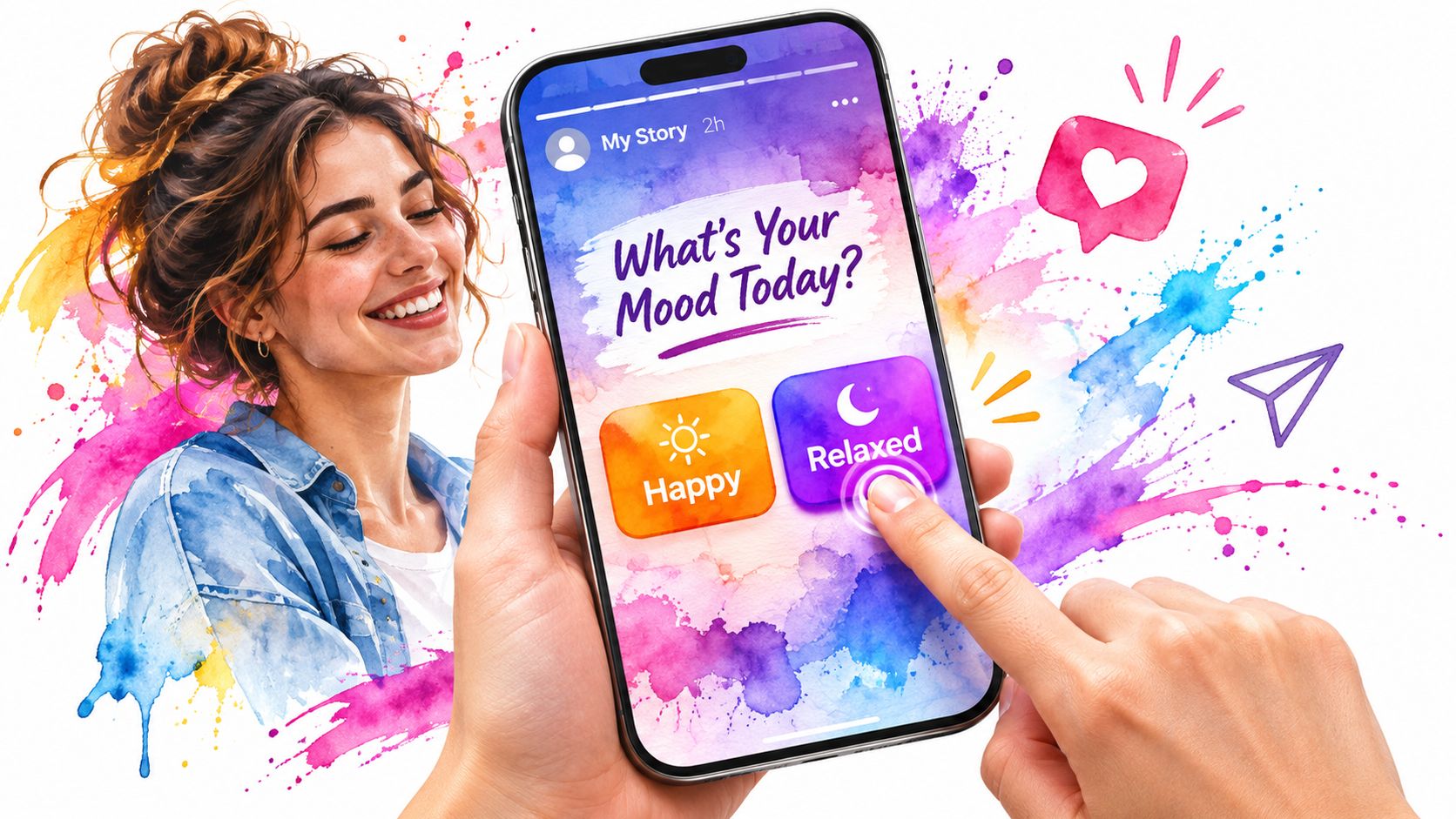
The mechanic is a low-effort reply. A tap is easier than composing a comment, particularly when someone is browsing casually. Use that convenience to ask a real question, not to collect meaningless participation.
A preference poll can guide a decision. A quiz can teach something. A question sticker can collect objections or requests, but it needs a narrower prompt than Ask us anything.
Ask something you'll use
- Make it concrete: Ask which demonstration viewers want next, rather than whether they like your content.
- Close the loop: Publish the result and explain what you'll do with it.
- Keep it usable: Save useful answers to topic-based Highlights where supported.
Don't treat a follower poll as representative customer research. Participants selected themselves, and a preference tap isn't a purchase commitment.
Solo creators can let viewers choose the next tutorial; small businesses can test interest in an offer; teams can collect questions before a product demonstration.
Plan the question and follow-up together in the calendar. For networks without the same sticker, use a native poll or a concise question post. Some interactive elements may need native completion, so assign that step rather than assuming a scheduled image includes the interaction.
Review participation and useful replies, then turn recurring questions into future posts.
6. Customer Testimonial and Review Posts
The mechanic is the save or click prompted by credible proof. A testimonial helps when it answers a buyer's specific concern. An anonymous compliment on a decorative background usually doesn't.

Say a bookkeeping service receives a review about clearer month-end reporting. With permission, it could feature the customer's exact wording and explain which service the customer used. That gives prospects more context than a general satisfaction claim.
A useful structure is customer situation, authentic quote, relevant service, next step. Keep the quote intact, or get approval for an excerpt that preserves its meaning. Never add a measurable result the customer didn't provide.
Keep proof attached to its context
Save the original review, permission, approved attribution, and permitted assets together. If the customer allows a business name but not a portrait, respect that boundary across every version.
- Solo creators: Share an approved comment about a specific lesson or resource.
- Small businesses: Match a review to the service being promoted.
- Teams: Build an approved proof library tagged by use case and audience.
Use a quote card on Instagram, a contextual customer story on LinkedIn, and a short customer clip where permission covers video. A Google or Yelp review shouldn't become a rewritten testimonial with invented enthusiasm.
Place the approved variations in the same campaign calendar. Track qualified visits, inquiries, or the intended next step. Reactions can indicate appreciation, but they don't tell you whether the proof resolved a buying objection.
7. Community Announcement Posts for Messaging Channels
Put the change before the celebration. Members of a Discord server or Telegram channel need to know what affects them before reading the backstory.
For a hypothetical developer-tool update, lead with the new capability, explain who can use it, and provide the setup path. Add a clear place for questions. Existing members don't need the same introduction as strangers encountering a public launch post.
The mechanic is the useful reply. Members can ask for clarification, report a problem, or confirm that they've taken the next step. The announcement succeeds when people understand what changed.
Use a practical announcement structure
- Change: Explain what's new or different.
- Impact: Name who needs to care and what they should do.
- Support: Point to instructions and the right discussion space.
Telegram, Discord, and Slack suit different community arrangements. Mastodon is a public social network, so write its version for a public audience rather than assuming a private messaging context.
Solo creators can announce office hours; small businesses can share member events or schedule changes; teams can publish release notes with an accountable owner.
Keep the full announcement and public summaries under the same calendar campaign. Adjust links, mentions, and channel conventions before publishing. Don't tag everyone for routine news, and don't promise a response window nobody can cover.
Use a predictable cadence where it helps members, but interrupt it for important changes. Measure the action the announcement supports, such as registrations, documentation visits, or completed setup, alongside replies.
8. Evergreen Recurring Posts and Content Recycling
Your most useful answer doesn't stop being useful because you've already posted it. A clear returns explanation, preparation guide, or troubleshooting demonstration can serve people who missed the original.
The mechanic is recycling with a fresh entry point. Keep the accurate core, then change the opening, example, visual, or format. Republishing an unchanged asset indefinitely is maintenance avoidance, not a strategy.
A freelance photographer might turn a session-preparation guide into a LinkedIn explanation, an Instagram checklist, and a Pinterest graphic. Revid's content repurposing examples offer additional ways to split a source asset into distinct outputs.
Refresh before requeueing
Attach a review date and original source to every recurring post. Check availability, links, screenshots, permissions, and any claims before approving another cycle. Seasonal content needs a fresh review too.
AI-powered content generation can draft platform-specific captions, hooks, hashtags, images, and videos, reducing blank-page delays and manual production work. AI agents can handle repetitive creation, adaptation, scheduling, and publishing across social platforms, reducing handoffs between disconnected tools. Keep factual review and final approval with a person.
Recycle the useful answer. Don't recycle an expired offer or an assumption you haven't checked.
Solo creators can refresh a signature tutorial; small businesses can rotate customer FAQs; teams can maintain an approved educational library.
Keep recurring versions grouped in the calendar, with a named reviewer. Compare refreshed versions against their intended goal, not just the original post's popularity. RSS-triggered publishing can distribute new articles, but automatic distribution doesn't replace editorial review.
9. Product Launch Teaser and Countdown Posts
A launch works as a sequence. Each post moves people from recognizing a problem to understanding the offer and taking action.
The mechanic is the returning hook. Every teaser should reveal something useful while leaving a clear reason to follow the next update. Repeated silhouettes and vague announcements give followers nothing to decide on.
Reveal value in stages
Open with the problem your product removes. Follow with a behind-the-scenes demonstration, then the main benefit, then availability details once they are confirmed. Countdowns work when they point at a real date. Used alone, they manufacture urgency without giving anyone a reason to act.
A typical launch week might run five posts: a problem post, a teaser clip, a feature reveal, a countdown reminder, and the release announcement. For a software feature, that short clip could demonstrate the old friction, and a carousel could walk through the new workflow. The launch-day announcement should state availability, eligibility, and the next step outright, so nobody has to reconstruct details from earlier teasers.
- Solo creators: Show the making of a course or digital product.
- Small businesses: Reveal a seasonal item through preparation and demonstration.
- Teams: Coordinate expert previews, partner assets, and support information.
When you schedule social media posts, group the launch posts into one campaign, assign an owner and approval status to each stage, and keep launch-day posts on hold until someone confirms the destination is live. Prepare a delay message that explains what happens next, in case the date moves.
After launch, replace suspense with demonstrations, answers, and real customer feedback. Measure visits, registrations, or purchases, not just anticipation.
How the nine social media post formats compare
| Item | Best for | Best platforms | Typical length | Production effort |
|---|---|---|---|---|
| Short-Form Vertical Video (Reels, TikTok, YouTube Shorts) | Discovery and quick ideas | Instagram, TikTok, YouTube | 15–60 seconds | Low to medium |
| Multi-Slide Carousel Posts and Pinterest Pins | Tutorials, lists, and visual search traffic | Instagram, Facebook, LinkedIn, Pinterest | 3–10 slides or a single pin | Medium |
| Text-Only Thought Leadership Post on LinkedIn | Building professional credibility | 150–300 words | Low | |
| Thread-Style Posts on X | Explaining ideas and telling stories | X | 5–15 posts | Medium |
| Interactive Stories with Polls, Quizzes, and Stickers | Audience feedback and follower engagement | Instagram, Facebook | Several brief frames; expires after 24 hours | Low |
| Customer Testimonial and Review Posts | Social proof and building buyer trust | Instagram, Facebook, LinkedIn | One quote card or a short video | Low |
| Community Announcement Posts for Messaging Channels | Direct updates to opted-in members | Telegram, Discord, Slack, Mastodon, brand communities | Short announcement | Low |
| Evergreen Recurring Posts and Content Recycling | Consistent publishing and reusing proven content | Instagram, LinkedIn, Facebook, and other social channels | Varies; often recurring weekly or monthly | Low to medium |
| Product Launch Teaser and Countdown Posts | Building anticipation for launches and events | Cross-platform social channels | A sequence over days or weeks | Medium to high |
Turn These Examples Into a Repeatable Posting Rhythm
Start with a format you can sustain. Run it for four weeks, then review the results before adding another. Choose a message your audience already needs, such as a recurring question, a buying objection, or a useful demonstration.
Give that message a clear job. A discovery video should introduce the problem to unfamiliar viewers. A carousel should help someone understand or remember the answer. A testimonial should address uncertainty, while a community announcement should make the next action obvious.
Plan the source idea before the channel versions
Keep the original idea, supporting material, approved assets, and platform variations together. That makes it easier to update a claim, replace a visual, or pause a campaign without hunting through separate drafts.
- Define the action: Decide whether you want a watch, swipe, reply, save, click, or conversion.
- Assign the work: Name who drafts, reviews, publishes, and handles responses.
- Record the lesson: Note what you'll keep or change after reviewing performance.
Use the same reporting window when comparing similar posts. Where possible, account for reach and paid distribution rather than comparing raw reactions alone. A heavily promoted post and an unpromoted tutorial aren't a clean creative test.
Automate production without outsourcing judgment
AI can shorten drafting and adaptation, but more output doesn't prove better performance. A Newsweek report on an AI-agent experiment described teams producing 50% more advertisements per worker without a significant overall improvement in campaign performance.
Keep people responsible for factual accuracy, customer permissions, brand voice, and the decision to publish. Never generate customer testimony or present synthetic imagery as documentary proof. Make disclosures clear when AI use could otherwise mislead the audience.
Our social media scheduling workspace, iHatePosting, supports publishing across 14 platforms, with a centralized calendar, per-platform tailoring, live previews, and approval steps. Use that shared view to coordinate related posts without forcing them into identical captions.
The strongest rhythm isn't the busiest calendar. It's a repeatable process that helps you publish useful material, respond thoughtfully, and learn what deserves another version. Add formats when they serve a purpose, not because another network has an empty slot.
iHatePosting brings AI-assisted content creation, platform-specific adaptation, scheduling, and analytics into one workspace. Visit iHatePosting to turn a useful idea into coordinated posts, review each version, and build a publishing rhythm you can maintain.