What Is Social Media Calendar
14 min readsocial media calendarcontent schedulingsocial media planningmarketing workflow
A social media calendar is a strategic operational layer that connects content planning, creative assets, and platform-specific timing in one shared publishing view. Teams commonly plan 2-4 weeks ahead so they can publish consistently while keeping room for reactive content.
You know the pattern. A product announcement sits in a spreadsheet, the final video is in someone's cloud folder, a caption draft is buried in chat, and each platform has a different native scheduler. On publishing day, someone shortens the copy, another person checks the link, and a third notices that the chosen format doesn't fit the network.
That's why the practical answer to what is a social media calendar needs to go beyond “a list of posts.” A useful calendar connects the idea, asset, caption, approval, timing, platform variant, and performance signal. It gives a team one shared view of what's planned, what needs work, and what's ready to publish.
Table of Contents
- The Reality of Multi-Platform Publishing
- Core Components of a Modern Content Calendar
- The Strategic Value of Structured Scheduling
- Adapting Content for Platform-Specific Timing
- Essential Features for Team Collaboration
- Organizing Campaigns and Content Pillars
- Refining Your Cadence with Performance Data
The Reality of Multi-Platform Publishing
A campaign can be approved in the morning and still break apart by publishing time. Instagram may require a visual-first caption with a Reel or carousel. LinkedIn may need a developed professional argument. TikTok depends heavily on the opening seconds of video, while X or Threads may work better with concise text and conversation. Copying one post into every channel saves setup time, but often creates content that does not fit the feed, format, or audience.
A modern calendar keeps the campaign connected while allowing each network to use the right treatment. It records the core idea, source asset, platform adaptations, publishing window, approval owner, and readiness status. The result is a shared source of truth that the whole team can use.
Practical rule: Treat every calendar entry as a production record, not just a date and caption.
A basic schedule might say, “Publish the launch post on Tuesday.” An operational calendar identifies the launch message, audience, asset, platform, and approved version of the copy. It can also show whether the landing page is approved, whether the creative has the required dimensions, and whether manual publishing is needed.
Why scattered tools fail
Scattered notes hide dependencies between people and tasks. The copywriter may not know that the video is still being edited. The designer may miss a late caption change. A stakeholder may approve the campaign concept without reviewing the platform-specific versions.
The calendar exposes those dependencies before they delay publication. Guidance from Hootsuite's social media calendar resource describes a calendar organized by publishing date and platform, with copy, hashtags, media, and channel details. That structure also supports a scalable video publishing workflow when one source video needs different edits, captions, or calls to action across feeds.
A calendar does not remove editorial judgment. It makes decisions easier to review. Teams can choose where a campaign belongs, identify formats that need original creative, and decide which posts can be adapted without weakening the message. For smaller teams, a single workflow for posting across social media can reduce duplicate setup, provided someone still checks each platform version before publishing.
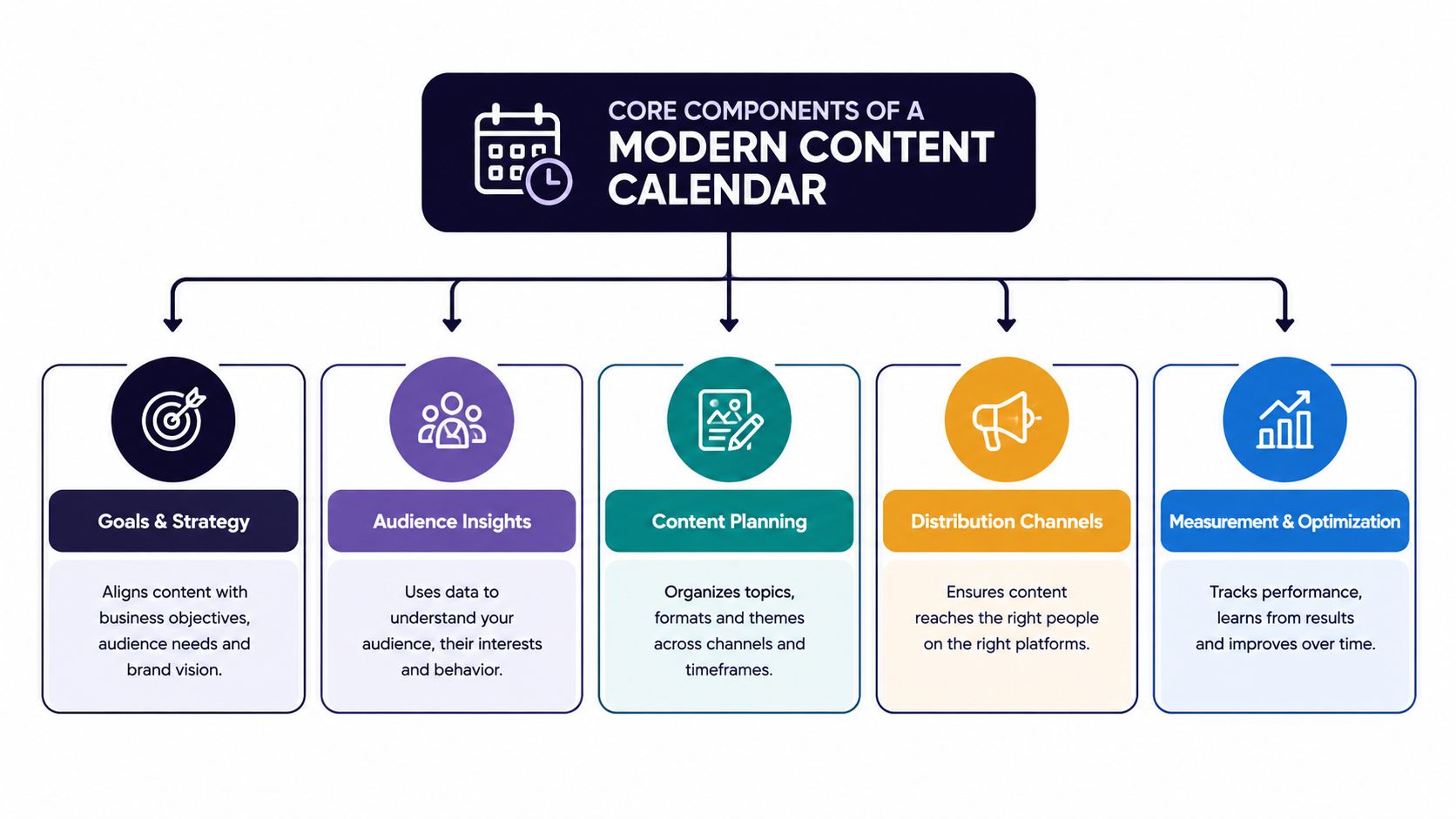
Core Components of a Modern Content Calendar
A functional calendar holds more than publication dates. It needs enough context for a creator, editor, approver, and publisher to understand the complete post without searching through separate systems.
The minimum record usually includes the platform, date, time, campaign, content pillar, caption, media asset, destination URL, status, owner, and approval notes. For a multi-platform campaign, add a separate field for each channel's caption variant and format. That small distinction prevents a common error, where one generic caption becomes the default everywhere.
The record behind each post
Think of each entry as a compact brief:
- Message: The point the post needs to communicate, separate from the final wording.
- Platform version: The adapted caption, call to action, hashtag group, and format for that network.
- Creative asset: The exact image, reel, carousel, or video attached to the post.
- Timing and timezone: The intended local publishing time and the relevant audience region.
- Workflow status: Draft, in production, awaiting approval, scheduled, published, or needs revision.
- Measurement details: Campaign label, tracked destination, and the outcome the team will review.
A spreadsheet can manage these fields, especially for a small team with a simple publishing rhythm. It becomes fragile when people need previews, asset handling, approvals, version history, or automatic publishing in the same place. A dedicated tool can connect those steps, but only if its workflow matches the way the team works.
The useful distinction isn't spreadsheet versus software. It's visible workflow versus hidden workflow. A spreadsheet with clear owners and statuses may outperform an expensive platform that nobody updates. Conversely, a growing team may need the automation and validation described in guides to a content calendar that delivers results.
A practical data structure
Keep the calendar readable by separating strategic fields from production fields. Campaign and pillar tags help managers audit the mix. Caption variants, media previews, and approval status help publishers execute. Links and tracking fields help analysts connect the post to a business objective.
If the calendar is becoming difficult to scan, a social media content calendar tool may be appropriate. The tool should make differences between platforms easier to manage, not hide them behind a single “publish everywhere” button.
The Strategic Value of Structured Scheduling
A campaign can have strong creative and still underperform when posts go live whenever someone finishes them. Structured scheduling turns publishing into an operating decision, connecting timing, campaign priorities, audience behavior, and production capacity across platforms.
A Journal of Marketing study by Kanuri, Chen, and Sridhar examined social scheduling as an optimization problem. Its findings show that timing choices can affect outcomes and profits, positioning scheduling as a strategic activity rather than clerical administration. (Study PDF)
The calendar gives the team a shared view of those choices. It makes planned windows visible, exposes conflicts between campaigns, and helps managers see whether the workload matches available creative and approval capacity. It also supports adaptation: one core idea may need different formats, captions, or link treatments on each network.
Consistency creates room for judgment
Planning ahead does not require filling every slot months in advance. A practical working horizon is 2-4 weeks ahead, leaving time for review while preserving space for timely posts. (Hootsuite guidance)
That balance protects both sides of the workflow. A rigid calendar can miss a relevant conversation, while a purely reactive process can rush important campaigns, repeat the same message, or publish without adequate review. Reserve capacity for planned work and responsive content.
Structured scheduling is already common among social teams. Nearly 50% of surveyed social media managers preferred scheduling at least a month in advance, according to the research summarized in the study. (Research PDF)
Frequency needs a deliberate test
Frequency depends on the network, audience, format, creative capacity, and objective. One analysis reports that organizations posting twice weekly had the highest overall Facebook engagement rate at 2.08%. (Scheduling research PDF)
Treat that figure as a test prompt, not a universal rule. Record a cadence, measure its result, and adjust. The calendar makes frequency an explicit operating decision instead of a random publishing habit.
Adapting Content for Platform-Specific Timing
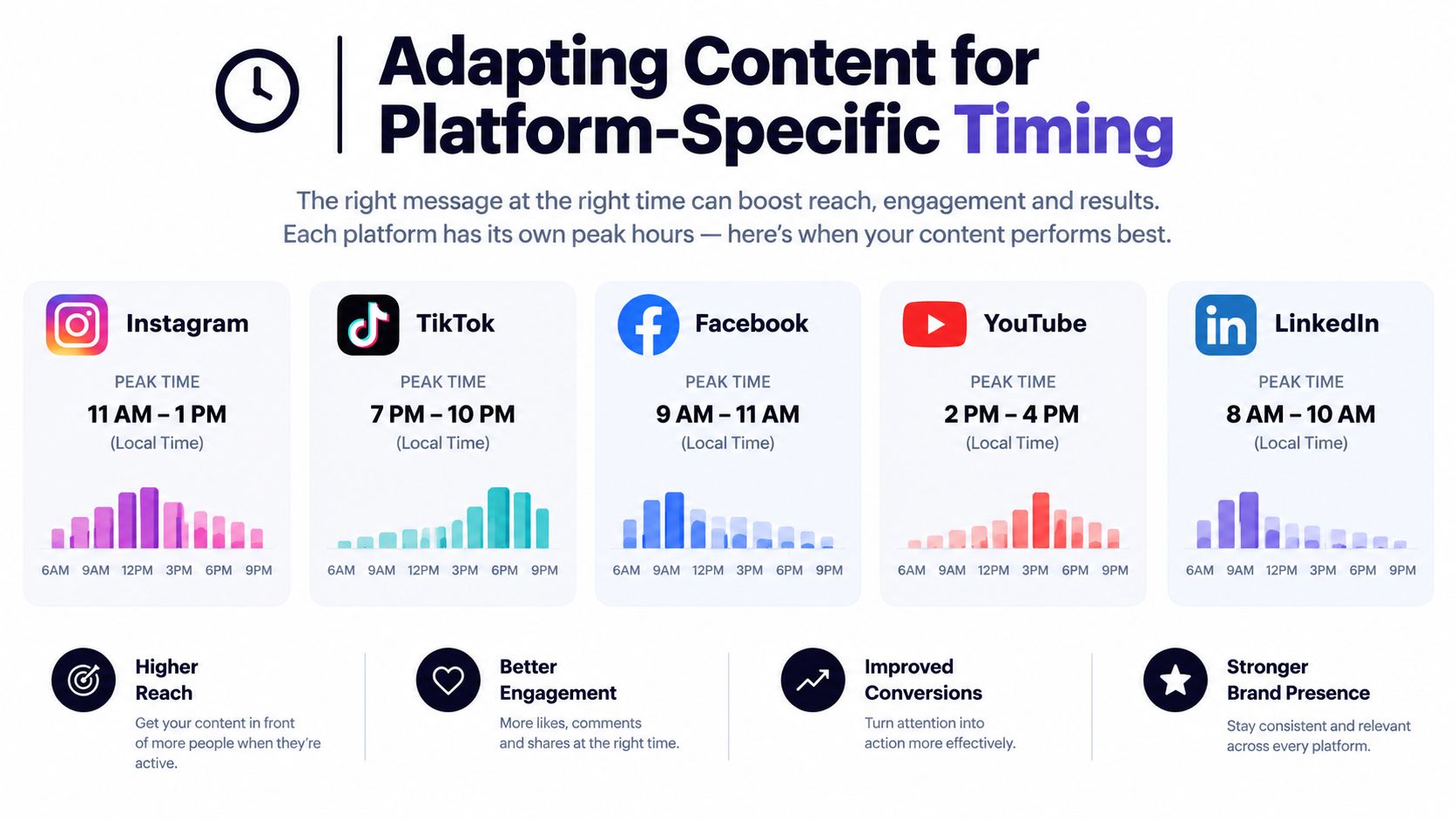
A single universal posting time is convenient, but it rarely reflects how audiences behave across networks and regions. A calendar should store timing rules by platform, local timezone, campaign type, and audience segment. It should also allow the team to test those rules against account-specific results.
Recent multi-platform analysis found the strongest overall performance between Tuesday and Wednesday from 11 a.m. to 6 p.m. local time, while platform-level research identifies different peak windows for Instagram, Facebook, LinkedIn, TikTok, and YouTube. (Sprout Social timing analysis)
Build timing rules, not assumptions
Start with a broad benchmark, then narrow it through your own account data. Store the original test window, the local timezone, the format, and the audience being targeted. That prevents a team from treating an average as a permanent answer.
Instagram research illustrates why generic rules conflict. Buffer's analysis of 9.6 million Instagram posts identified Thursday at 9 a.m., Wednesday at noon, and Wednesday at 6 p.m. as top-performing windows, while Later's study of 6M+ posts reported 5 a.m. local time as the strongest Instagram posting hour. Metricool's cross-platform sample found 20:00 UTC to be the most consistent high-engagement hour. (Buffer's Instagram timing analysis)
These findings point to a practical conclusion: use benchmarks to design tests, not to replace measurement.
Adapt the idea before adapting the time
Take one content pillar, such as a product education theme, and create distinct executions:
- Instagram: Lead with the visual demonstration, then use a caption that adds context and a clear action.
- LinkedIn: Turn the same insight into a professional lesson, operational observation, or document-style post.
- TikTok: Open with the problem or outcome, then build the explanation into a short video.
- X or Threads: Reduce the idea to a sharp observation, question, or short sequence designed for replies.
- YouTube: Expand the topic into a longer explanation, tutorial, or searchable video.
Stories need their own production and timing logic, especially when they depend on sequential frames or interactive elements. A workflow for scheduling Instagram Stories can be useful, but the calendar still needs to show the narrative order and the action expected from viewers.
Essential Features for Team Collaboration
A scheduler publishes. A workflow calendar helps people make the right post ready for publication. Those are different products, and the difference becomes obvious when a campaign includes several creators, reviewers, formats, and regional accounts.
The evaluation should start with the failure you're trying to prevent. If the problem is missed dates, status visibility matters. If it's broken formatting, previews and platform checks matter. If approvals happen in chat, comments and sign-off states matter more than decorative calendar views.
Calendar Feature Evaluation Matrix
| Feature Category | Basic Scheduler | Advanced Workflow Calendar |
|---|---|---|
| Planning view | Dates and queued posts | Week, month, campaign, and content-pillar views |
| Caption handling | One caption field | Platform variants, character counts, snippets, and reusable hashtag groups |
| Media | Upload an attachment | Attached creative library with previews for images, reels, carousels, and video |
| Approval | Manual confirmation or none | Assigned reviewers, status changes, comments, and approval history |
| Publishing | Queue or auto-publish | Channel-specific publishing rules, alerts, retries, and manual fallback |
| Campaign control | Basic labels | Grouped launches, seasonal promotions, creator work, and educational series |
| Measurement | Post-level results | Trend views, account history, exports, and timing recommendations |
A basic scheduler works when one person owns the entire process and the content needs little adaptation. It becomes restrictive when a reviewer needs to see the final preview or when a platform requires a different link, caption, or media treatment.
Favor clarity over feature volume
The best feature is often the one that removes a handoff. A visual preview can catch a truncated caption or awkward line break before approval. An attached asset can prevent the wrong video from being uploaded. A campaign status can show whether a launch is ready without asking five people for updates.
For teams comparing a social media scheduler app, ask whether it supports the full path from idea to approved post. iHatePosting is one option that combines a visual calendar, platform-specific caption tools, campaign organization, media attachments, and publishing across fourteen networks. The important criterion is fit: the system should reflect your approval process instead of forcing your team to recreate it elsewhere.
Organizing Campaigns and Content Pillars
A calendar becomes useful when it answers two questions quickly: what are we publishing, and why does it belong here? Content pillars provide the recurring subject structure. Campaign tags provide the temporary business context.
Suppose a team is preparing a product launch. The campaign shouldn't exist as one announcement row. It needs a sequence of related records, each with a specific role: problem awareness, educational explanation, product reveal, proof or demonstration, reminder, and follow-up conversation. The exact sequence will vary, but the calendar should make the relationship visible.
A campaign record in practice
Create the campaign before drafting individual posts. Add its objective, audience, launch window, owner, landing page, core message, approved creative direction, and the platforms involved. Then tag each post by both campaign and pillar.
A post can belong to the “Spring Launch” campaign and the “Education” pillar. Another can belong to the same campaign and the “Product Update” pillar. Those tags let a manager see whether the sequence is balanced, whether a channel has been ignored, and whether promotional content has crowded out useful information.
For a clearer framework on defining recurring themes, review this guide to what content pillars are. The calendar should turn those themes into visible production decisions, not leave them as a strategy document nobody consults.
Protect the handoffs
Set deadlines for the asset, caption, review, and final scheduling separately. If everything has one due date, a late video can make the whole campaign look “on track” until publishing day arrives.
Use statuses that describe action:
- Draft: The idea or copy still needs development.
- In production: Creative or copy is actively being prepared.
- Needs review: The owner has completed the working version.
- Approved: The exact platform variant can be scheduled.
- Scheduled: Publishing details and timezone have been confirmed.
- Published: The post is live and ready for measurement.
This short video offers a visual reference for how campaign planning can fit into a broader publishing workflow.
Before approval, check the destination URL, media crop, caption length, accessibility text, platform format, and disclosure requirements. Organization isn't about making the calendar look tidy. It's about catching the mistake while correction is still cheap.
Refining Your Cadence with Performance Data
A calendar shouldn't become a museum of old assumptions. Teams often choose a posting rhythm, fill the schedule, and stop questioning whether the mix still fits the account. That set-it-and-forget-it approach turns a useful operating system into a recurring checklist.
Review performance by platform, format, content pillar, campaign, audience region, and publishing window. Don't compare every post as if it had the same job. A product announcement may be judged by qualified traffic or conversions, while an educational post may be intended to generate saves, replies, or repeat attention.
Audit the calendar against outcomes
Create a recurring review that asks:
- Which formats earned meaningful interaction for this account?
- Which publishing windows performed consistently for the relevant audience?
- Which pillars generated useful conversations rather than surface activity?
- Which campaign posts supported the intended business action?
- Which production steps consumed effort without producing a clear return?
- Which planned posts should be reshaped, paused, or removed?
Keep the answers next to the calendar's planning fields. If the timing insight lives only in an analytics dashboard, it won't influence the next production cycle. If the result is attached to the campaign and format, the team can make a more informed decision about what to repeat.
Use benchmarks as starting points
The timing evidence discussed earlier shows why teams shouldn't copy a universal schedule. Conflicting studies can identify useful test windows, but account-level behavior should decide which rules remain active. A calendar can record the test, the audience timezone, the format, and the resulting signal, giving the team a history of decisions instead of a collection of opinions.
A mature calendar tells you not only what you published, but what you learned from publishing it.
Change one meaningful variable at a time where possible. If you change the format, message, audience, and time together, you won't know what caused the result. Preserve strong evergreen ideas, but refresh their opening, creative treatment, or platform adaptation when the data shows that the current version has weakened.
Your next step is practical: audit the tools and spreadsheets your team uses, define the fields every post needs, then build a calendar that shows platform variants, assets, approvals, and timing in one place. For a workflow that combines planning, tailoring, campaign organization, and publishing, visit iHatePosting and use its trial to test the process with a real campaign rather than a sample schedule.