8 Social Media Scheduler Template Resources
18 min readsocial media scheduler templatesocial media calendarcontent planning templatessocial media scheduling
Your team has plenty of social content, but none of it lives in the same place. Ideas sit in a notes app, finished videos are buried in cloud folders, captions are copied between spreadsheets, and a launch deadline is approaching while someone still needs to approve the final link. A social media scheduler template can bring order to that mess, but only if it matches the problem you're trying to solve.
The right template might organize content pillars, support weekly batching, coordinate a campaign launch, adapt one idea for multiple platforms, or turn analytics into the next month's plan. The comparison below considers team size, campaign complexity, implementation effort, and the point at which a scheduling platform such as iHatePosting becomes more useful than a spreadsheet. The broader shift toward structured scheduling is clear. A 2026 report found that 73% of social media marketers use dedicated scheduling tools, compared with 61% in 2024 and 47% in 2022, while the average manager using those tools handles 5.2 platforms. The report's scheduling data reflects the operational reality behind these templates: teams need repeatable systems, not another blank calendar.
Table of Contents
- 1. Content Pillar Organization Template
- 2. Weekly Batch Content Creation and Scheduling Template
- 3. Campaign Launch Timeline and Coordination Template
- 4. Caption Writing Framework and Hashtag Strategy Template
- 5. Analytics Review and Optimization Cycle Template
- 6. Cross-Platform Content Repurposing and Adaptation Template
- 7. Team Collaboration and Approval Workflow Template
- 8. Seasonal Content and Holiday Planning Calendar Template
- Social Media Scheduler Templates, 8-Item Comparison
- Turn the Template Into a Repeatable Publishing System
1. Content Pillar Organization Template
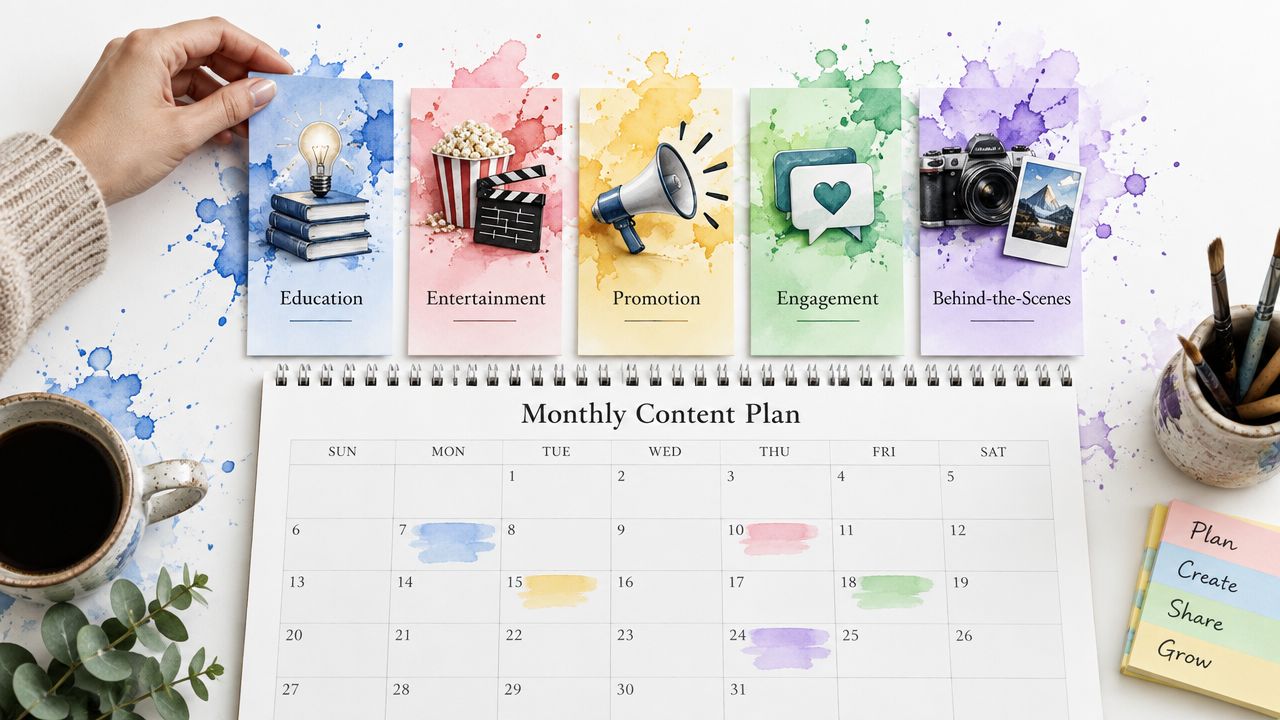
A content pillar template solves an editorial balance problem. Instead of starting each morning by asking what to publish, you assign ideas to durable themes such as education, product updates, customer stories, entertainment, or community. Each row can include the pillar, audience need, platform, format, campaign, owner, asset, caption status, and planned date.
Start with three to five core pillars. A SaaS brand might separate product education from product announcements, while a creator could distinguish entertainment, tutorials, and behind-the-scenes content. The labels should come from your positioning and audience research, not from a generic framework copied from another brand.
The template works best as a planning layer before exact dates are assigned. Tag every idea, then scan the calendar for over-reliance on promotional content or neglected community posts. A color-coded calendar makes that review fast. iHatePosting's campaign organization can group posts by content pillar, and its visual calendar gives teams a quick view of whether the publishing mix feels intentional.
Keep the framework usable
Too many pillars create administrative work without improving decisions. If a post could belong to four categories, the taxonomy probably needs clearer definitions. Add a short description and an example for each pillar so a freelancer, creator, or new marketer can classify ideas consistently.
A practical pillar template includes:
- Pillar definition: State the audience problem or brand role the category serves.
- Format options: Note whether the pillar commonly uses Reels, carousels, text posts, video, or links.
- Caption bank: Save reusable opening lines, proof points, and calls to action without forcing every post into the same wording.
- Review field: Revisit the mix through analytics and adjust the strategy when audience response changes.
This is a strong fit for solo creators and small marketing teams that need strategic visibility without a complex workflow. Implementation is light, but maintaining the tags requires discipline. iHatePosting becomes useful when the same pillar structure must remain visible across multiple networks, campaigns, and scheduled variants rather than living in a single planning sheet.
2. Weekly Batch Content Creation and Scheduling Template
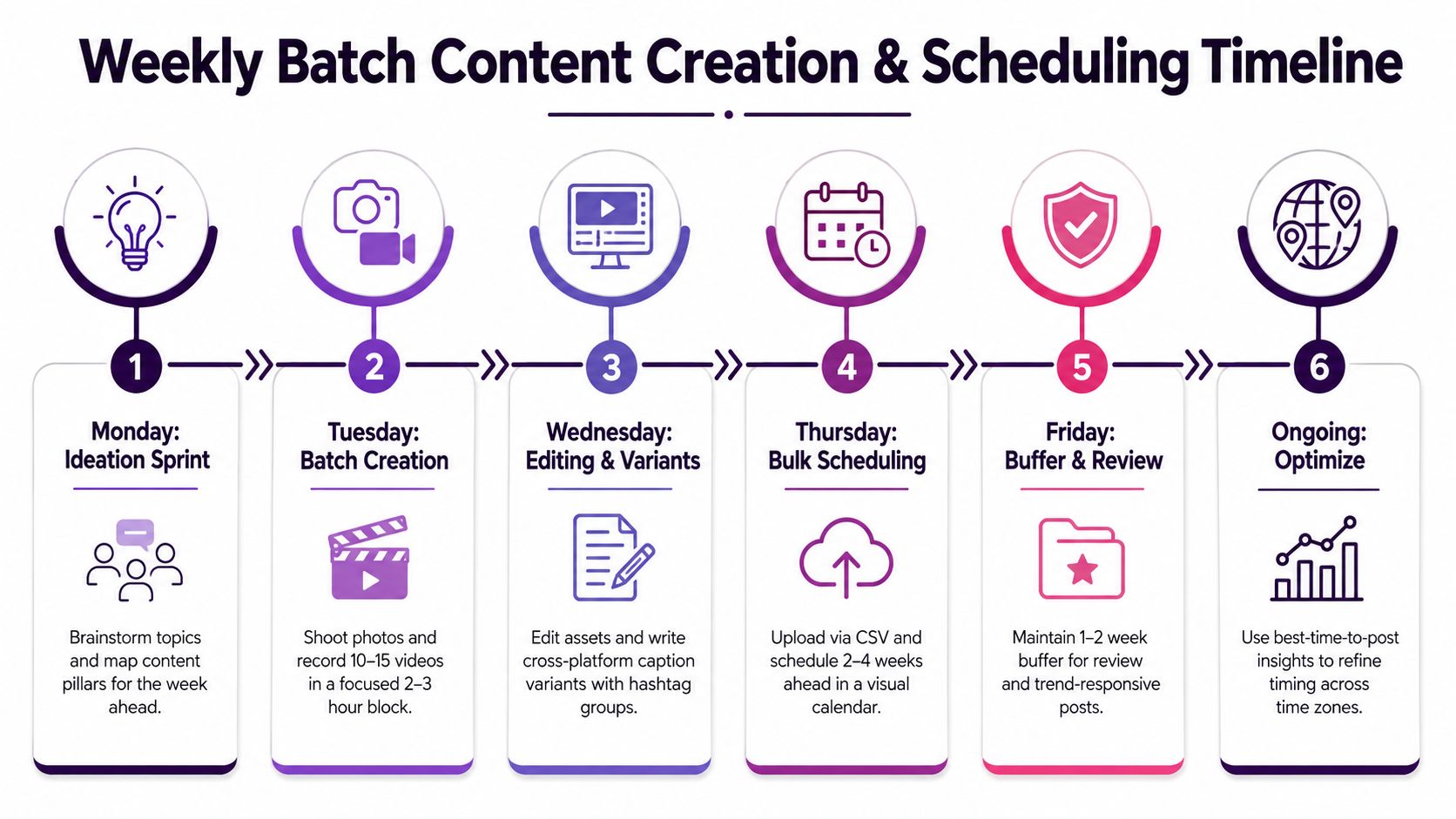
Batching separates creative production from daily publishing. The template reserves a recurring work block for ideation, filming, design, caption writing, review, and scheduling. A creator might use one session to prepare the next week's videos, while an agency could build a longer queue for several clients.
The sheet should distinguish idea, brief, asset ready, caption ready, approved, scheduled, and published. Add platform-specific fields rather than treating one caption and one file as universal. A TikTok concept may need a different opening from its Instagram Reel adaptation, and a LinkedIn version may require a text-led explanation instead of a short entertainment hook.
iHatePosting's multi-platform composer and visual calendar support this workflow by keeping planning and publication in the same place. Its per-platform caption tools can reduce the awkward copy-and-paste process that often causes duplicate captions or missing media.
Batching rule: Prepare the core idea in one session, but make the final version native to each platform.
Build a buffer without making the calendar rigid
A useful batch template includes an evergreen library alongside time-sensitive posts. Evergreen content gives you room to respond to a trend, customer question, or unexpected business priority without destroying the entire week's schedule. The calendar should also include a review date, because a post that was sensible during drafting may need changes before publication.
The approach suits solo creators, small businesses, and lean B2B teams with repeatable formats. It takes more setup than an idea list, but it pays back when daily context switching is the main bottleneck. It becomes harder to maintain when several people create assets in different systems or when platform variants multiply. At that stage, a scheduler reduces duplicate entry and makes the queue visible.
For creators who publish on Instagram, the workflow can be paired with this guide to Schedule Instagram Posts And Reels. The important distinction is that batching doesn't mean abandoning flexibility. Reserve space for reactive content and review queued posts before they go live.
For more planning inspiration, compare this approach with weekly schedules and templates for creators.
3. Campaign Launch Timeline and Coordination Template
A campaign timeline is built around dependencies, not just dates. It connects the teaser, announcement, demonstration, social proof, reminder, and follow-up so every post supports the same launch objective. Each entry should show the campaign phase, platform, audience, asset version, CTA, owner, approval status, and relationship to the main launch moment.
For a product release, the first posts might establish the problem, later posts can reveal the product, and subsequent content can answer objections or demonstrate use. A podcast campaign needs a different sequence, with episode announcements, clips, guest soundbites, and community discussion adapted to the channels where those formats make sense.
The template should preserve a shared campaign identity while allowing separate execution details. One campaign record can connect every teaser, announcement, and follow-up. iHatePosting's campaign organization is useful here because it keeps related posts grouped while the visual calendar shows how the sequence lands across networks.
Add checkpoints for moments that matter
Not every scheduled post needs the same level of attention. Mark critical entries for manual review, especially the launch announcement, paid support copy, partner content, product claims, and posts containing time-sensitive links. Add a campaign captain who checks publication, replies, and unexpected audience reactions.
A strong timeline includes:
- Milestones: Define the launch, announcement, promotion, and follow-up windows.
- Platform adaptation: Record the unique angle, format, and CTA for each network.
- Pre-publish checks: Verify links, assets, hashtags, and platform-specific caption requirements.
- Reactive capacity: Leave unscheduled room for customer feedback, creator content, or relevant news.
- Escalation owner: Name the person who can pause or amend scheduled content if circumstances change.
This template fits startups, agencies, product marketing teams, and creator partnerships. It has moderate implementation effort because the team must agree on phases and responsibilities before drafting. A spreadsheet works for a contained launch, but a platform such as iHatePosting becomes more practical when one campaign produces many coordinated posts across multiple networks.
4. Caption Writing Framework and Hashtag Strategy Template
A caption template should protect the message while leaving room for platform-native writing. The basic record can contain the hook, context, proof or value, primary CTA, secondary engagement prompt, hashtags, asset, and platform version. This prevents a common mistake, writing one general caption and pasting it everywhere.
For example, a LinkedIn post may lead with a business problem and explain the lesson behind a product update. A TikTok caption may support a visual hook with concise context and a direct prompt. An Instagram Reel can use a question or short story to encourage comments, but the caption still needs to match the actual video instead of carrying generic keyword blocks.
iHatePosting's caption composer includes a character counter, hashtag groups, caption snippets, and per-platform caption tools. Use those features to write distinct variants, then preview each version before scheduling. The iHatePosting character limit guide is useful when a caption needs to be adapted without losing its central message.
Treat hashtags as organized context
Create reusable hashtag groups by pillar, audience, or campaign, but review them regularly. A group for product education shouldn't automatically appear on a customer story, and a trend-related group should be checked for relevance before use. Hashtags can support discovery and categorization, but they won't rescue a weak hook or an asset that doesn't deliver on the caption's promise.
The template should include:
- Voice note: Describe the tone for the platform and campaign.
- Hook type: Record whether the post opens with a question, claim, story, or demonstration.
- CTA purpose: Separate traffic, comments, saves, shares, and direct responses.
- Variant status: Track whether each network has its own caption.
- Hashtag review: Record when a group was last checked and which tags no longer fit.
This framework suits creators and small teams first, then scales to agencies with shared caption libraries. Implementation is moderate because the team must document voice and review rules. A scheduler becomes valuable when captions, media, and hashtag sets need to stay attached to many platform-specific posts instead of being managed across separate tabs.
5. Analytics Review and Optimization Cycle Template
A performance template turns reporting into decisions. It should connect each published post to its platform, pillar, format, campaign, date, posting window, and selected KPI. A monthly review can then answer practical questions: which themes attract discussion, which formats earn saves, which campaigns generate clicks, and which publishing windows deserve another test?
Avoid collecting every available metric. Choose the measures that match the objective, such as reach for awareness, engagement for conversation, shares or saves for content utility, and clicks for traffic. The template should include a finding, evidence from the account's data, action, owner, and test window. Without those fields, analytics becomes an archive rather than a planning tool.
iHatePosting provides trend analytics, a 12-month history, CSV export, and best-time-to-post recommendations based on account performance. Its optimal posting times for each platform can provide a starting hypothesis, but the account's own results should determine whether a time slot stays in rotation.
Review one variable at a time. If you change the format, caption style, posting window, and hashtag group together, you won't know which change mattered.
Make the review repeatable
Schedule a regular analytics session and produce a short report with the strongest findings, the next actions, and one hypothesis to test. Compare periods consistently, segment by platform and pillar, and annotate unusual results caused by launches, seasonal events, or platform changes. A spreadsheet remains adequate for a small account with limited posting volume.
The template becomes more valuable for growing teams, agencies, and performance-focused marketers when data must feed directly into future scheduling. iHatePosting helps close that loop by combining calendar planning, account-level timing guidance, and historical trends. The implementation effort is moderate, but the benefit comes from acting on the review rather than producing a polished report no one uses.
6. Cross-Platform Content Repurposing and Adaptation Template
Repurposing works when one source asset becomes a family of related pieces, not when the same post is duplicated everywhere. Start with a hero asset such as a podcast episode, customer interview, product demonstration, or long-form article. Then map the usable ideas, visual moments, quotes, objections, and calls to action before assigning each to a platform format.
A useful template has columns for source asset, extracted angle, destination platform, format, duration or copy type, hook, media crop, caption variant, CTA, publication date, and result. It should also include an asset continuity field so the correct video edit, thumbnail, transcript, or link remains connected to the post.

A podcast discussion might produce short clips, a LinkedIn summary, a Threads conversation, and a newsletter mention. A product video may need a concise vertical cut for short-form video, a fuller demonstration for YouTube, and a problem-focused explanation for LinkedIn. The source stays consistent, but the audience promise changes.
Prevent the efficiency trap
Repurposing saves time only when the adaptation rules are clear. Identical copy can feel automated, while trying to transform every asset into every possible format creates a production backlog. Select a few hero assets, document which adaptations worked, and keep a record of the editing and review effort.
iHatePosting's multi-platform composer and bulk import can reduce repetitive scheduling work, while its per-platform caption tools help preserve native wording. This guide to Post To All Social Media At Once is relevant when one campaign needs coordinated publication without repeated setup.
The template fits content teams, podcasts, agencies, and businesses with strong source material. It demands higher implementation effort than a basic calendar because each adaptation needs a distinct brief. A scheduler becomes useful when asset attachments, captions, dates, and platform versions are difficult to keep aligned in a spreadsheet.
7. Team Collaboration and Approval Workflow Template
Approval problems rarely come from a lack of effort. They come from unclear ownership, scattered feedback, and submissions arriving too close to publication. This template creates a visible path from draft to review, approval, scheduling, and publication.
Give every post a creator, reviewer, approver, deadline, status, revision note, and escalation contact. A technical product post might move from a writer to a marketing manager, then to a product lead for accuracy. A regulated or sensitive campaign may require another review, while a routine community post may need only one person.
Separate review types
Not every stakeholder should review every detail. Define what each role checks, such as brand voice, factual accuracy, legal language, accessibility, links, or platform fit. A short approval checklist prevents reviewers from reopening unrelated decisions and gives creators clear revision instructions.
Use statuses that describe real work:
- Draft: The creator is still developing the post or asset.
- In review: A named reviewer has an active deadline.
- Changes requested: Feedback is recorded in one location with a revision owner.
- Approved: The post can move to scheduling without another informal sign-off.
- Scheduled: The date, time, platform versions, and attached media have been checked.
iHatePosting's drafts, scheduling features, publish alerts, and workflow integrations can support this process. Teams that need automation can review how to Connect Ihateposting To Zapier Make N8n, but automation shouldn't replace accountable approval. It should move information between systems and notify the person who must act.
This template is best for agencies, SaaS teams, multi-creator brands, and organizations with compliance needs. Implementation effort is high because roles and response expectations must be agreed in advance. A small local business may only need a shared sheet, while a multi-platform team quickly benefits from a central calendar that shows what is waiting and who owns it.
8. Seasonal Content and Holiday Planning Calendar Template
Seasonal planning gives known moments a proper production runway. The calendar can include holidays, industry events, product milestones, community activities, promotional windows, asset deadlines, and post-publication review dates. Keep the master view broad, then connect each major moment to a campaign group with its own briefs and approvals.
An e-commerce brand may plan gift guides, promotional content, shipping reminders, and customer-service updates as one connected sequence. A SaaS company may organize content around business planning periods, industry events, and product education. A creator can map recurring cultural moments, seasonal formats, collaborations, and content series without allowing the calendar to become a list of generic holidays.
Plan for relevance, not volume
Start with the moments that matter to the audience and the business. A holiday belongs on the calendar because it creates a meaningful content angle, not because every brand is expected to mention it. Add a relevance note, target audience, offer or message, asset requirement, owner, and cancellation condition.
Build the template around these decisions:
- Audience fit: Explain why the event matters to the people you want to reach.
- Production path: Assign ideation, creation, review, scheduling, and monitoring dates.
- Campaign grouping: Keep related teasers, launch posts, reminders, and follow-ups together.
- Evergreen balance: Protect space for useful regular content when seasonal posts dominate.
- Post-season archive: Save strong assets, copy lessons, and audience questions for future planning.
The template suits retail brands, community managers, creators, and marketing teams with recurring annual activity. Implementation effort is moderate to high because it requires a forward-looking content inventory and coordination with promotions or events. A spreadsheet can hold the master dates, but iHatePosting becomes useful when each seasonal moment expands into platform-specific posts, media attachments, approvals, and scheduled updates.
Social Media Scheduler Templates, 8-Item Comparison
| Template | Core features ✨ | Top value 💰 | Target audience 👥 | Impact ★ | Standout 🏆 |
|---|---|---|---|---|---|
| Content Pillar Organization Template | Predefined pillars, distribution % guidelines, pillar performance dashboard, per‑platform mapping | Ensures balanced feed & reduces planning guesswork; included with iHatePosting (tier limits may apply) 💰 | Small teams, creators, brand marketers 👥 | ★★★★☆ | Aligns pillars with iHatePosting campaign grouping ✨🏆 |
| Weekly Batch Content Creation & Scheduling Template | Sprint time blocks, batch checklist, CSV bulk upload flow, 2–4 week scheduling calendar | Saves time via batching; leverages bulk CSV imports to scale scheduling 💰 | Busy creators, agencies, in‑house social teams 👥 | ★★★★★ | Optimized for iHatePosting bulk scheduling and visual calendar ✨🏆 |
| Campaign Launch Timeline & Coordination Template | Phased timeline, platform sequencing, stakeholder checklists, approval checkpoints | Coordinates high‑impact launches and reduces message drift; clear accountability 💰 | Product marketers, agencies, cross‑functional teams 👥 | ★★★★★ | Staggered platform timing + campaign grouping for launch orchestration ✨🏆 |
| Caption Writing Framework & Hashtag Strategy Template | Hook→body→CTA formula, platform length guides, reusable hashtag groups, A/B testing | Improves engagement and discoverability; reusable snippets speed scheduling 💰 | Social copywriters, creators, community managers 👥 | ★★★★☆ | Deep integration with per‑platform caption tools & hashtag groups ✨🏆 |
| Analytics Review & Optimization Cycle Template | Monthly checklist, 12‑month trend analysis, best‑time recommendations, CSV export | Turns data into action; validates strategy with iHatePosting insights 💰 | Data‑driven marketers, growth teams, managers 👥 | ★★★★★ | Uses account‑specific best‑time insights and 12‑month history for seasonality ✨🏆 |
| Cross‑Platform Content Repurposing & Adaptation Template | Repurposing matrix, format specs, extraction framework, staggered scheduling | Multiplies content ROI and reduces new asset creation workload 💰 | Solo creators, content teams, repurposing-heavy brands 👥 | ★★★★★ | Per‑platform adaptation + scheduling templates for 14 networks ✨🏆 |
| Team Collaboration & Approval Workflow Template | Role definitions, SLA approval timelines, version control, pre‑publish safety checks | Reduces brand risk and speeds reviews with defined SLAs; integrates with publish alerts 💰 | Agencies, multi‑stakeholder brands, regulated teams 👥 | ★★★★☆ | Built for audit‑ready approvals and iHatePosting publish alerts ✨🏆 |
| Seasonal Content & Holiday Planning Calendar Template | Annual event calendar, pillar mapping per season, lead‑time planning, repurposing archive | Prevents last‑minute scrambles and maximizes seasonal ROI; supports batch creation 💰 | E‑commerce, SaaS, creators planning yearly campaigns 👥 | ★★★★☆ | Full‑year visual calendar + campaign grouping for seasonal campaigns ✨🏆 |
Turn the Template Into a Repeatable Publishing System
A template only creates value when people use it consistently. Choose the one that matches your immediate bottleneck. Content pillars help a brand restore strategic balance. Batch scheduling helps a solo creator or lean team stop rebuilding the week every morning. Campaign timelines keep launches coordinated, while approval workflows protect teams from late reviews and unclear responsibility.
Repurposing templates suit organizations with strong source material and limited production capacity. Analytics cycles help teams replace assumptions with account-specific evidence. Seasonal calendars protect known opportunities from last-minute production, but they should leave room for timely community conversations and unexpected events.
Start with one template, not all eight. Define the owner, the required fields, the review point, and the publishing cadence. Then run the process long enough to identify friction. If the problem is missing assets, improve the creative handoff. If the problem is weak platform fit, add separate caption and format fields. If the problem is timing, record the test window and result rather than copying generic advice.
A spreadsheet is often the right starting point for a solo creator or a small team with limited channel complexity. It gives you flexibility and makes the workflow visible without requiring a new system. It becomes harder to maintain when posts are duplicated across networks, dates move frequently, approval comments split across messages, or media files lose their connection to the correct caption.
A dedicated scheduler becomes useful at that point because it can centralize planning, tailoring, publishing, and review. iHatePosting provides a visual calendar, per-platform caption tools, campaign organization, media attachments, analytics, and publishing across fourteen networks in one workflow. Its account-level timing recommendations are more useful than a universal “best time” rule when you validate them against your own results.
Keep an ideas journal alongside the operational calendar. A simple space for collecting observations, customer language, hooks, and unfinished concepts, such as these ideas journal on walls, can protect creativity while the scheduler handles execution. The calendar tells you what is ready and when it goes live. The journal gives you material worth scheduling.
Review the system regularly. Remove fields no one uses, clarify statuses that cause confusion, and keep a record of successful formats and campaign lessons. A good social media scheduler template should reduce decisions, not create another administrative job. Once the process feels predictable, centralize the work in a scheduler and preserve flexibility for the posts that need a human response.
If scattered calendars and repeated cross-posting are slowing your team down, iHatePosting brings campaign organization, platform-specific captions, visual scheduling, media attachments, and analytics into one workflow. Start with the template that matches your biggest planning problem, then use iHatePosting to schedule, review, and refine the system across your connected networks.