Social Media Campaign Planning That Actually Ships
17 min readcampaign planningsocial media strategycontent calendarsocial media workflow
Campaign planning is the work between the big idea and the publish button: lock the offer, set goals tied to business outcomes, assign platform owners, adapt one idea per platform, schedule a QA pass before launch, and review a primary metric weekly. A 14-day workflow protects the QA and buffer days that prevent launch-night errors.
Key takeaways
- Lock the offer, audience, action and approved claims before building the calendar, so the calendar doesn't create rework.
- A content marketing KPI benchmark framework recommends tracking three to five goal-linked numbers instead of every available metric.
- In the 14-day workflow, Day 10 is the dry run and QA pass and Day 12 is a free buffer day before launch on Day 13.
- Track no more than three metrics per platform: one primary, one trend and one quality metric, reviewed in a 15-minute weekly read.
The launch is tomorrow. You've got forty posts queued, assets scattered across four platforms, and no agreement on the one message those posts are supposed to reinforce. Someone notices that LinkedIn promises a demo, Instagram sends people to the profile, and the landing page still describes the old feature. At 11 p.m., legal flags the product claim, a video thumbnail is missing, and three captions use the same copy with different punctuation.
That campaign didn't fail at 11 p.m. The visible mess was created earlier, when the team built a calendar before locking the offer, assigned posts without assigning platform owners, and treated quality assurance as a final favor instead of scheduled work. Campaign planning is the unglamorous middle between the big idea and the publish button. That middle decides whether a launch survives contact with reality.
Table of Contents
- Why do social media campaigns fall apart?
- How do you set social media campaign goals?
- Build Content Pillars That Match the Campaign
- How do you schedule a campaign with a 14-day workflow?
- Tailor One Idea for Every Platform
- How do you measure a campaign without vanity metrics?
- Your Reusable Campaign Planning Checklist
Why do social media campaigns fall apart?
The first thing that breaks is usually not the calendar. It's the connection between the calendar and the campaign idea.
A product team changes the feature name after copy is drafted. The social lead updates one caption but misses the carousel headline. A designer exports the approved asset, but the wrong version remains attached to the scheduled post. The copywriter adapts the announcement for LinkedIn, then someone pastes that version into X, Instagram, and TikTok because the deadline is close. Each post looks acceptable in isolation. Together, they contradict one another.
The decisions made before launch week
Three planning choices determine whether the work holds together:
- Lock the offer before building the calendar. Decide what's being promoted, who it's for, what action matters, and which claims are approved. A calendar built before the offer is stable creates rework disguised as productivity.
- Assign platform-native owners early. One person may coordinate the campaign, but the LinkedIn version, short-form video, Instagram story, and X thread need owners who understand how audiences behave on each platform.
- Schedule a real QA pass. Someone must check links, captions, tags, subtitles, image crops, permissions, dates, disclosure language, and approval status before anything goes live.
Practical rule: If a post can't be checked without asking who owns it, the campaign plan is incomplete.
The launch-week problems are symptoms of dependencies that were never recorded. Missing assets expose a production gap. Contradictory CTAs expose an offer gap. A late legal flag exposes a review gap. None of those problems gets solved by adding another row to a content calendar.
A practical plan therefore tracks more than publishing dates. It records the campaign promise, each platform's job, the asset required, the person responsible, the approver, and the test that defines readiness. That's the operating layer most calendar screenshots leave out.
How do you set social media campaign goals?
A social goal should explain why the campaign deserves time, budget, and attention. “Increase visibility” may be directionally useful, but it doesn't tell a team what to publish or what to stop.
Start with the business outcome. If the campaign supports pipeline, choose the conversion event that represents meaningful progress, then work backward to the social behavior most likely to influence it. For a B2B content program, a benchmark framework recommends tracking three to five goal-linked numbers, rather than filling the dashboard with every available metric. Its healthy reference points include MQL-to-SQL rates of 15–25%, content-influenced pipeline of 25–40%, and an LTV:CAC ratio of about 3:1 or better. Use those as planning references, not promises, and cite the content marketing KPI benchmark framework when presenting them to stakeholders.
Use a primary metric and a supporting signal
Give each platform pillar one primary KPI and one supporting trend KPI. The primary metric answers, “Did this channel contribute to the campaign outcome?” The supporting metric helps explain why performance moved.
Take a mid-stage SaaS company promoting a free trial:
- LinkedIn's primary KPI could be trial signups attributed to social, with click-to-signup rate as the supporting signal.
- Instagram's primary KPI could be trial-related profile visits, with saves or story link interactions showing audience interest.
- TikTok's primary KPI could be trial landing-page visits, with video completion helping assess whether the creative held attention.
- X's primary KPI could be trial landing-page clicks, with replies or reposts indicating message resonance.
The exact choices depend on the funnel and tracking setup. What matters is that each metric has a job.
A goal such as “grow followers by 20%” is a weak campaign objective because follower growth doesn't establish whether the audience is relevant, whether people took the intended action, or whether the company moved closer to revenue. It may be a useful audience-development signal, but it shouldn't carry the campaign alone.
Goal versus vanity metric
Campaign goal framing: weak goals versus better alternatives (checked November 2026)
| Campaign Goal Framing | Why It Fails or Works | Better Alternative |
|---|---|---|
| Grow followers by 20% | Measures audience volume without showing business impact | Increase qualified trial signups from social by the launch review date |
| Get more engagement | Too broad to guide creative or evaluation | Increase saves on educational posts while monitoring visits to the offer page |
| Promote the new feature | Describes activity, not an outcome | Move feature-page visits from the current baseline to the approved target by the launch date |
| Generate demand from social | Works only when demand is defined by a tracked action | Increase attributed demo requests and review click-to-demo rate by platform |
Use this sentence structure in the brief:
From [current state], move [metric] to [number] by [date] because [business outcome].
If the current state or target isn't known, document the baseline work as a prerequisite. Don't invent a target merely to make the brief look complete.
Build Content Pillars That Match the Campaign
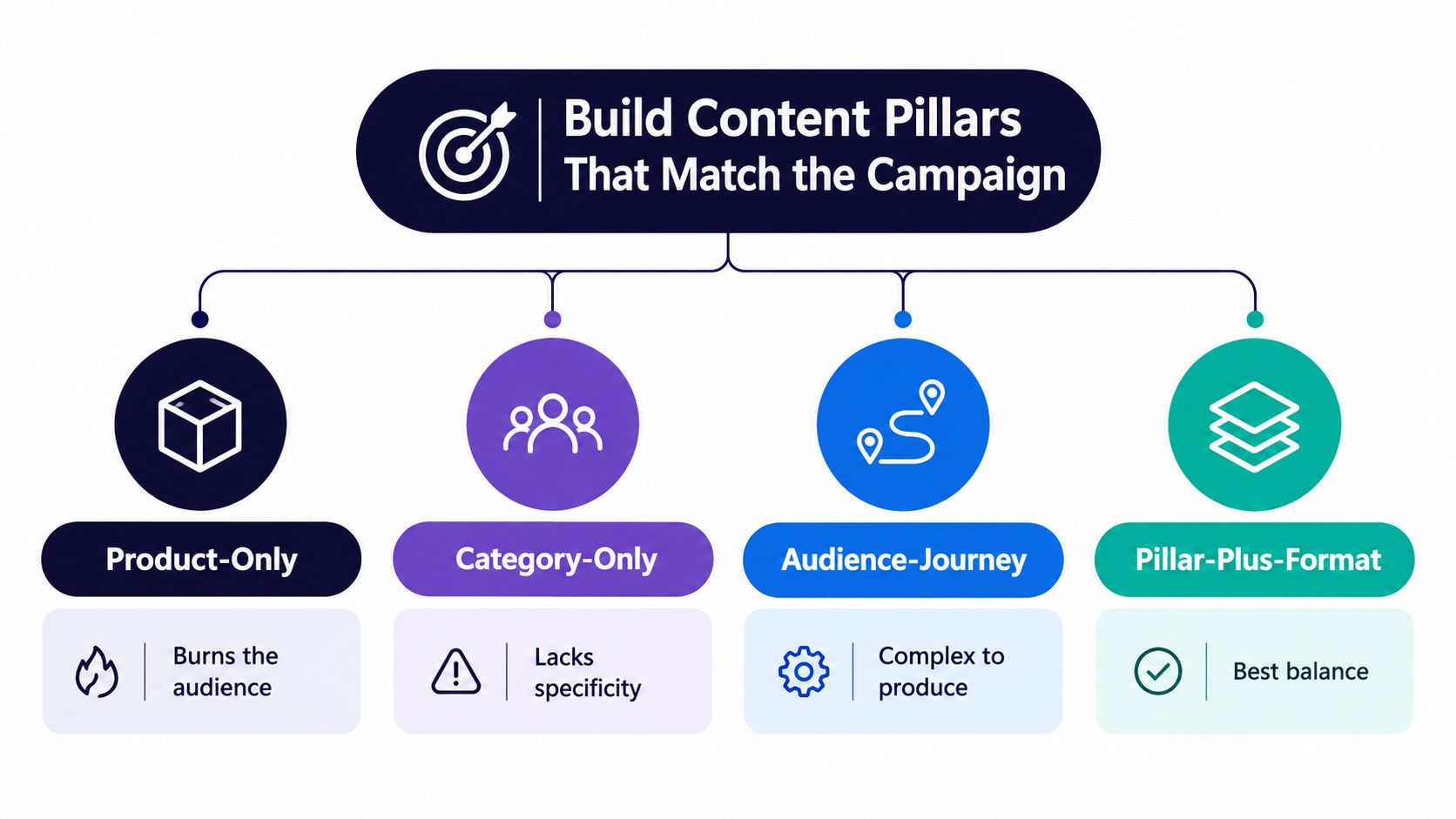
Content pillars aren't interchangeable. Each model creates a different editorial trade-off.
Product-only content keeps every post close to the offer, but it burns the audience when every message sounds like a pitch. Category-only content can attract broad attention, but it may bring in people who never need the product. Audience-journey planning maps content to awareness, evaluation, and decision stages, yet it can fragment the campaign if every stage gets a separate message. Pillar-plus-format planning gives editors a repeatable structure while leaving room for one central campaign idea.
For most launches, the fourth model is the most workable default. The pillar defines the reason to publish. The format defines how that reason becomes native content. A useful primer on the broader concept is this guide to what content pillars are.
A SaaS launch example
Suppose a SaaS company is launching a feature that helps teams identify stalled approvals. Build three pillars:
- How teams use it, paired with short demo videos and operator-led posts.
- Proof and numbers, paired with customer quote cards and document posts that show the workflow before and after.
- Behind the build, paired with founder POV posts and concise engineering explainers.
The campaign idea belongs primarily to the first pillar because the audience needs to understand the feature in context. The second pillar supplies evidence. The third gives the launch a human angle and creates material for people who care about product decisions rather than a direct sales message.
The result is rhythm without repetition. A demo introduces the problem, a proof post answers skepticism, and a behind-the-build post gives the audience a reason to discuss the release. The formats change the viewing experience even when the message remains consistent.
AI can help with repurposing prompts, format variations, and draft organization, but it shouldn't decide the campaign's editorial logic without human review. Teams exploring AI tools for social strategy, or connecting an assistant through the AI agents hub, should use them to accelerate production after the pillars and offer are clear, not to replace audience judgment.
How do you schedule a campaign with a 14-day workflow?
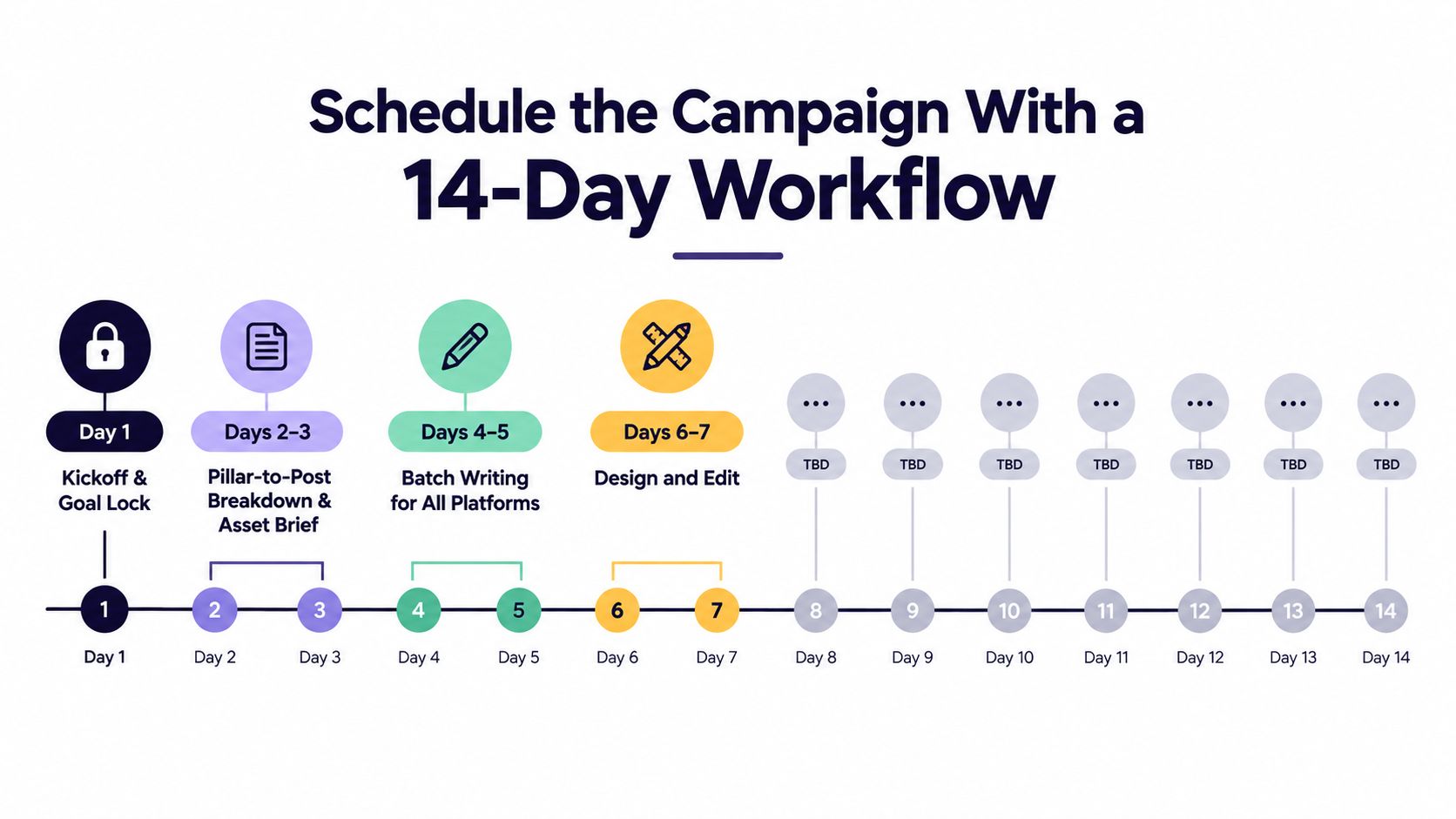
A campaign ships more reliably when the schedule protects the work that prevents rework. A two-week workflow creates room for production, review, correction, and a buffer day.
The operating schedule
- Day 1, kickoff and goal lock: Confirm the offer, audience, primary KPI, supporting signal, launch date, and approver.
- Days 2–3, pillar-to-post breakdown: Map each campaign idea to a pillar, platform, format, asset, owner, and CTA. Write the asset brief.
- Days 4–5, batch writing: Draft all platform versions together so the message stays aligned while the execution changes.
- Days 6–7, design and edit: Produce graphics, videos, subtitles, thumbnails, carousels, and alternate crops.
- Day 8, stakeholder review: Review the campaign as a system, not as isolated posts.
- Day 9, revisions: Resolve comments, update assets, and confirm claims.
- Day 10, dry run and pre-publish QA: Test links, previews, formatting, accessibility, tags, permissions, and schedule settings.
- Day 11, calendar load: Upload approved assets, add captions, set platform-specific times, and configure tracking.
- Day 12, buffer: Keep this day free for a late correction.
- Day 13, launch: Publish the planned first wave and monitor replies.
- Day 14, first-day read: Record what happened, what surprised the team, and what needs attention next.
Day 10 is the safety net. Moving QA to launch morning turns every error into a live incident.
For a five-post SaaS feature launch, the copywriter can own the LinkedIn announcement, Instagram caption, TikTok script, X thread, and customer-proof post. The designer owns the carousel, quote card, thumbnail, and video text overlays. The approver checks product accuracy, brand language, and legal requirements on Day 8, while the social lead owns the final QA and calendar load.
A seven-day schedule can work for a small brand with one decision-maker and ready-made assets. The trade-off is obvious: compression removes the buffer that catches broken links, missing exports, and late feedback. Teams that need a repeatable production rhythm can study how to build a video creation system, then connect that process to a calendar rather than treating video as an ad hoc task. A practical social media content calendar tool can handle the final scheduling layer, but it can't repair an unresolved offer.
Tailor One Idea for Every Platform
Cross-posting is a production shortcut, not a content strategy. Start with one campaign idea, then rewrite the hook, format, pacing, and CTA for the platform where the post will appear.
Use a SaaS feature launch as the source idea: “Teams can now see where approvals are stalled.” The core message stays stable. The execution changes because each platform gives the audience a different reason to stop.
Four native executions
Platform-native executions of one campaign idea (checked November 2026)
| Platform | Format | Caption Tone | Hook Style | CTA |
|---|---|---|---|---|
| Professional post of roughly 150 words with a document or carousel | Analytical, useful, credible | Name the operational problem, then show the workflow change | Link to a gated demo or relevant conversion page | |
| Hero image or Reel, supported by a story sequence and poll | Visual, concise, conversational | Lead with the pain point or a recognizable team moment | Direct people to the bio link, with story interaction as a secondary action | |
| TikTok | Native short video, roughly 15–30 seconds, with burned-in captions | Casual creator voice | Put the friction point in the opening moments | Send viewers to the profile link |
| X | A four-to-six-post thread or one sharp post with an image | Professional but conversational | State the observation, then unpack the implication | Link to the landing page |
The LinkedIn version can explain how approval bottlenecks affect handoffs, then use the carousel to show the feature flow. It earns attention through clarity and operational detail. The CTA belongs after the explanation because the reader needs enough context to see why a demo is relevant.
Instagram needs a visual proof point. Show the feature interface, use a short caption, and turn the story sequence into a lightweight conversation with a poll about where approvals stall. The feed post and story shouldn't duplicate one another. If the team is unsure how those formats differ, this guide to the difference between a Reel and a Story provides a useful distinction.
TikTok should feel made for the feed, not like a cropped product webinar. Have a creator show the moment an approval gets stuck, reveal the feature, and place the explanation in on-screen captions so the video works without sound. X can turn the same insight into a short argument, with each post in the thread handling one part of the problem.
The idea is shared. The audience experience is not.
Before scheduling, inspect every version side by side. Check that the promise is consistent, but don't force identical wording, identical imagery, or identical CTA placement. Native adaptation takes more planning than copying, yet it produces a campaign that belongs on each platform instead of looking syndicated.
How do you measure a campaign without vanity metrics?
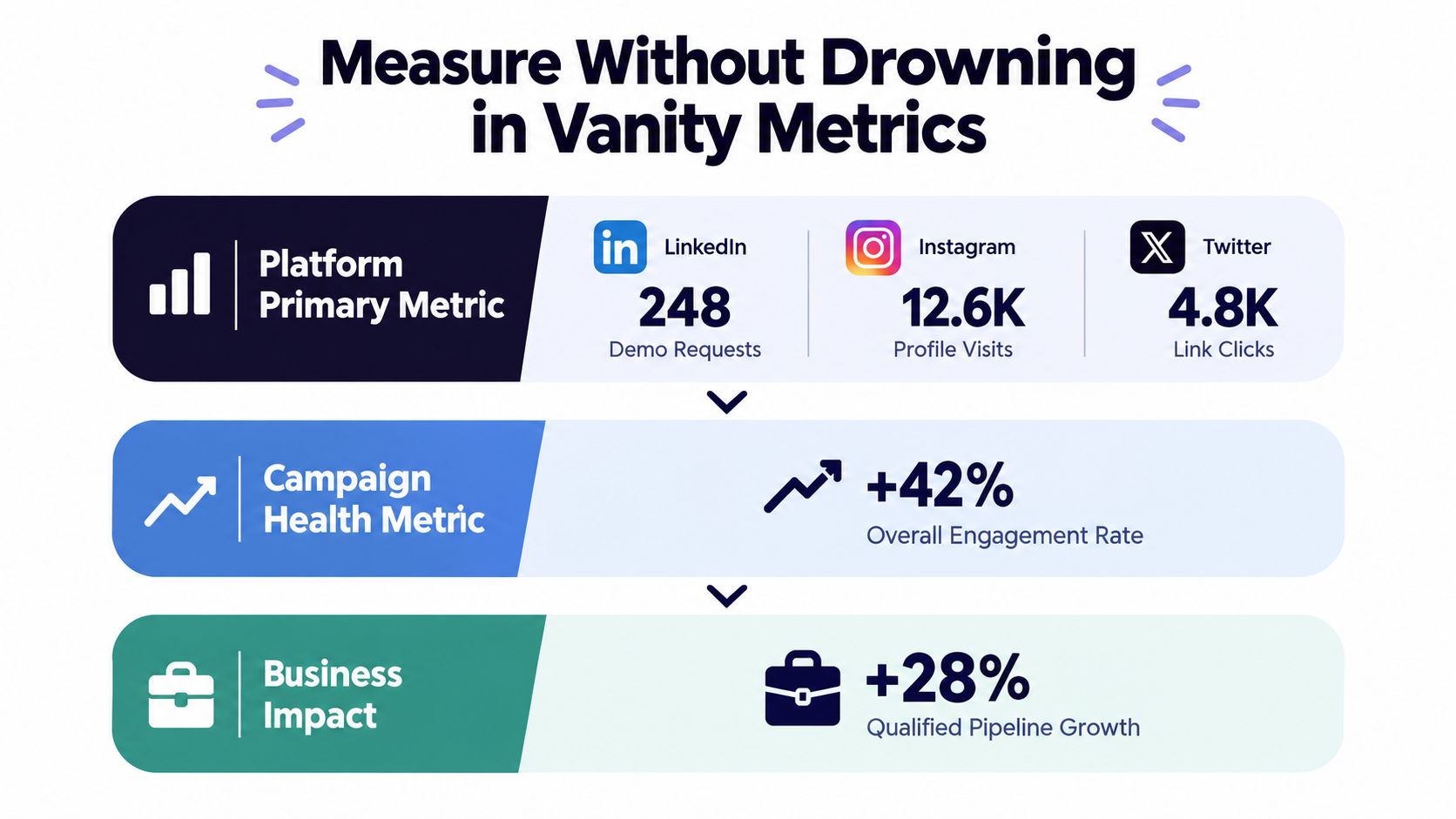
A social dashboard becomes useful when every number changes a decision. Build a three-layer stack for each platform, then stop adding metrics unless the team can explain what action the new number would trigger.
The three layers
Primary metric: Connect this directly to the campaign goal. LinkedIn may use demo requests, Instagram profile visits, TikTok video completion rate, and X link clicks. These examples aren't universal rules. They're starting points that should match the role each platform plays in the campaign.
Trend metric: Use one directional signal to understand movement over time, such as reach, follower change, or share rate. A trend metric helps explain distribution, but it shouldn't replace the primary outcome.
Quality metric: Add one measure of audience response, such as comment sentiment, save rate, or DM replies. Quality signals help distinguish passive exposure from content that people find useful enough to keep, discuss, or act on.
Raw impressions, sudden follower swings, and likes without context are easy to report and hard to interpret. A post can collect attention from the wrong audience, attract low-intent reactions, or perform well because of distribution while producing no meaningful next step.
The 15-minute review
Run the review weekly, using a strict time box:
- Five minutes to pull numbers: Record the primary, trend, and quality metrics for each platform.
- Five minutes to write the read: State what changed, where it changed, and the most plausible explanation supported by the available evidence.
- Five minutes to choose one adjustment: Change one hook, format, CTA, posting context, or audience response tactic for the next publishing window.
Tracking more than three metrics per platform usually creates analysis paralysis. The team debates the dashboard instead of changing the work.
Measurement also gets harder when several channels claim the same conversion. Current B2B measurement discussions increasingly focus on pipeline-sourced and pipeline-influenced revenue, dark-funnel signals, incrementality testing, and modeled attribution rather than relying on one last-click view. The operational implication is to triangulate CRM and first-party signals with broader modeling and controlled tests, especially when privacy limits visibility. This overview of B2B campaign ROI measurement trends offers useful context for that shift.
For teams choosing a scheduling workflow, compare whether a tool supports the reporting behavior you need. A practical Buffer versus Metricool comparison can help clarify the trade-off between calendar operations and analytics depth.
Your Reusable Campaign Planning Checklist
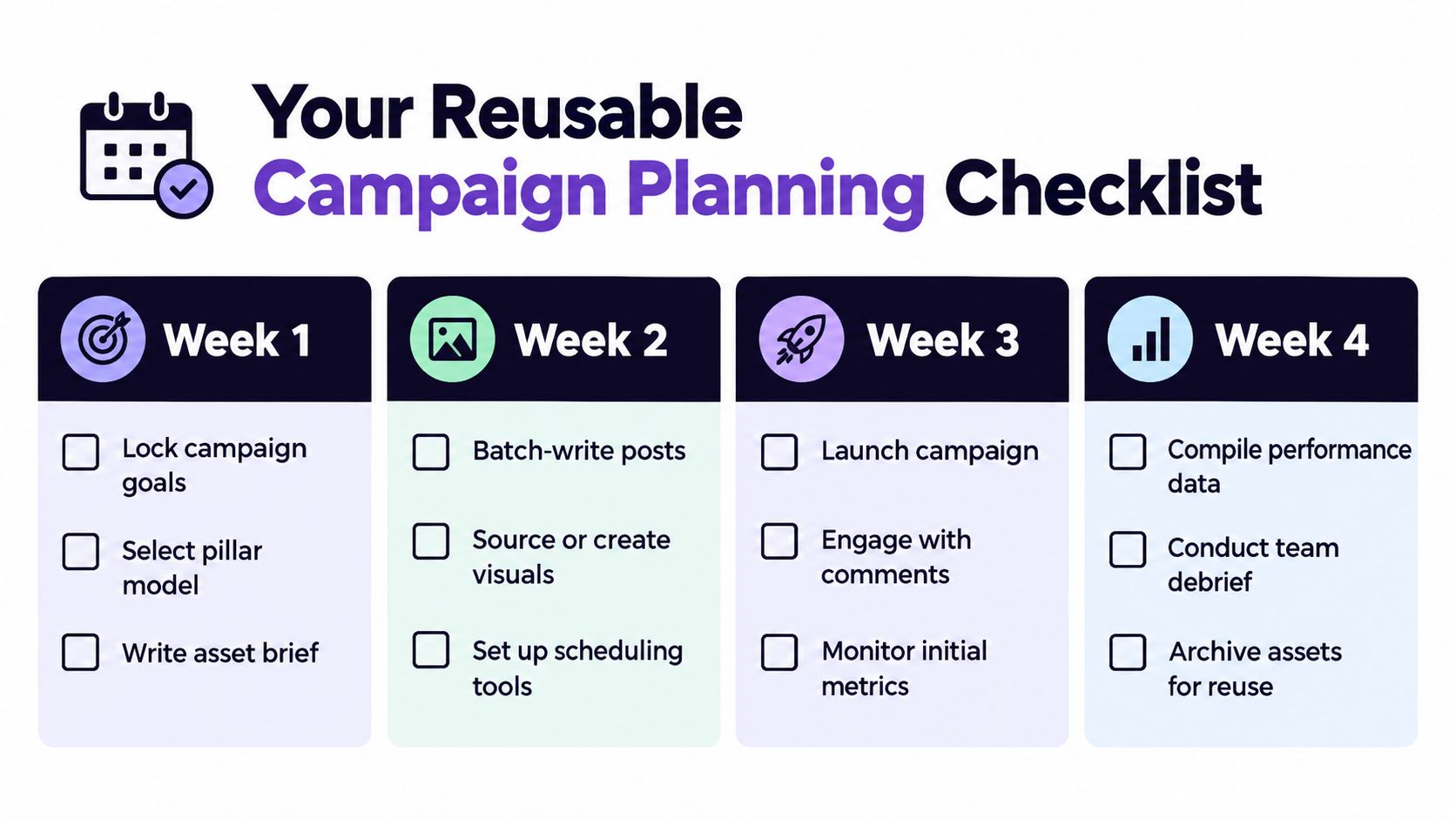
A reusable campaign plan should be short enough to run, detailed enough to prevent ambiguity, and structured so the next team can learn from it. Use a 30-day cycle that separates decisions from production, live management, and reflection.
Week one sets the boundaries
- Lock the goal: Record the business outcome, primary KPI, supporting trend, baseline, target, date, and tracking owner.
- Choose the pillar model: Select the editorial structure and name the lead pillar for the campaign idea.
- Write the asset brief: List platform, format, hook, CTA, dimensions, claims, dependencies, owner, and approver for every asset.
Week two makes the work shippable
Batch-write the platform versions before designing. This exposes message conflicts early and gives the designer a stable brief. Produce the visuals, subtitles, thumbnails, carousels, and alternate crops, then run the mandatory QA pass before loading the calendar.
QA should confirm:
- Links: Every destination opens, matches the CTA, and carries the intended tracking.
- Copy: Claims, names, dates, tags, hashtags, and character limits are correct.
- Creative: Crops, contrast, subtitles, thumbnail frames, and file versions are approved.
- Ownership: Each post has one responsible person and one final approver.
- Timing: The asset exists before the scheduled slot, and the launch sequence makes sense.
Week three runs the campaign
Launch the first wave, respond to comments, and check the primary metrics without rewriting the strategy every few hours. Use the midpoint to make one evidence-based adjustment, such as replacing a weak hook or moving emphasis toward a format that is attracting qualified interaction.
Week four turns activity into institutional memory
Compile performance data, write the one-paragraph read, hold the retrospective, and update the template. Archive the approved captions, source files, final links, comments from reviewers, and decisions made during optimization. If the team wants to compare workflow options, it can browse campaign features while deciding which planning and execution capabilities belong in one system.
Five recurring mistakes deserve a direct fix:
- Skipping QA: Put the checkpoint on the calendar before launch assets are loaded.
- Copying one asset everywhere: Create a platform brief for every execution.
- Measuring follower growth alone: Pair audience signals with a goal-linked conversion metric.
- Treating the calendar as static: Mark a defined review window for changes and document why they happen.
- Failing to archive learnings: Add a retrospective note and duplicate the improved template for the next campaign.
A reusable social media scheduler template can help standardize the handoff, but the template only works if the team records decisions instead of filling cells mechanically.
iHatePosting, an AI social media scheduler for 15 networks with unlimited accounts for $15/month (billed annually), helps teams plan, tailor, and publish campaigns from one visual workflow, with per-platform caption tools, previews, pre-publish checks, and campaign organization. It also costs $19 month-to-month. Start the 90-day free trial, no credit card needed, at iHatePosting and use the next launch to test a complete process, from locked offer to QA-approved calendar. See the pricing page, or follow the guides to schedule LinkedIn posts, schedule TikTok videos and post to all social media at once.
Frequently asked questions
What is social media campaign planning?
It is the work between the campaign idea and publishing: locking the offer, setting goals, assigning owners, adapting content per platform, running QA and measuring results.
How long should campaign planning take?
A 14-day workflow gives room for production, review, a Day 10 QA pass and a buffer day. A small brand with one decision-maker can compress it to seven days.
How many metrics should I track per platform?
Three: one primary metric tied to the goal, one trend metric and one quality metric. More than that usually creates analysis paralysis.
Should I post the same content on every platform?
No. Keep the message consistent but rewrite the hook, format, pacing and call to action for each platform.
How does an agency plan campaigns for several clients?
Agency campaign planning uses the same steps as any campaign, repeated for each client. Lock each client's offer, name a platform owner and an approver, and schedule a QA pass before launch. Keep every client's calendar apart. In iHatePosting, customer groups give each client separate channels, calendar and analytics, and approval workflows let your team review posts before they go live.