Social Media Scheduler App: A Practical Guide for 2026
14 min readsocial media scheduler appscheduling toolsmulti-platform postingcontent calendar
On Monday morning, one product update can turn into a small publishing operation. You write the idea once, then open LinkedIn, Instagram, X, Facebook, and TikTok in separate tabs. The image needs a different crop, the caption needs a different shape, and the posting time needs to fit each audience. By the time the final upload finishes, the original asset is buried in a downloads folder and you're no longer sure which version is approved.
That pattern is why a social media scheduler app has become more than a convenience tool. It acts as operational infrastructure for planning, adapting, approving, and publishing content across several networks. In 2025, social media use reached 5.41 billion people globally, and the typical user engaged with around 6.84 platforms per month, according to Planable's social media statistics. A central workflow helps teams handle that fragmented environment without turning every post into a separate manual task.
Table of Contents
- Juggling Five Tabs Just to Post One Idea
- What a Social Media Scheduler App Actually Does
- Core Features That Separate Useful From Frustrating
- How Multi-Platform Support Really Works
- Self-Serve SaaS Versus the Alternatives
- A Short Framework for Picking the Right Scheduler
- Where Automation Stops Helping and Human Posting Steps Back In
- Your First Week With a Social Media Scheduler App
Juggling Five Tabs Just to Post One Idea
A solo marketer starts with a clean product announcement and a reasonable plan. The LinkedIn version needs a professional opening and a clear link. Instagram needs a visual-first caption. X needs a tighter message. Facebook can carry more context, while TikTok may need a short video description rather than the original product copy.
None of those edits is difficult on its own. The friction appears when the marketer repeats the same sequence for every account, checks each media requirement separately, and tries to remember whether a post was published, saved, or still waiting for approval.
Practical rule: Treat one campaign idea as a set of platform-ready packages, not as one identical post copied everywhere.
Manual publishing also creates small points of failure. A caption can lose a sentence during copy and paste. A scheduled time can be entered in the wrong time zone. A revised image can be uploaded to one network while an older version remains queued on another. These errors rarely look dramatic, but they interrupt campaigns and create extra checking work.
A scheduler changes the shape of the task. You begin with one campaign record, attach the approved media, create platform-specific caption variants, and assign each version to a queue or calendar slot. The software then keeps the work visible while preparing the publishing action for each connected account.
That doesn't mean every network receives an identical post. A useful workflow lets you shorten the X version, adjust the Instagram caption, remove an unsuitable link, or choose a different video format without losing the connection to the original campaign.
Teams that want a broader overview of coordinated publishing can also review this guide to Post To All Social Media At Once. The useful idea isn't blind duplication. It's having one place to manage the variations that cross-platform publishing requires.
The result is quieter than a productivity slogan suggests. You still write, edit, and approve the content. You stop reopening five tabs to perform the same administrative sequence.
What a Social Media Scheduler App Actually Does
Think of a scheduler as a mail room between your content plan and the social networks that receive it. You place a draft into the holding area, label each package for its destination, set a delivery time, and let the system send the approved version through the appropriate publishing connection.
The workflow usually looks like this:
- Connect the accounts. The app uses official platform connections or APIs to receive permission to publish. Each account may expose different publishing capabilities.
- Create the draft. You add copy, media, links, tags, and campaign information in a shared composer.
- Tailor each destination. You adjust the caption, asset, format, and other details for each network.
- Choose the timing. You can select a specific time, place the post in a queue, or use account-specific recommendations where available.
- Review and approve. A creator can approve their own post, while a team may route it to a manager or client.
- Release and monitor. The app attempts publication, reports errors, and keeps the item visible in the calendar or activity log.
This distinction matters because scheduling isn't the same as engagement automation. A scheduler releases content you or your team has already prepared. It doesn't automatically understand every comment, hold a useful conversation, or replace a human response to a customer.
It also isn't necessarily a content generator or a complete analytics suite. Some products include writing assistance, reporting, asset storage, or campaign management, but those are additional layers. The core function is controlled publishing across connected destinations.
A content plan also needs a sensible cadence for each channel. For example, teams deciding how often to publish video can use this resource on B2B SaaS YouTube posting frequency as a planning reference, then adapt the cadence to their own production capacity and audience.
The calendar is the operating view. It shows what is planned, which account owns the post, who must approve it, and whether the item is ready to publish. If you're comparing calendar workflows, use this guide to find the right content calendar tool rather than judging a scheduler only by its composer.
The best mental model is simple: a scheduler controls the release of approved content. It supports planning and coordination, but it doesn't make strategic decisions for you.
Core Features That Separate Useful From Frustrating
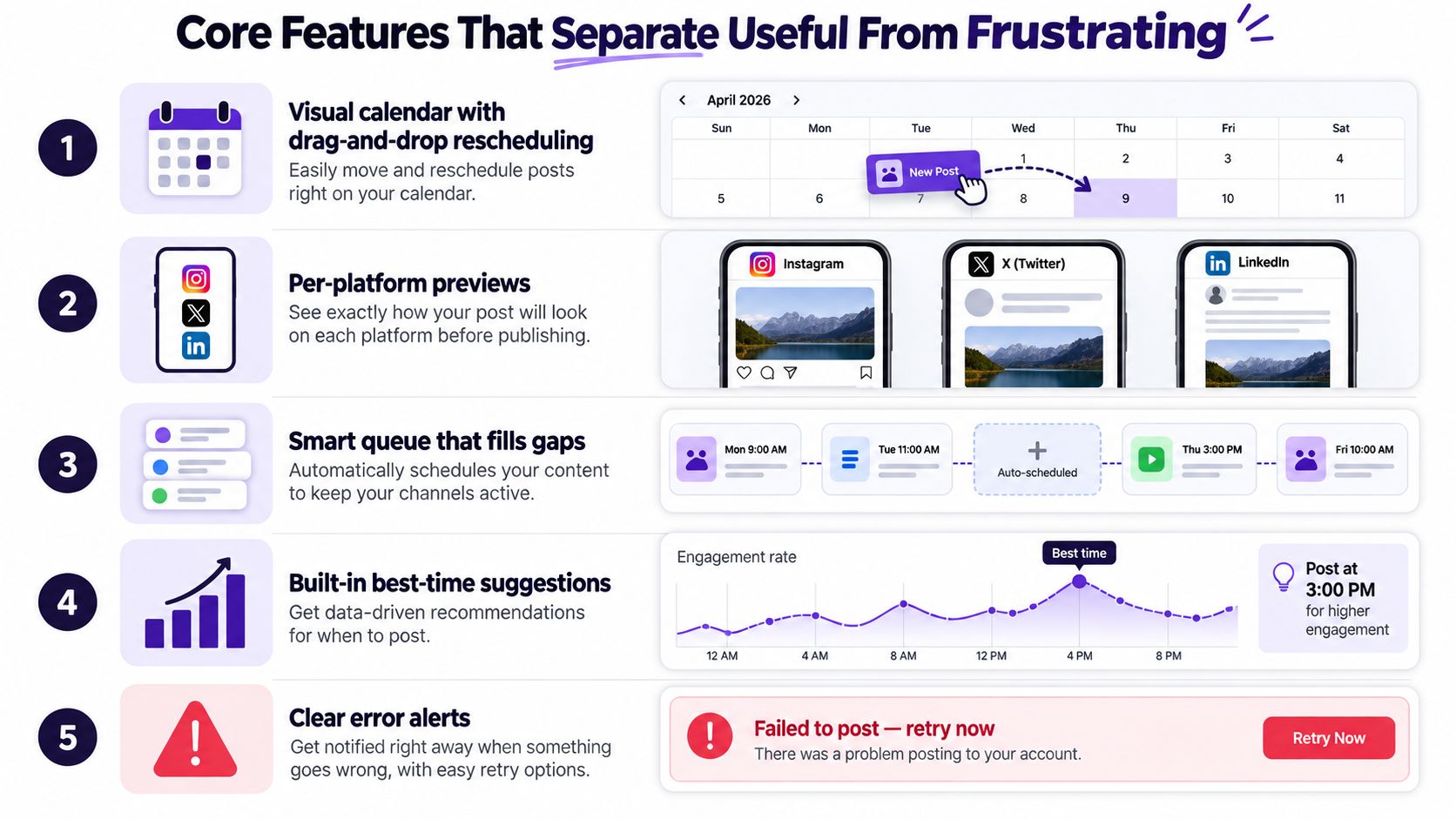
The difference between a helpful scheduler and an expensive extra tab usually appears in the details of the workflow. A polished editor isn't enough if the team can't see conflicts, catch platform-specific errors, or move a campaign without manually rebuilding every post.
The calendar should show the work clearly
A visual calendar gives you a campaign-level view that a simple queue can't provide. Drag-and-drop rescheduling is useful when a launch moves, a holiday changes the order of posts, or a planned announcement needs to pause.
Look for separate states such as draft, awaiting approval, scheduled, published, and failed. Those labels reduce the need to ask a teammate whether a post is ready.
Previews prevent platform surprises
A post can look correct in the editor and awkward in the live feed. Per-platform previews help you check image crops, link cards, caption breaks, video presentation, and placement of calls to action before publication.
This is especially important when one idea becomes several versions. The preview should make those differences visible rather than encouraging you to approve a single generic representation.
Bulk tools and a media library support batching
CSV import can save time for a campaign with many evergreen posts, but only if the tool preserves media references and validation warnings. A media library should make approved assets searchable and reusable without forcing you to upload the same file repeatedly.
Keep naming conventions practical. A file name that identifies the campaign, format, and revision is more useful than a folder full of files called final, final-new, and final-new-2.
Approvals and tracking connect publishing to results
Team approvals protect brand quality. Role permissions should let a writer prepare a draft without granting unrestricted publishing access, while managers can review the exact caption and asset assigned to each account.
Link controls matter too. A built-in shortener or redirect layer can support tracking parameters and make it easier to connect a social post to website activity. Check whether the tool preserves your campaign parameters rather than replacing them.
Queue rules should account for real work
Useful queue settings include account time zones, blackout windows, recurring slots, and a clear way to pause a post while someone edits it. A queue shouldn't publish an unfinished draft because the original time has arrived.
The evaluation is less about collecting features than testing whether they remove actual admin work. iHatePosting's scheduler recommendations can help frame that comparison around multiple-account workflows rather than a feature checklist alone.
How Multi-Platform Support Really Works
Cross-platform publishing resembles a dispatch desk, not a photocopier. You hand the scheduler one campaign idea, and the system prepares a separate package for Instagram, X, LinkedIn, Facebook, TikTok, YouTube, Pinterest, or Threads according to the connection and format each network accepts.
A single draft may need several changes:
- Caption handling: One network may need a concise post, while another supports more context or a different link treatment.
- Media preparation: An image, carousel, short video, or long-form upload may require different specifications.
- Endpoint selection: The scheduler must use the correct API operation for the account and content type.
- Permission checks: The connected account must still authorize the requested publishing action.
- Status reporting: The system should explain whether the post published, failed, was delayed, or needs attention.
The platform rules create hard operational boundaries. Networks enforce limits at the account or app level, and those limits can vary by endpoint, content type, and rolling time window. As this explanation of social media scheduling APIs describes, a scheduler may need to queue, validate, or defer jobs so a functioning app doesn't exceed a network's publishing or request limits.
That is why “supports Instagram” is an incomplete buying criterion. Ask which formats are supported, whether automatic publishing is available for the account type you use, how errors appear, and what happens when a token expires or a platform changes its API.
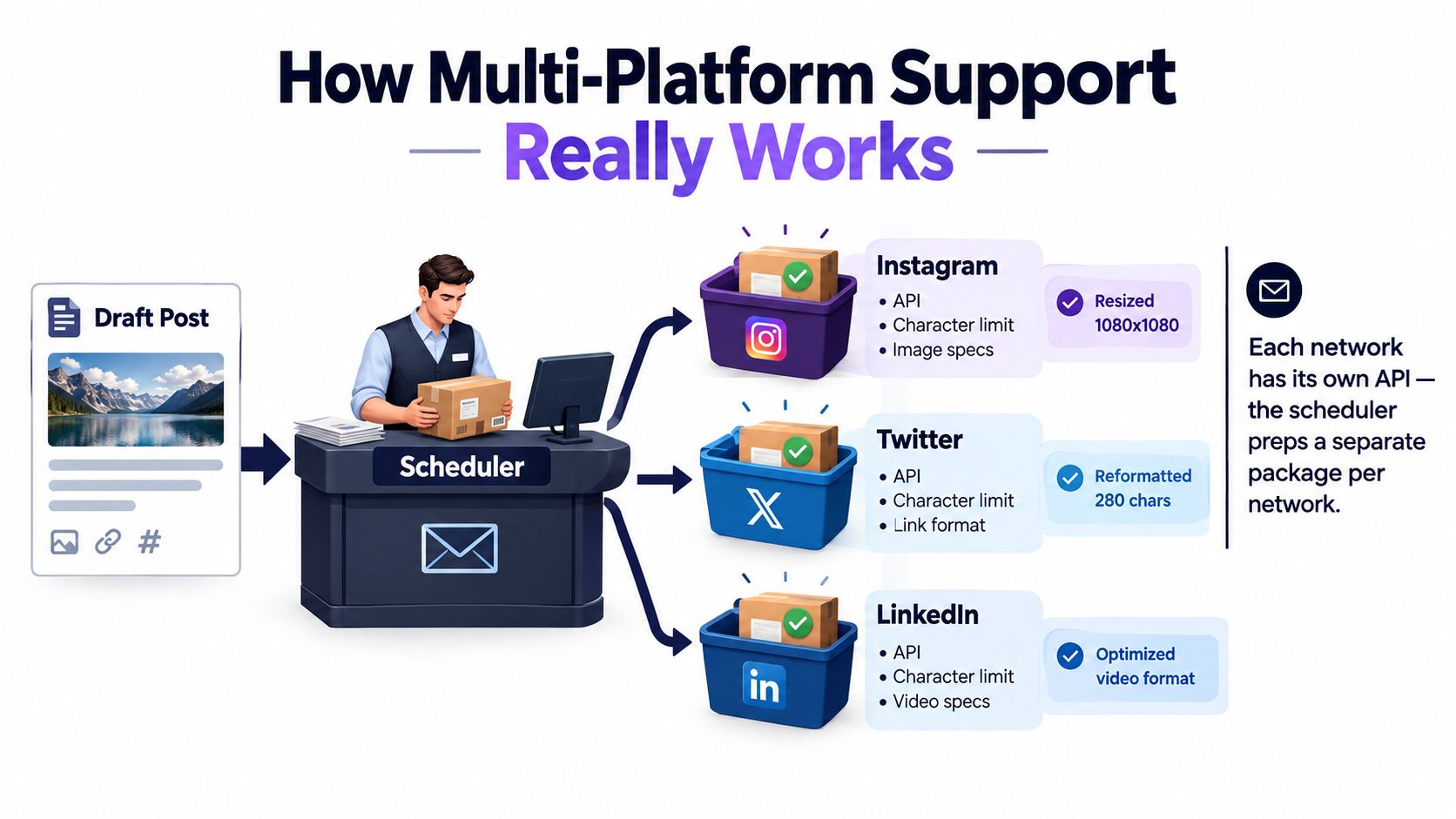
Maintained integrations also matter. A connection isn't a one-time code push. The scheduler provider has to keep pace with endpoint changes, permission requirements, media rules, and publishing restrictions across every supported network.
Watch this short walkthrough before testing an integration-heavy workflow:
For teams using automation beyond the scheduler itself, Connect Ihateposting To Zapier Make N8n shows how external workflows can pass information into the publishing process. The practical takeaway is that the scheduler earns its place by absorbing network-specific complexity, not by pretending those differences don't exist.
Self-Serve SaaS Versus the Alternatives
A self-serve SaaS scheduler sits between native platform tools and large agency suites. It isn't automatically the right choice, but it often fits the team that needs several networks without adopting a full enterprise operating system.
| Option | Best Fit | Typical Cost Shape | Multi-Platform Support |
|---|---|---|---|
| Native platform schedulers | A creator or business focused on one network | Usually included with the platform or account | Limited to that network |
| Self-serve SaaS | Solo creators, small businesses, and lean marketing teams | Often tiered by accounts, posts, or seats | Designed for several networks |
| Agency or enterprise suites | Large teams that need governance, listening, and complex approvals | Usually higher tiered plans or negotiated contracts | Broad, with deeper administration |
| Manual posting | Trend-led creators working on one primary channel | Staff time and operating effort | Low, because each network is handled separately |
Native tools are practical when you only need Meta Business Suite, LinkedIn's native publisher, or YouTube Studio. They keep the work close to the network and avoid adding another account, but they make cross-platform calendars and shared approvals harder to coordinate.
Manual posting can be the best fit for live work. A creator covering an event, responding to comments, or reacting to a fast-moving conversation may value direct access more than a queue. The trade-off is that every repeatable post requires the same setup again.
Agency and enterprise platforms such as Sprinklr, Khoros, or Hootsuite Enterprise suit organizations with extensive governance needs. They can support permissions, listening, approvals, and reporting at a deeper operational level, but that depth may be unnecessary for a small team that mainly needs a reliable calendar and publisher.
Self-serve SaaS usually charges according to connected accounts, scheduled volume, or seats. Compare the pricing curve against your actual channel count and team structure, not against the longest feature list.
Switching also isn't necessarily permanent. Your content ideas, drafts, and media can often be exported or recreated, so a short trial with real work is safer than treating the first choice as an irreversible commitment.
A Short Framework for Picking the Right Scheduler
Choose a scheduler by testing the workflow it must support, not by counting buttons on a pricing page. Five filters expose most mismatches quickly.
Start with network coverage
List every active account, including the less common network that your audience still uses. Confirm the exact publishing formats and account types supported for each one. A tool that covers four important channels and ignores the fifth may create the same manual workaround you wanted to remove.
Inspect the calendar and queue
Create drafts, move them, place them in recurring slots, and load a small batch. Check whether you can see campaign gaps, approval states, time zones, and failed posts without opening several screens.
Test previews before analytics
A preview catches immediate publishing problems. Check the caption, image, video, link, and call to action on every destination you care about. Then review analytics to see whether reports are available per post and per network, whether data can be exported, and whether timing recommendations use your account's own history.
Independent analysis from Emplifi on the best times to post supports an important principle: there isn't one universal best time. Midweek mornings and early afternoons can be useful starting points, but account-specific behavior is more actionable than a generic average.
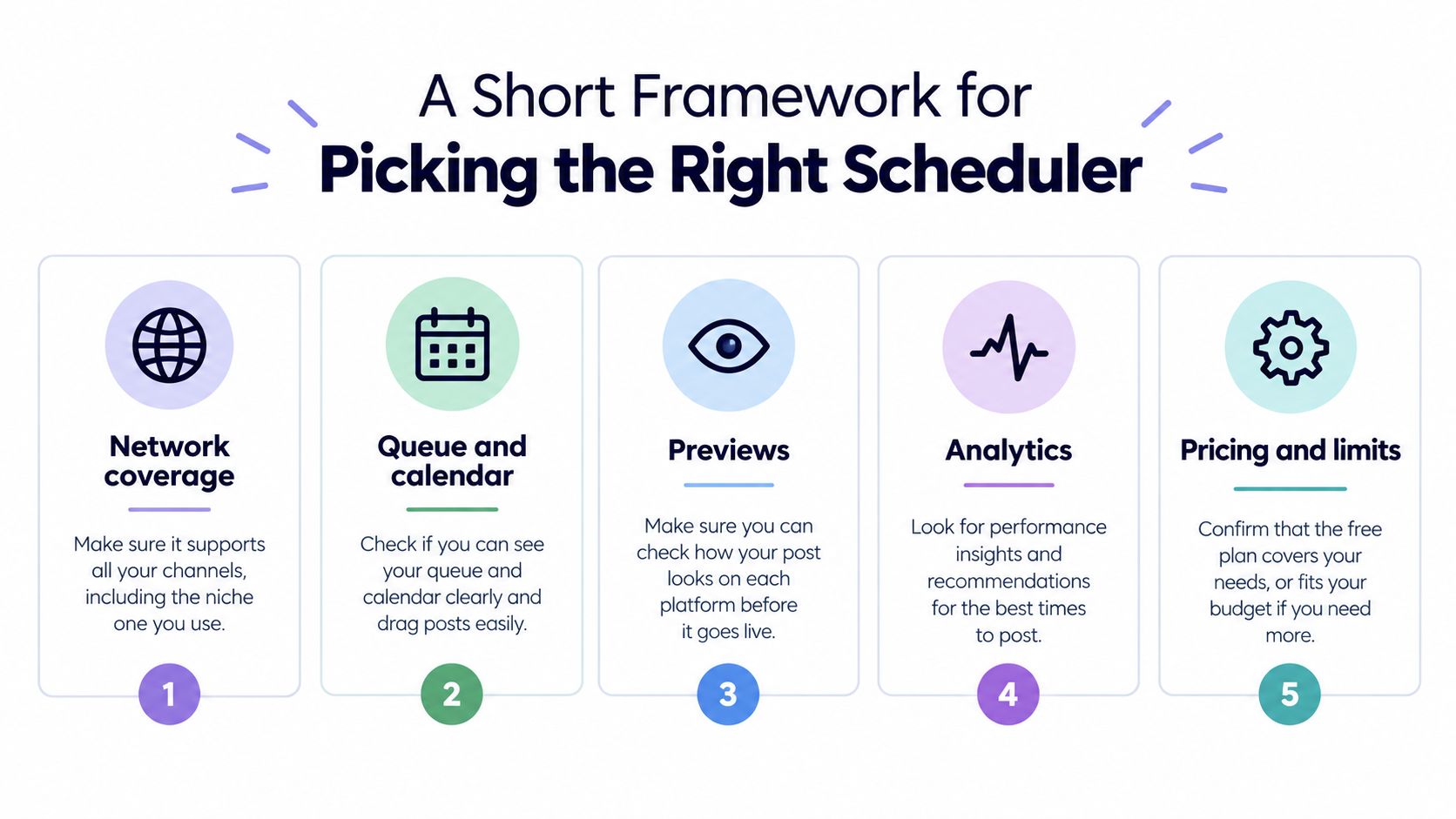
Check the pricing curve
Ask whether the plan changes when you add a user, account, post, or location. Then run a one-week trial with real content instead of a demo dataset. Publish a normal mix of posts, request an approval, edit a queued item, and deliberately test an unsupported format.
For broader comparisons, a current roundup of best tools for 2026 can help you build a shortlist. The final choice should be the tool that disappears into your routine. If it adds more tabs, duplicate approvals, or unclear failure states, it hasn't become infrastructure yet.
Where Automation Stops Helping and Human Posting Steps Back In
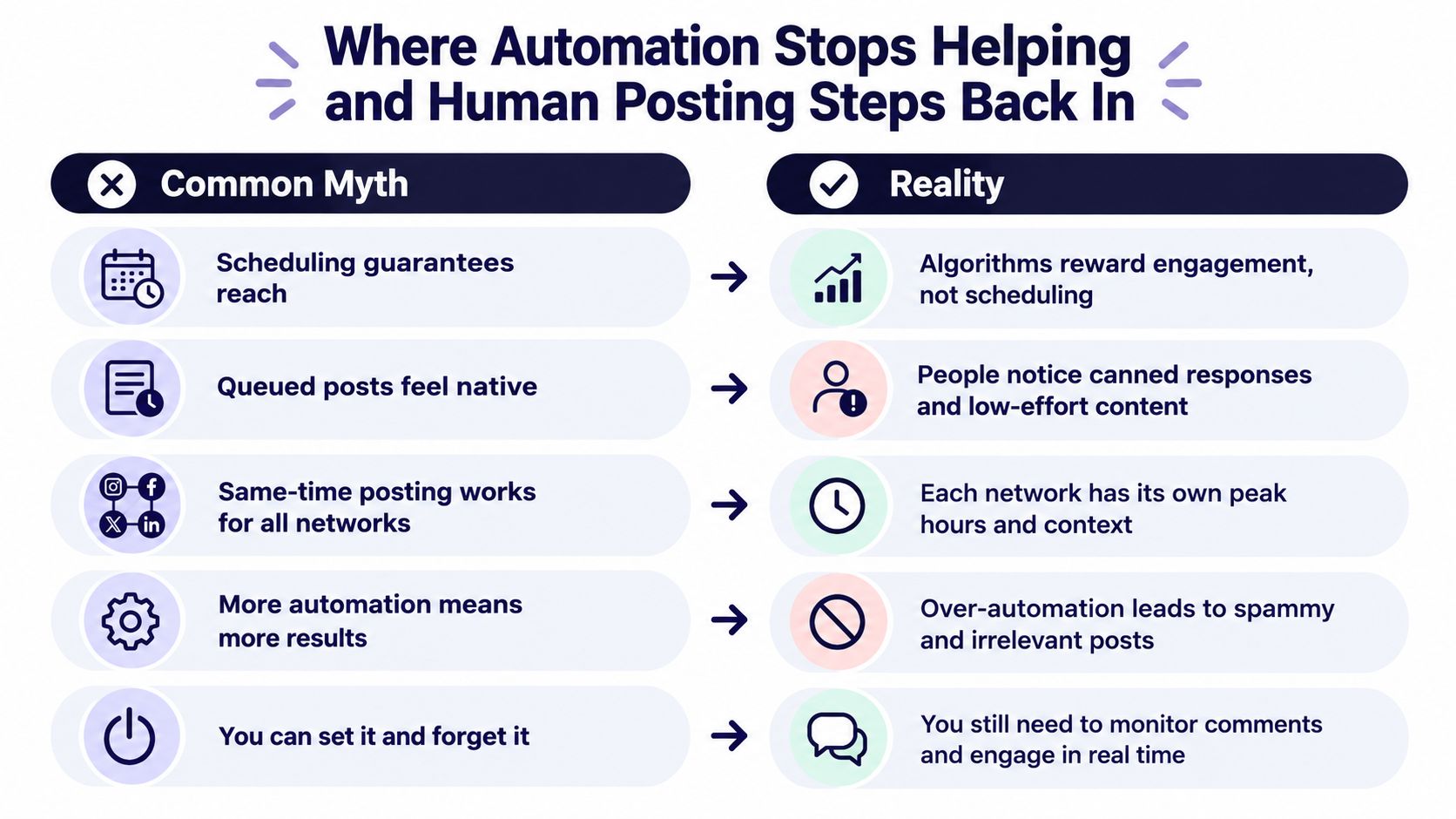
Scheduling solves repetition, not judgement. A queued post can publish on time and still miss the tone of the moment, use the wrong context, or leave a team silent when the audience expects a response.
Independent guidance on social media scheduling software and its limits highlights the tension between planned publishing and real-time responsiveness. Over-scheduled feeds can feel mechanical, trends can move faster than an approval process, and publishing isn't the same as engaging.
Keep human posting available for:
- Live events: The value comes from immediacy, observation, and audience participation.
- Trend-led content: A relevant response may need to be written and approved while the conversation is still active.
- Comment follow-ups: A useful reply depends on what a person asked.
- Founder or creator voice: Personal reactions often lose their value when written too far in advance.
- Sensitive moments: Scheduled promotional content may need to pause when the public context changes.
A scheduler should handle repeatable campaigns, evergreen material, planned launches, and routine publishing windows. Humans still own taste, context, conversation, and trust. Automation becomes harmful when it replaces those decisions, not when it replaces repetitive keystrokes.
Your First Week With a Social Media Scheduler App
Use the first week as an operating test rather than a tour of every feature.
- Day 1: Connect active accounts, review permissions, and import a small backlog of evergreen content.
- Day 2: Build the master calendar for one network before adapting the campaign elsewhere.
- Day 3: Add other priority platforms, set account-specific time windows, and check for queue clashes.
- Day 4: Create reusable templates for recurring formats, but leave room for manual edits.
- Day 5: Schedule the coming week and observe whether the queue matches your actual working habits.
- Day 6: Review early publishing results, remove awkward slots, and adjust the cadence.
- Day 7: Write the process down so a teammate, contractor, or future version of you can repeat it.
Keep a record of failed posts, confusing permissions, missing formats, and approval delays. Those observations tell you more than a polished product demo. If you need starting material, collect the eight scheduling template resources and adapt only the formats your team can maintain.
The trial period is for measuring fit. A scheduler is working when it reduces account switching, makes responsibilities visible, and leaves deliberate space for human publishing.
iHatePosting brings planning, platform-specific tailoring, previews, campaign organization, and publishing across fourteen networks into one self-serve workflow. Visit iHatePosting to test whether its calendar and cross-platform scheduling process fits the way you already create and approve content.