Social Media Scheduling Tool Explained and How to Choose
17 min readsocial media scheduling toolsocial media schedulingcontent calendarsocial media workflow
You open your laptop to publish the morning post and discover that the image is in one app, the revised caption is in a chat thread, and the platform-specific version is still in your notes. Instagram needs a shorter caption, LinkedIn needs a more professional opening, and the video upload is processing just as your posting window closes. By lunchtime, you've repeated the same work across several networks and still haven't checked whether every post went live.
A social media scheduling tool can remove much of that friction, but only if you understand what it's responsible for. It isn't merely a queue that releases identical posts at preset times. A useful scheduler coordinates assets, caption variants, approvals, platform rules, time zones, publishing jobs, and performance feedback.
That distinction matters whether you're a solo creator planning a week of content, a local brand coordinating product updates, or an agency handling several clients. The social media scheduling tools market was estimated at USD 2.54 billion in 2024 and is projected to reach USD 7.50 billion by 2033 at a 14.2% CAGR, according to market data on social media management software. Scheduling has become an operating layer for multi-channel marketing, not just a convenience.
This guide gives you a practical mental model. You'll learn what scheduling software does, which features protect reliability, how it fits into campaign workflows, how to use your own analytics for timing, and how to compare tools without getting distracted by long feature lists.
Table of Contents
- Introduction to Smarter Social Publishing
- What a Social Media Scheduling Tool Really Is
- Core Features That Make Scheduling Reliable
- How Scheduling Fits Into Your Content Workflow
- Benefits You Can Expect From Consistent Scheduling
- How to Choose the Right Scheduling Tool for Your Needs
- How iHatePosting Compares on Key Differentiators
Introduction to Smarter Social Publishing
At 8:55 a.m., a creator might be switching between Instagram, LinkedIn, TikTok, and a content folder while trying to publish one campaign idea in four different forms. The image needs a crop, the video needs a thumbnail, the LinkedIn caption needs a rewrite, and a client has just requested an approval change. Posting manually turns a simple campaign into a sequence of small interruptions.
A scheduler changes the unit of work. Instead of treating each network as a separate destination, you treat the campaign as one coordinated project with several platform-specific outputs. The asset, caption variations, publish time, owner, approval status, and destination stay connected.
That's why campaign planning matters before you open any publishing software. A practical campaign planning workflow helps you decide what the posts are meant to achieve, which topics belong together, and what needs to be adapted for each audience. The scheduling tool then turns that plan into executable work.
The problem isn't only posting
Manual publishing creates several predictable weaknesses:
- Context switching: You repeatedly log in, upload, format, preview, and publish across separate platforms.
- Version confusion: A late caption edit may update one network while older copy remains queued elsewhere.
- Timing gaps: A post intended for one time zone may publish at an inconvenient hour for another audience.
- Approval pressure: Reviewers often see content only after it has been prepared inside a native app.
- Poor feedback loops: Analytics remain separate from the planning process, so timing decisions become guesswork.
A scheduler can address these issues, but it won't replace judgment. You still need a clear content idea, an appropriate format, and a reason for publishing. The tool's role is to make the plan repeatable and visible.
What you'll be able to do
By the end, you should be able to describe a scheduler as a workflow orchestration system. You'll know how to check whether a product supports the networks and formats you use, whether it adapts captions properly, and whether its publishing layer handles limits and failures responsibly.
You'll also have a selection process for comparing a simple queue with a more complete operating system for social publishing. That makes the buying decision less about collecting features and more about protecting the workflow your team needs to run every week.
What a Social Media Scheduling Tool Really Is
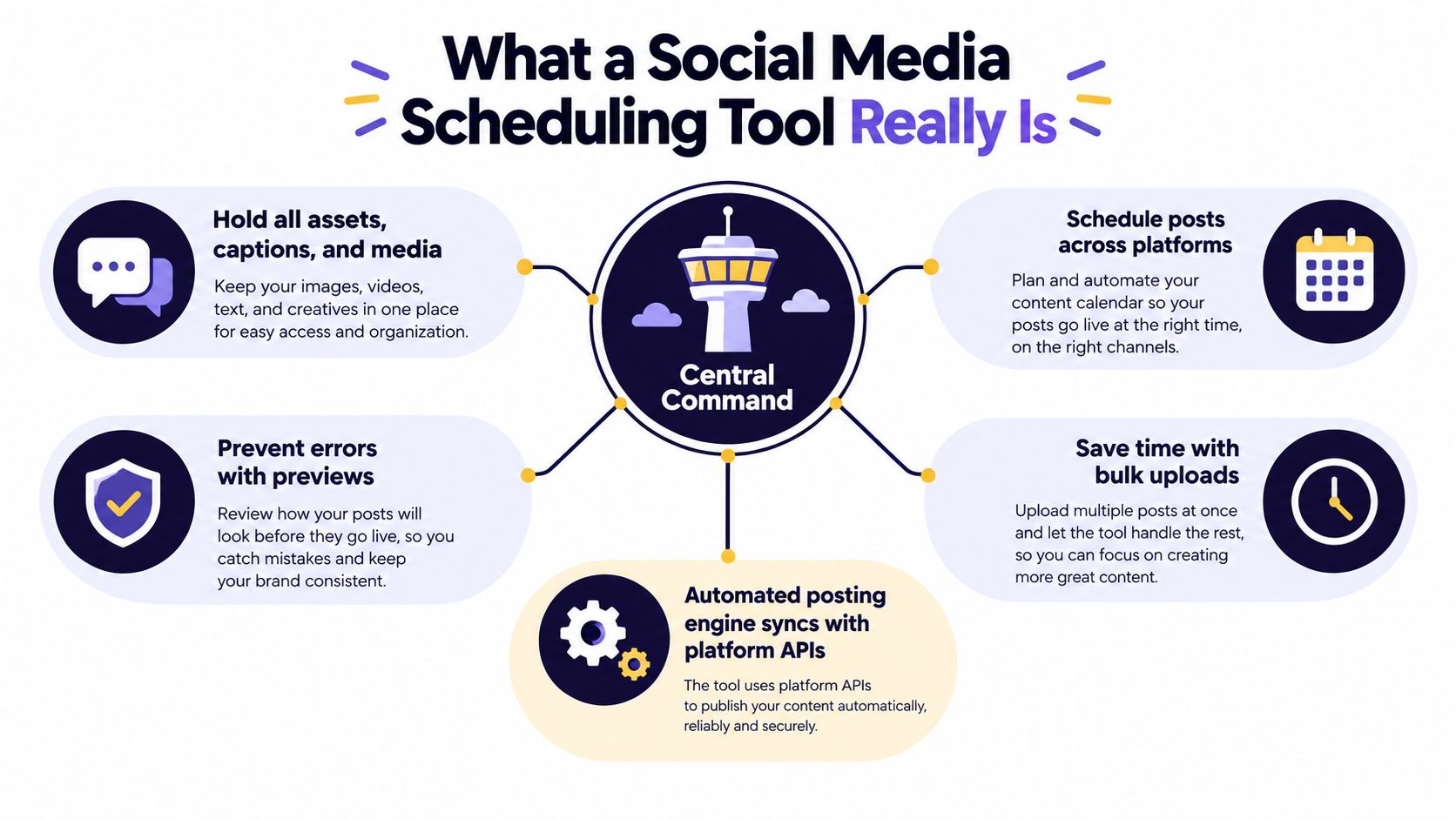
Start with a simple analogy. A social media scheduling tool is a control tower for content. It holds the information needed for each post, decides when a publishing job should run, and coordinates delivery to different platforms. The tower doesn't send one identical aircraft into every runway. It checks the requirements of each destination before dispatch.
In practical terms, the tool stores or references the media asset, caption, destination, scheduled time, account, and status. It may also store approval notes, campaign labels, hashtag groups, and platform-specific edits. That gives a team one place to see what should happen and what still needs attention.
From one dashboard to an execution engine
Dedicated scheduling platforms emerged around 2008 to 2010, when Hootsuite launched in 2008 and Buffer followed in 2010, as described in this history of social media management tools. Their central promise was straightforward, plan and publish across multiple networks without logging into every service separately.
That original dashboard model remains useful, but it doesn't fully describe modern scheduling. Saving a draft is not the same as creating a dependable publishing job. A draft waits for a person. An orchestrated job needs a durable queue, time-zone logic, status tracking, and a way to recover when a request fails.
Suppose a team schedules a video for a regional campaign. The scheduler needs to interpret the intended local time, keep the media reference available, send the request at the right moment, and record whether the platform accepted it. If the process stops halfway through, the system should identify the failure instead of leaving the post in limbo.
For teams publishing on LinkedIn, the practical differences between native scheduling and third-party workflows can be confusing. A resource such as how to schedule content on LinkedIn can help clarify which actions LinkedIn supports directly and when a separate tool adds value.
The useful distinction
Think of these terms as different levels of maturity:
- Draft storage: Keeps copy and media available for later manual publishing.
- Calendar planning: Shows posts by date, time, campaign, or account.
- Queue management: Places approved posts into a sequence of publishing jobs.
- Workflow orchestration: Coordinates platform variants, approvals, time zones, limits, retries, and reporting.
A basic tool may stop at the second or third level. A serious social media scheduling tool connects all four. That's the difference between a calendar that looks organized and a system that helps content reach the right platform without unnecessary manual intervention.
Core Features That Make Scheduling Reliable
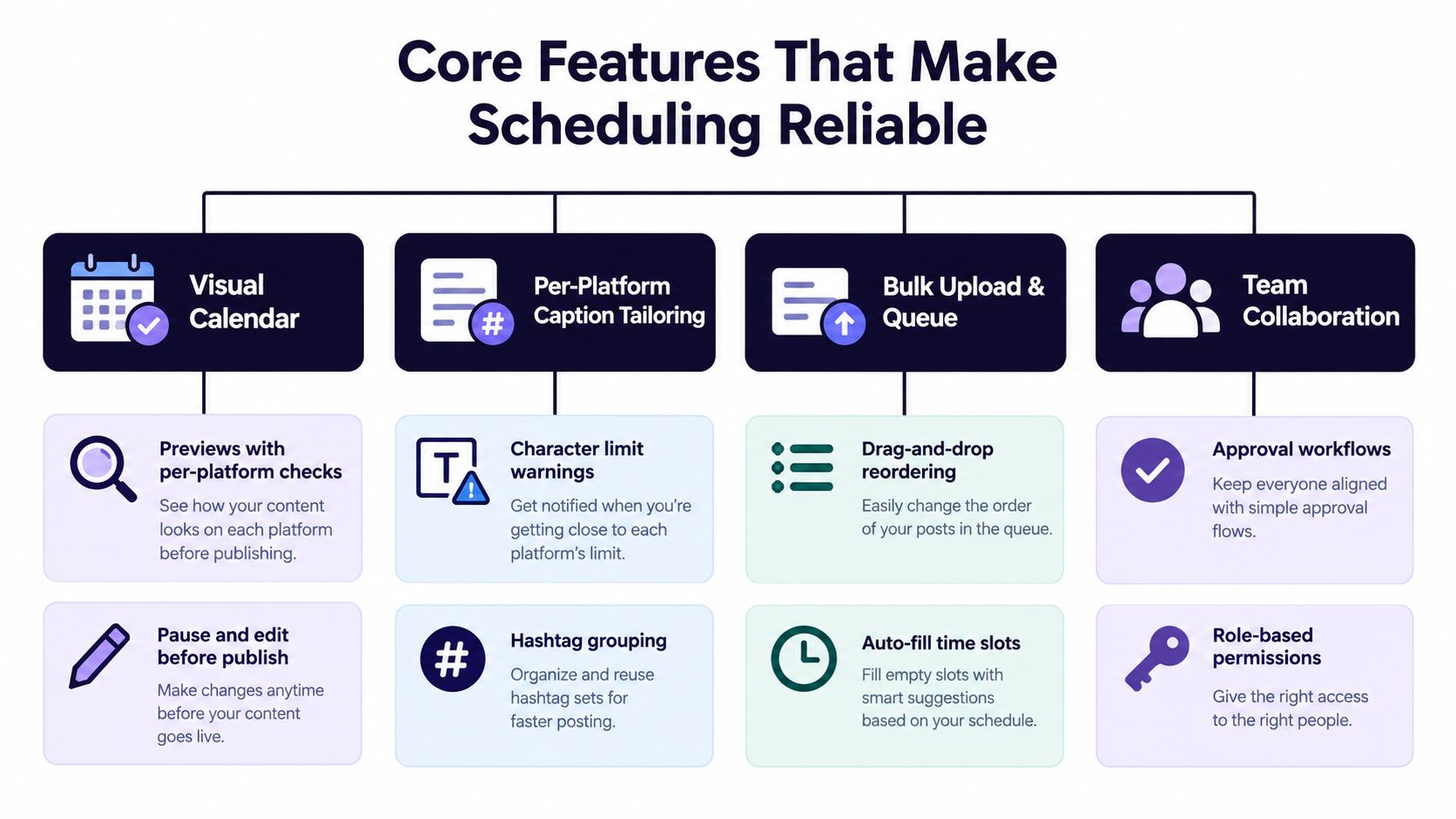
A long feature list doesn't guarantee dependable publishing. Evaluate each feature by asking what failure it prevents. A visual calendar reduces timing mistakes, caption checks reduce formatting errors, and a resilient publishing layer reduces the chance that an approved post disappears because an API request failed.
Make errors visible before publishing
A strong calendar should show more than colored blocks. Look for:
- Platform previews: See how the same asset and caption will appear on each destination.
- Caption checks: Catch length, formatting, and unsupported elements before the job enters the queue.
- Media validation: Confirm that a reel, carousel, image, or video matches the destination's requirements.
- Approval status: Separate drafts, revisions, approved posts, paused items, and failed jobs.
- Easy editing: Change the post in the calendar without rebuilding the entire campaign.
Per-platform tailoring is particularly important. A single caption may need a different opening, call to action, or hashtag group on each network. Character counters and reusable snippets help creators adapt the idea without losing the connection between versions.
For a deeper look at the product category and its practical functions, see this guide to a social media scheduler app. The important question isn't whether a tool can create one post. It's whether it can manage the complete family of versions that one campaign requires.
Understand the hidden publishing layer
Instagram illustrates why the back end matters. The Instagram Content Publishing API documentation describes an API that isn't a native scheduler. It uses media containers for publishing, and those containers expire after 24 hours. A scheduler therefore needs to preserve the post payload, including the asset reference, caption, and intended time, then create the publish container close to execution.
If a system creates the container too early, the container may expire before the scheduled job runs. Reliable software needs a durable queue, time-zone handling, retry logic, and status alerts so a restart or temporary platform error doesn't turn into a missed post.
Add guardrails before the queue fills
Publishing limits deserve the same attention as previews. Instagram documents a ceiling of 100 API-published posts per rolling 24 hours per account, with a carousel counted as one post, and its Content Publishing API is available to business accounts rather than personal accounts. The documented overview of social media posting limits also explains why advisory limits can vary across networks, plans, and endpoints.
A dependable scheduler should therefore provide:
- Pre-queue validation: Warn before a batch exceeds a platform or account limit.
- Per-network throttling: Spread jobs instead of sending a burst that the destination rejects.
- Publish-time checks: Recheck account status, media readiness, and platform constraints before execution.
- Retry controls: Retry temporary failures without duplicating successful posts.
- Alerts and logs: Tell the operator what happened and what action is needed.
These controls matter most for agencies and multi-brand teams. The larger the scheduled batch, the more expensive a silent failure becomes.
How Scheduling Fits Into Your Content Workflow
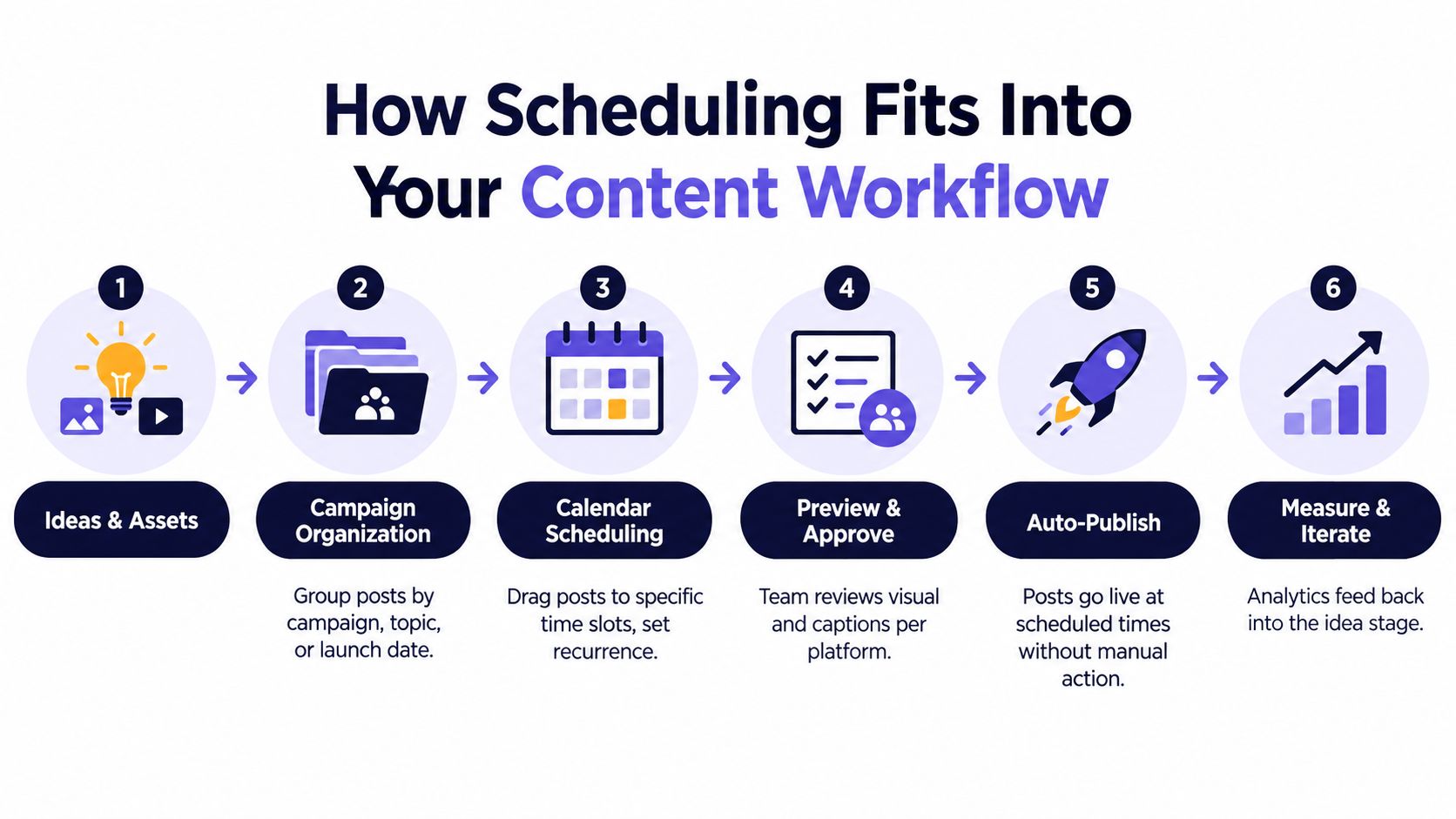
A scheduler becomes useful when it gives every post a place in the larger production process. An idea starts as a note, becomes an asset and caption, joins a campaign, receives an approval decision, enters a calendar, publishes, and contributes performance information to the next round of planning.
Start with campaigns, not isolated posts
A creator might group posts around a podcast episode. A small brand might organize content around a product update. An agency may manage separate folders for each client, launch, or seasonal promotion. In each case, campaign labels answer a useful question: what does this post belong to?
That context reduces random scheduling. Instead of filling empty calendar slots, the team can see whether a campaign has an announcement, an educational post, a proof point, a reminder, and a follow-up. The scheduler becomes a planning surface, not a storage bin.
Assets should remain attached to the relevant post throughout the workflow. That sounds basic, but it prevents a common handoff problem, where a caption is approved in one place and the final media file lives somewhere else. When the file, copy, platform variants, owner, and publish status travel together, fewer tasks depend on memory.
Coordinate people and time zones
A solo creator may need a simple review step before publishing. A small marketing team may need a copywriter to prepare the caption, a designer to attach the media, and a manager to approve the final version. An agency may need client review without giving every collaborator unrestricted access.
The calendar should make those responsibilities visible. It should also display scheduled times in a way that prevents accidental confusion between the operator's time zone and the audience's local time. The point isn't to find one universal hour. It's to make the intended audience, account, and regional context explicit.
Workflow clarity often matters more than adding another network. Recent market coverage describes an expanding category in which tools increasingly emphasize multi-platform coverage, AI-assisted planning, and cross-channel analytics, while a social media scheduling tool market report projects a 23.1% CAGR from 2025 to 2031. The operational lesson is that breadth helps only when the team can coordinate the work.
Close the loop with measurement
After publishing, analytics should return to the planning stage. Track which topics, formats, openings, and time windows deserve another test. Link analytics can also connect social posts with downstream visits, so teams evaluating best tools for link analytics and dwell can judge more than surface engagement.
A reusable social media scheduler template can help establish the fields your team needs, such as campaign, platform, owner, asset, approval status, publish time, and result. The software should support that structure rather than force every campaign into an identical queue.
Benefits You Can Expect From Consistent Scheduling
A product launch is ready, but the designer is offline, one caption still mentions the wrong platform, and nobody knows whether the supporting posts are approved. A scheduling tool prevents that scramble by coordinating the work before publication, rather than acting as a simple queue.
A creator can prepare a campaign, tailor each caption to its destination, attach the right media, and review the full sequence before anything goes live. A brand team can check whether a launch has enough supporting content. An agency can see which posts await approval instead of discovering the gap when a client asks why nothing appeared.

Compare the operational outcomes
| Manual publishing | Orchestrated scheduling |
|---|---|
| The operator repeats uploads and formatting on each platform | The team prepares connected platform versions in one workflow |
| Timing depends on someone being available | Approved jobs can run at planned times |
| Errors appear during last-minute publishing | Previews and checks expose issues earlier |
| Campaign context stays in separate documents | Posts remain grouped by campaign or content pillar |
| Timing decisions rely heavily on general advice | Account performance can inform future scheduling |
The benefit is coordination across the whole publishing path. A campaign keeps its platform versions, media, approvals, timing, and ownership together, much like a production checklist that follows an item from preparation to release. Guardrails can catch missing assets, incorrect previews, or unfinished approvals before a scheduled job reaches the platform.
Consistency also creates a steadier testing environment. If every post is published reactively, a weak result may reflect poor timing, incomplete execution, or the idea itself. A structured workflow cannot guarantee success, but it gives the team cleaner evidence for the next decision.
Better timing rule: Generic best-time charts are a starting point. Your own account data, follower activity, audience region, and platform context should guide the schedule you keep.
Recent 2026 guidance varies on exact windows. One summary identifies Tuesdays and Wednesdays from 11 a.m. to 6 p.m. local time as strong overall, while another emphasizes midweek mornings and platform-specific differences, including late-evening Instagram windows and early-morning LinkedIn windows. The practical lesson from this best-times-to-post guidance is to test general windows against your own account evidence, not copy a chart unchanged.
Before scheduling, a team posts whenever someone remembers, rewrites captions inside each app, and loses comparable testing opportunities. After scheduling, the team groups the campaign, prepares platform-specific variants, reviews the calendar, checks the publish conditions, and uses the resulting data to refine future time slots.
The category's growth reflects how publishing now fits into regular marketing operations. Teams need a repeatable way to coordinate several destinations, contributors, formats, and review steps. The operational payoff is fewer avoidable decisions during busy publishing periods.
The visual planner shows what is planned. The reporting layer shows what happened. Together, they turn a posting habit into an operating rhythm that can be reviewed, adjusted, and repeated.
How to Choose the Right Scheduling Tool for Your Needs
Choose the tool that matches your workflow, not the one with the longest feature page. Start by listing the networks, formats, collaborators, approval steps, and reporting decisions you already make. Then test whether the software reduces those tasks or merely moves them into another dashboard.
Use this comparison while evaluating products:
Scheduling Tool Buying Criteria at a Glance
| Criteria | What to Look For | Why It Matters |
|---|---|---|
| Platform coverage | Your actual networks, account types, and formats | A tool that excludes a key destination creates another manual workflow |
| Caption tailoring | Separate variants, counters, previews, and reusable hashtag groups | One caption rarely fits every audience or platform |
| Calendar clarity | Campaign labels, filters, time-zone visibility, and status states | Teams need to understand what is planned, blocked, or approved |
| Analytics quality | Account history, trends, exports, and timing recommendations | Your own results should influence future scheduling |
| Publishing reliability | Retries, alerts, API access, validation, and throttling | Failed jobs are costly when campaigns publish in bursts |
| Collaboration | Roles, comments, approvals, and client visibility | Review should happen before content reaches the queue |
| Pricing model | Per-seat, per-channel, account, storage, or usage charges | The billing structure should remain predictable as the workflow grows |
Platform breadth is useful only when the tool preserves platform-specific control. A composer that sends the same copy everywhere may save clicks while weakening the content. Look for the ability to choose destinations individually and edit each version without losing the shared campaign context.
Timing recommendations need the same scrutiny. Generic charts can suggest a test window, but account-level recommendations are more useful because they reflect your audience and regional activity. Ask whether the analytics layer uses your account's performance or repeats broad averages.
Publishing guardrails should be part of the trial, not an afterthought. Check how the tool handles an invalid asset, a disconnected account, a rate limit, a failed request, and a retry. If you're also evaluating creative support, this overview of starryai's social media tools can help you separate content generation needs from scheduling and publishing needs.
For a broader shortlist, use this guide to the best social media scheduler, then test two or three options with the same campaign. Compare the time needed to prepare, adapt, approve, publish, and review one realistic batch. The fastest interface isn't always the best fit if it leaves reliability or reporting gaps.
How iHatePosting Compares on Key Differentiators
When the criteria are applied to iHatePosting, the product fits teams that want broad network coverage without splitting planning across several specialist tools. Its composer supports fourteen networks, including Instagram, LinkedIn, Facebook, TikTok, YouTube, X, Bluesky, Threads, Mastodon, Telegram, Discord, Tumblr, Pinterest, and Slack.
The workflow keeps a visual calendar, live previews, per-platform caption editing, character counts, hashtag groups, reusable snippets, and attached media in one planning environment. Campaigns can be organized by a launch, content pillar, creator partnership, product update, podcast episode, or seasonal promotion, which gives teams a way to inspect the reason behind a group of posts rather than viewing only a chronological queue.
Where the differences matter
The analytics layer includes trends, 12-month history, CSV export, and best-time recommendations based on account data rather than generic industry averages. That approach supports the timing principle discussed earlier, test broad guidance first, then let your own performance decide what remains in the schedule.
The publishing infrastructure includes automatic publishing, alerts, retries, an API, MCP server, webhooks, and integrations with Zapier, Make, and n8n. Its pricing uses a flat model without per-seat or per-channel charges, and the Pro plan allows unlimited connected accounts. There's also a 7-day free trial with no credit card, which gives a solo creator or team time to test a real campaign before committing.
That combination may suit creators managing several formats, small brands coordinating launches, agencies handling multiple accounts, and community teams publishing across social and group channels. Teams comparing alternatives can also use this SocialPilot alternatives guide to examine where simpler scheduling, collaboration, analytics, and pricing models differ.
Before choosing, run a practical checklist:
- Connect the accounts you manage.
- Import or create one real campaign.
- Adapt captions separately for each destination.
- Send the post through approval.
- Test a scheduled publish and inspect the alert behavior.
- Review the resulting analytics and timing recommendations.
- Calculate the cost as your account and team needs expand.
A simple queue answers, “When should this post go out?” An orchestration system answers the larger set of questions: “Which version belongs on which platform, who approved it, can the account accept it, what happens if delivery fails, and what should we change next time?” That's the standard worth using when you evaluate a social media scheduling tool.
iHatePosting brings campaign organization, per-platform caption tailoring, visual calendar planning, analytics, and publishing safeguards into one workflow across fourteen networks. Start the 7-day free trial without a credit card, run one real campaign through the process, and visit iHatePosting to see whether it fits the way your team publishes.