Content Management Social Media: A Practical Guide
13 min readcontent management social mediasocial media workflowsocial media schedulingsocial media calendar
Thursday's launch post is sitting in a spreadsheet tab nobody opened, one teammate thinks the caption was approved, another has a newer version in chat, and you're logged into the wrong brand account. That's usually the moment content management social media work stops feeling creative and starts feeling like operations, because the failure wasn't the idea. It was the handoffs.
Table of Contents
- Why Social Posting Became an Operations Job
- The Six-Stage Content Workflow Explained
- Planning Cadence Without Overposting
- Adapting One Idea for Every Platform
- AI Generation and Approvals Without Slowing Publishing
- Centralized Scheduling and Collaboration Tools
- Measuring Results Without Vanity Metrics
- Fix Common Challenges and Start This Week
Why Social Posting Became an Operations Job
Content management for social media means planning, creating, adapting, approving, scheduling, publishing, and measuring posts across channels from one shared view. A three-person team posting by hand to five networks logs in and out of each account, rewrites the same caption five times, hunts for the right crop, and still misses the Thursday slot. One post is a news story. Content management is the editorial desk deciding which story runs where, in what form, and who signs off.
Scale explains why that desk matters. DataReportal's Digital 2025 analysis reported 5.24 billion social media user identities worldwide, equal to 63.9% of the global population, with the typical internet user spending 2 hours and 21 minutes per day on social media and using 6.83 platforms each month. Your audience isn't waiting on one page. They're moving across nearly seven networks, each with its own formats, timing habits, and signals.
Three Pressures That Break Manual Posting
- More channels: Every network wants a different crop, length, and tone, so identical posting creates rework.
- More people: Writers, reviewers, clients, and approvers all touch the same post, and chat threads don't preserve decisions.
- More rules: AI-made media, claims, and client restrictions now need checks before publishing, not apologies after.
AI hasn't removed that pressure. In HubSpot's survey of more than 1,500 social media marketers, 71% of surveyed social media marketers said they used AI tools in 2024, so tools are standard and control is the question. Teams selling to other businesses face the same test, and Grou's guidance on building a consistent B2B posting cadence is useful context for why rhythm beats random bursts.
Run a quick self-check. Count your networks, people, brands, and live campaigns. If the total needs a spreadsheet to explain, manual posting has already outgrown its fit.
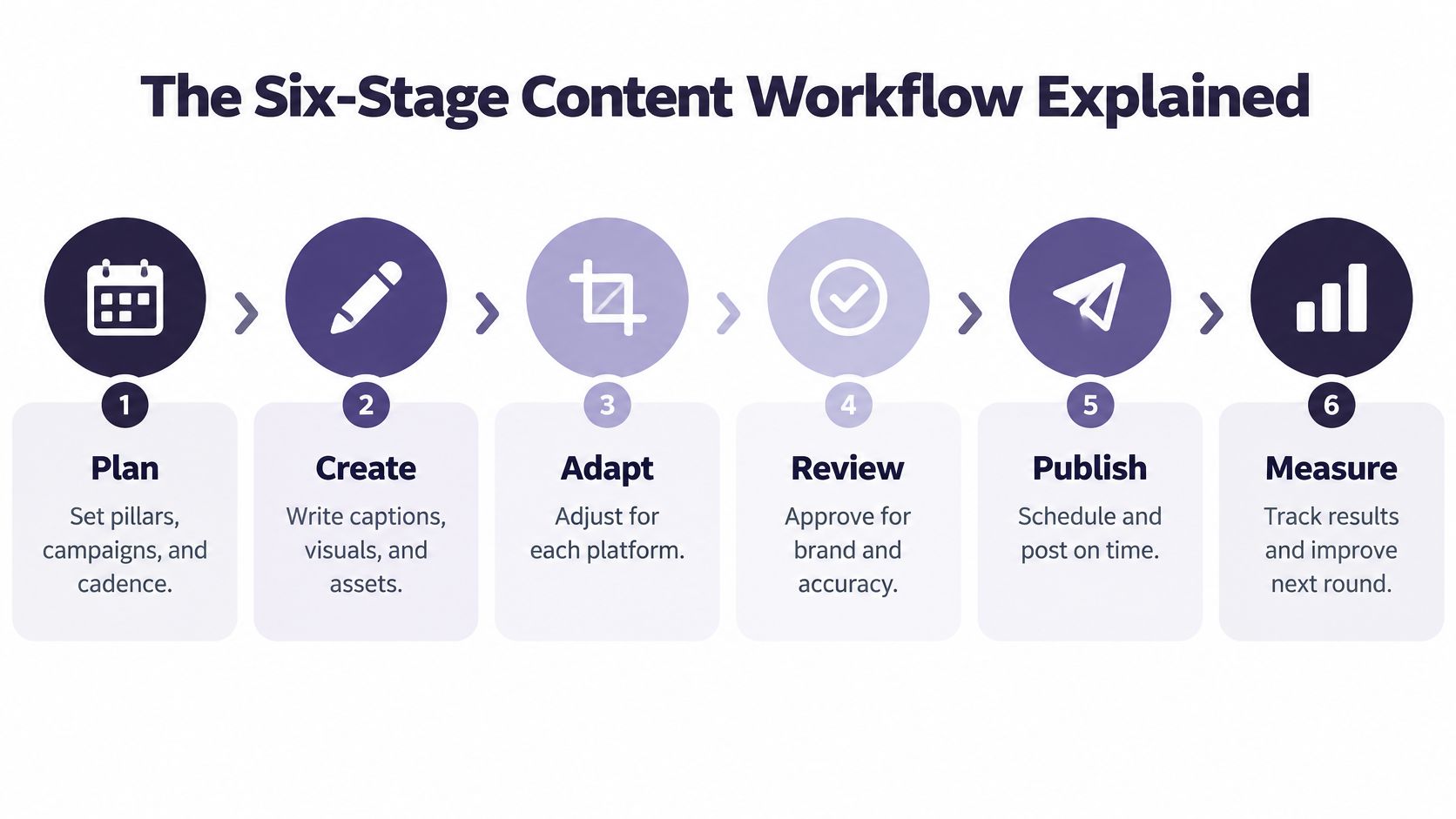
The Six-Stage Content Workflow Explained
Use this table as your operating reference. It separates jobs that teams often blur together, which is why posts stall.
| Stage | What Happens | Output | Typical Owner |
|---|---|---|---|
| 1. Plan | Set content pillars, campaigns and posting cadence in a calendar | Dated content plan | Strategist or manager |
| 2. Create | Write the core idea and capture the master image or video | Master asset library | Creator or copywriter |
| 3. Adapt | Tailor captions, media and hashtags for each network | Platform-ready variants | Social media manager |
| 4. Review | Check facts, brand rules and required disclosures | Approved posts | Reviewer or client |
| 5. Schedule | Assign time slots and set recurring or evergreen posts | Filled queue on the calendar | Social media manager |
| 6. Publish and measure | Publish, then track post and channel results | Performance notes | Analyst or manager |
The diagram below shows the same handoffs in order.
One Idea Through All Six Stages
Say you publish a product update as a blog post. In Plan, the strategist assigns it to the product education pillar and reserves launch week slots. In Create, you record one master video explaining the change and save the transcript, stills, and source link together.
In Adapt, that master becomes a LinkedIn text post with a document, an Instagram Reel, a short X post, and a TikTok cut with on-screen text. In Review, a named approver checks the claim, the date, the caption file, and whether any AI voice needs disclosure. Nothing moves forward because it looks finished. It moves because the next station checked it.
That's the kitchen brigade logic. One station preps, one cooks, one plates, and the dish doesn't leave until someone tastes it. Blurring stations feels faster until the wrong version reaches the client.
The Simplest Working Model
Our workflow has three steps. Connect your accounts, create or upload content with per-platform captions, then schedule everywhere. You bring your ideas, captions, images, videos, campaigns, and platforms into the scheduler, then build a post-everywhere rhythm you can maintain.
In Schedule, those four variants enter a two-week queue, with one evergreen version set to return later. In Publish and measure, you record which hook drove saves, clicks, or sign-ups, then feed that note into the next planning round.
Practical rule: If a post can't show its owner, variant, approval state, and scheduled time in one glance, it's not ready, however good the creative looks.
Planning Cadence Without Overposting
Posting more is the easiest goal to set and one of the weakest to defend. A peer-reviewed study in the Journal of Marketing for Higher Education found no statistically significant effect of posting frequency on engagement for Instagram, Facebook, or Twitter. Filling every slot can consume creative capacity without improving audience response.
Treat the calendar as a control surface, not a quota sheet. It should show what's planned, what still needs edits, where gaps sit, and which experiments are running. iHatePosting's guide to content calendar creation covers the setup mechanics. Your job is deciding what earns a slot.
Six Planning Moves
- Choose three to four pillars tied to business goals, such as product education, proof, community, and offers.
- Set a minimum cadence per channel, for example three LinkedIn posts a week, rather than a maximum you feel pressured to hit.
- Reserve roughly a fifth of slots for platform-specific variants and tests of hook, format, or topic.
- Batch creation weekly so adaptation and review happen together instead of in daily fragments.
- Add evergreen posts for proven explainers and FAQs, with fresh captions so repeats don't read as filler.
- Set a stop rule, such as reviewing a format after four weeks of weak results and retiring it if nothing improves.
Compare posts by engagement rate per impression or reach, not raw likes or post counts. Higher volume inflates totals while hiding weak per-post efficiency. That's how teams celebrate a busy month that taught them nothing.
Audit monthly for missed slots, stale pillars, and formats nobody owns. Do a deeper quarterly review, and another after major campaigns, before you lock the next cadence. I'd protect one reliable rhythm over an ambitious schedule the team abandons by week three.
Adapting One Idea for Every Platform
A vertical campaign video uploaded everywhere unchanged usually fails. The framing crowds the subject on one feed, the caption runs long on another, and hashtags copied from Instagram look careless on LinkedIn. The asset isn't bad. The adaptation never happened.
This image captures that review moment before a video gets resized and rewritten.

Start with one master asset, then adapt in a fixed order. Write a platform-specific hook, crop to the format, rewrite the caption for that audience, choose a separate hashtag set, and check the preview. Our guidance on how to adapt cross posts for different platforms goes deeper on avoiding identical copies.
Captions Are Part of Adaptation
Generate captions before scheduling, not after publishing. A 2025 systematic review of 36 peer-reviewed studies found captions support accessibility, viewer attention, and discoverability across YouTube, TikTok, and Instagram, and reports that approximately 85% of Facebook videos are watched without sound and viewers are about 80% more likely to watch an entire video when captions are present.
Check speech-recognition errors, overlapping speakers, product terminology, and timing. Keep a captioned master and an accurate transcript, then reuse that transcript in descriptions, search metadata, and accessibility notes. Caption errors are hard to spot once five versions are live.
| Platform | Typical Format | Caption Habit | Watch-Out |
|---|---|---|---|
| 4:5 image, Reels, carousels | Longer captions with a strong first line | Hashtags and first line both matter | |
| Text posts, documents, short video | Professional tone, moderate length | Keep the hook above the fold | |
| X | Short text, images, short video | Brief, direct lines | Count characters before scheduling |
| TikTok | Vertical video | Short caption plus on-screen text | AI disclosure may be required |
| Image, video, text | Short, conversational opening lines | Realistic AI video may need a label | |
| Vertical pins | Keyword-rich title and description | Written for search, not feeds |
The short walkthrough below is worth watching before you lock templates for a new channel.
Platform specifications change, so verify current limits before turning this table into permanent templates. If video volume grows, RenderIO's notes on automating cross-platform video publishing show where rendering and delivery can be systematized.
AI Generation and Approvals Without Slowing Publishing
AI can draft captions, hooks, hashtag sets, images, and short videos from one brief, which removes blank-page delays. It also moves the bottleneck. Writing gets faster, checking becomes the work.
Adoption has outrun governance. Metricool's State of AI in Social Media study found 95% of surveyed social-media professionals use AI, including 75% who use it daily, while only 12% report having a clearly defined workplace AI policy and 35% report having no formal restrictions. Faster autonomous publishing isn't automatically better. Controlled delegation is.
The screenshot below shows the useful pattern, generation inside a workspace where review still happens before release.

Disclosure Rules Shape the Workflow
Meta's AI help guidance states Facebook, Instagram, and Threads may require an AI label for photorealistic video or realistic-sounding audio that was digitally created or altered, while the requirement does not generally apply to images. A centralized workspace for AI social media content management lets you vary that treatment by media type instead of copying one universal post.
TikTok is stricter in practice. TikTok's seller guidance says creators should disclose AI-generated content through on-screen text, a watermark, sticker, description note, or its publishing toggle. TikTok's advertising policy treats fully AI-generated media, or AI that makes a real person appear to do or say something that did not happen, as significantly AI-modified and requiring an AIGC label or clear disclaimer.
| Asset and Platform | Disclosure Need | Routing Before Publishing |
|---|---|---|
| Photorealistic AI video on Facebook, Instagram or Threads | AI label may be required | Mandatory human approval |
| Realistic AI voiceover or AI vocals on Meta networks | AI label may be required | Mandatory human approval |
| AI-generated still image on Meta networks | Generally no label, though Meta may label it | Spot check against brand rules |
| AI-generated video on TikTok | Disclose with on-screen text, watermark, sticker, description note or publishing toggle | Confirm disclosure before scheduling |
| Fully AI-generated TikTok ad video or AI voice cloning | AIGC label or clear disclaimer required | Hold or reject if undisclosed |
Route by risk. Human-edited text passes standard review, AI images get a spot check, and AI video or voice goes to mandatory approval. That is the core of keeping automated social posts human-guided.
Before publishing, our scheduler asks seven questions covering content pillar, intent, platform fit, creative alignment, hashtag strategy, measurement, and campaign context. Connecting an account authorizes us to publish there on your behalf, only what you compose and only when you tell it to. Agents can handle reformatting, queuing, and publishing across networks, but uncertain disclosure cases should stop for a person.
Centralized Scheduling and Collaboration Tools
Don't buy a tool because its calendar looks tidy in a demo. Test whether it preserves decisions when several people, brands, and AI assets move at once.
What to Require
- Shared calendar: One view across every account, brand, and campaign, showing blocked work as clearly as finished work.
- Role-based approvals: Named reviewers at each gate, so edited text moves quickly while AI voice waits for sign-off.
- Per-platform previews: Crop, character count, and opening line visible before anything enters the queue.
- Asset fields on the post: Caption file, transcript, source link, and AI label note attached where the reviewer works.
- Recurring and evergreen queues: Proven posts refill gaps without rebuilding the calendar each week.
- Linked analytics: Campaign ID and tracked link tied to the post, so reporting doesn't start with detective work.
Directories help you compare categories quickly, and you can explore Teampost on AI Tool Seekers as one reference point. Still run your own test. A listing can't tell you whether your client approver will find the right button under deadline pressure.
Use one real week as the trial. Build a two-week calendar, route one AI asset through approval, schedule variants for three networks, and ask a reviewer to find the caption, disclosure note, and publish time without help. If they need a side conversation to approve, the tool hasn't centralized anything.
A capable social media scheduler should also turn existing blog posts, videos, and guides into scheduled drafts for several networks, with separate variants rather than identical copies. I'd choose fewer features with clear ownership over a larger dashboard that hides who approved what.
The best tool test is boring on purpose. Pick an ordinary post, add one disclosure complication, and see whether the system still feels calm.
Measuring Results Without Vanity Metrics
A post earns 4,000 likes and drives no visits, sign-ups, or sales. It's popular. It may still be commercially useless.
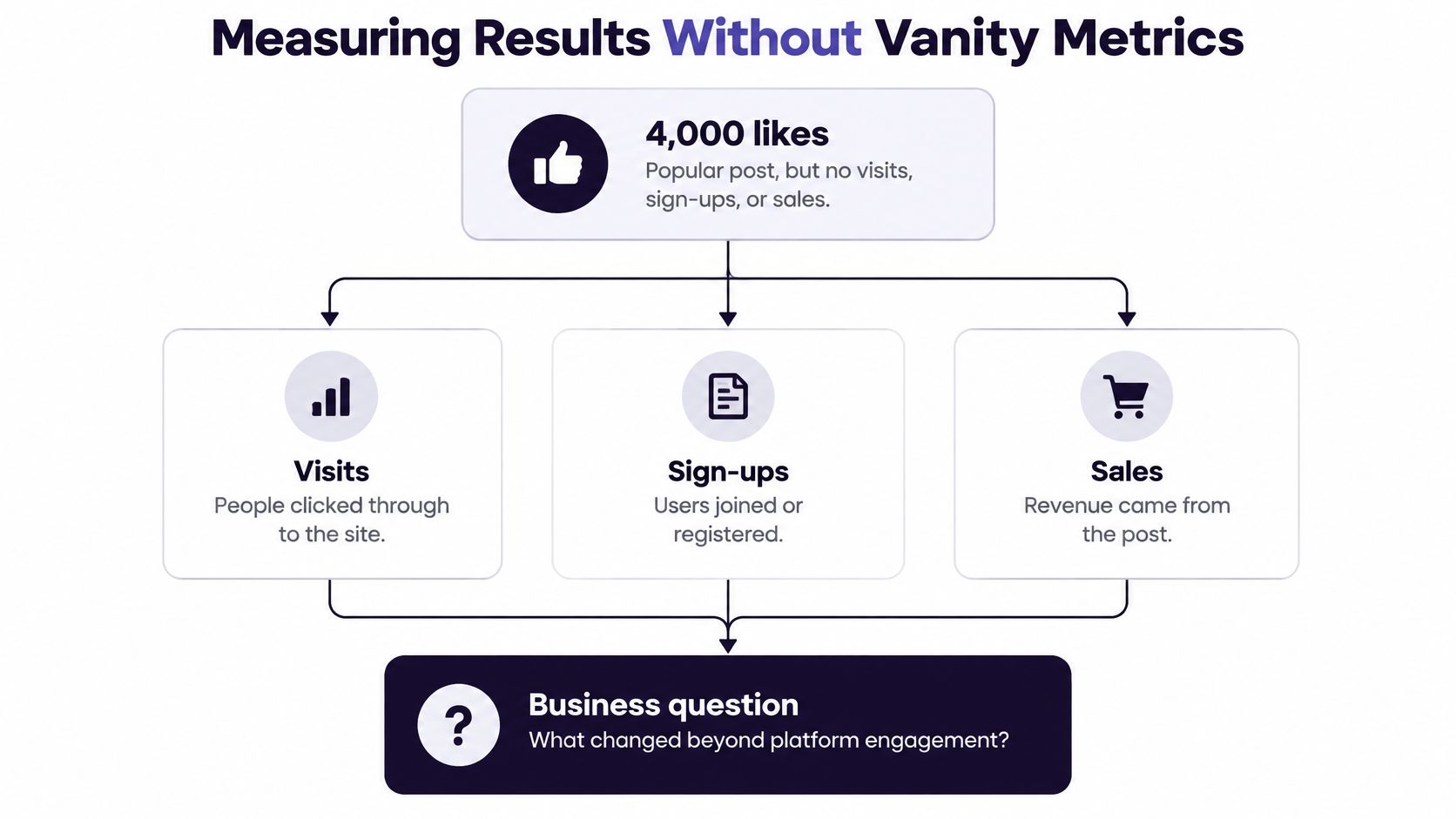
Read results as a ladder from activity to impact.
- Operational: On-time publishing rate and response time show whether you delivered the plan.
- Audience: Reach, saves, and qualified engagement show whether the right people paid attention.
- Behavioral: Site visits, sign-ups, and assisted conversions show whether people took a next step.
- Business: Pipeline, revenue, and retention show whether content moved the business.
Sprout Social's 2025 Impact of Social Media Report, based on a survey of 1,200 marketing leaders, examined why some teams can prove social ROI while others rely mainly on engagement when reporting outside marketing. Close that gap with setup, not better charts. Tag every post with a campaign ID, use consistent link parameters, and log its purpose in the calendar, then compare channel and post analytics on normalized rates.
Our audit-ready planning uses the calendar as the starting point for a social media audit of frequency, channel mix, and content consistency. Review monthly, go deeper quarterly, and check again after major campaigns. Give educational and community posts their own measures, because influence without a click is still influence.
Fix Common Challenges and Start This Week
Most breakdowns repeat because teams fix the post instead of the cause. Use this lookup first.
| Challenge | Typical Cause | Fix |
|---|---|---|
| Missed posts | No named owner for each slot | Shared calendar with one owner per post |
| Captions over limits | One caption written for all networks | Character count check before scheduling |
| Unclear approvals | Every asset routed the same way | Risk-based routing by asset type |
| Client confusion | One calendar covers several brands | Separate calendar per brand |
| Untracked AI media | No disclosure step before publishing | Disclosure check for AI video and voice |
Your First Two Weeks
- List every account and channel you run, including dormant ones someone still expects you to use.
- Pick three content pillars and write one master asset for each.
- Build a two-week calendar from those assets, adapting each variant before it enters review.
- Name an approval owner and add a disclosure check for AI-made media.
- Review after thirty days by channel, using operational, audience, behavioral, and business measures.
Repurposing helps you start small. We can turn blog posts, videos, newsletters, webinars, podcasts, and guides into scheduled social content, and we support one-click publishing to 14 networks from a single composer. Don't launch on all of them at once.
Start with one channel and one pillar. Expand only after the calendar holds for two straight weeks without rescue work in chat. That restraint feels slow for a few days, then it saves every week after.
Bring your accounts, pillars, and first two-week calendar into iHatePosting to create platform-specific variants, route approvals, and schedule from one shared workspace. Start with one channel this week, prove the workflow holds, then expand without returning to scattered logins and spreadsheets.