AI Social Media Automation Guide: What to Automate in 2026
12 min readsocial media automationAI schedulingAI content planningsocial media workflow
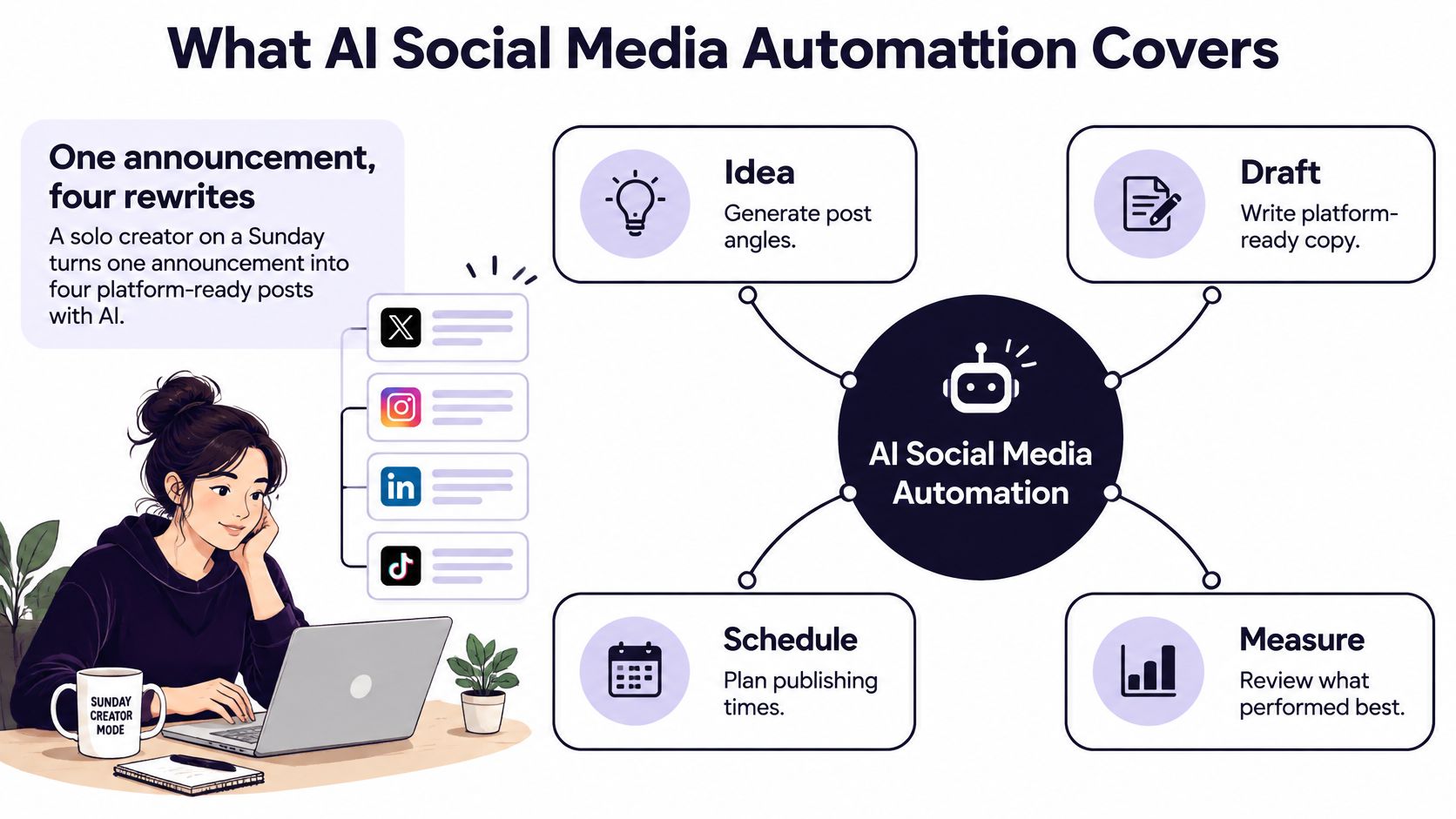
You've got one announcement to share, but Sunday disappears while you rewrite it for Instagram, LinkedIn, X, and TikTok. Each version needs a different opening, length, and call to action, and you still have to check the dates before anything goes live. That's the practical promise of AI social media automation: less repetitive production, with a person still responsible for what gets published.
Table of Contents
- What AI Social Media Automation Covers
- Which Social Tasks to Automate and Which to Keep Human
- Platform Limits and Format Rules for Each Network
- How to Build an Automated Posting Workflow
- Disclosing AI Use Without Losing Audience Trust
- Where Automation Fails and How to Catch It
- Set Up a Human-Guided Workflow This Week
What AI Social Media Automation Covers
AI social media automation is software that helps move a post from an idea to a published item, then gives you a way to review how it performed. It can support four connected jobs: generating ideas, drafting captions, adapting content for different platforms, and scheduling posts with analytics. The value isn't limited to a bot that publishes on a timer. For many teams, it's the time saved on planning and repetitive writing.
Think of the workflow like a commercial kitchen. Software can help prep ingredients, portion a recipe, and plate variations for different orders. But the head chef still tastes the dish before it leaves the pass. In social media, that final taste test means checking the message, facts, timing, and fit for the audience.
A worldwide survey conducted in May 2024 among professionals working in marketing, public relations, sales, and customer service found that 38% identified increased efficiency as a leading benefit of generative AI for social media marketing, while 34% cited easier idea generation, according to Statista's survey summary. Those benefits map to everyday work: turning a product update into angles for different audiences, drafting alternate captions, and getting a calendar started without staring at a blank page.
For a small business, the practical workflow might start with one announcement, generate a few post angles, draft a version for each network, and queue the approved posts. A guide to social posting automation for small businesses can help clarify how scheduling fits into that process. The expected result is faster output and a more consistent cadence, not a hands-off account. Software can help with repeatable work; it can't take responsibility for your brand's judgment.
Which Social Tasks to Automate and Which to Keep Human
| Task | Risk level | Automation rule |
|---|---|---|
| Evergreen tips and recycled posts | Low | Automate with automated checks |
| Repurposing a blog post or video into captions | Low to medium | Automate drafts, a person reads before publishing |
| Campaign announcements | Medium | Draft automatically, approve before scheduling |
| Product claims and pricing | High | Human review with source links |
| Regulated, legal or political topics | High | Write by hand, human approval only |
| Customer replies and direct messages | High | Suggest drafts, a person sends |
| Community moderation | High | Flag only, a person decides |
| Crisis communications | Very high | Never auto-publish |
Automation doesn't just save time. It increases how quickly a mistake can travel across accounts. A stale price, unverified claim, or careless reply can be copied into several feeds before anyone spots it. That's why risk matters more than volume when deciding what to automate.
Consumer expectations reflect that tension. Research summarized by Emplifi on AI-supported customer care found that 64% of surveyed consumers believed AI could improve brand engagement on social media, yet 60% feared inaccurate AI-generated responses. People may welcome faster interaction while still expecting a brand to get the answer right.
Treat the table as a starting point, not a substitute for judgment. A recycled tip can usually move through routine checks if it's still accurate and relevant. A customer reply that looks ordinary may need a human if the person is upset, asks for a refund, or describes a safety issue. Even an announcement can become high-risk if it includes a new product promise or a deadline.
Practical rule: If the wrong version would be expensive, public, or hard to reverse, keep a person in the approval step.
For campaign planning, plan monthly content around campaign goals so each post has a clear purpose before you automate its production. When drafts sound stiff, take time to refine marketing copy with Lumi Humanizer, then have the reviewer check accuracy and brand fit. A smoother sentence isn't proof that the underlying claim is sound.
Platform Limits and Format Rules for Each Network
| Platform | Caption limit | Format note |
|---|---|---|
| X | 280 characters | Short, one idea, links use part of the budget |
| Threads | 500 characters | Conversational, fewer hashtags |
| Bluesky | 300 characters | Short lines, link cards carry context |
| 2,200 characters | Hook in the first line, feed truncates early | |
| TikTok | 2,200 characters | Caption supports the video hook |
| 3,000 characters | Line breaks and a professional angle | |
| YouTube | 5,000 characters | Timestamps and links in the description |
| 500 characters | Searchable keywords near the start |
A single caption can be technically publishable everywhere and still work poorly everywhere. X rewards a concise thought that fits its character budget, including space taken by a link. LinkedIn can support more detail, but readers need line breaks and a reason to care in a professional context. Instagram's caption can be longer than what appears before the feed truncates it, so the opening line has to earn the tap.

The format should match how people use each network. Threads and Bluesky suit a more conversational rhythm, often with fewer hashtags. On TikTok, the caption should add context to the video's opening rather than repeat it. YouTube descriptions can provide useful detail such as timestamps and links, while Pinterest descriptions need searchable phrases near the start.
Take a campaign announcing a new guide on choosing an energy-efficient appliance. An X version could make one concise point and include the guide link, keeping the link within the character budget. A LinkedIn version could use two short paragraphs, first naming the problem and then explaining what the guide helps readers compare. A YouTube description could introduce the video, include timestamps for the buying criteria, and link to the guide.
Use templates as starting points, not as permanent rules. Platforms can change their character limits and publishing formats, so find platform-specific post character limits before you build a reusable template. A composer with per-platform previews and character counts can catch a cut-off caption, but someone should still check whether the message fits the audience and placement.
How to Build an Automated Posting Workflow
A reliable workflow doesn't begin with a button that says “publish everywhere.” It begins with a purpose for each post, a source for its claims, and an approval decision appropriate to its risk.
Set content pillars and a monthly theme. Choose a few themes tied to what the audience needs to learn, trust, or do. If you skip the pillars, automated ideas tend to become generic posts that are hard to assess; for a deeper planning approach, align content pillars with growth goals.
Give the drafting tool source material. Use a blog post, webinar transcript, product update, or another approved source so the tool has details to work with. Thin notes produce vague captions; an organized workflow can Connect Ihateposting To Zapier Make N8n to move content between tools.
Generate variants, then score them. Ask for platform-specific options and compare each for fluency, interactivity, information, and tone. A multi-study investigation of GPT-4 social posts using Fortune 500 Twitter content found that AI-generated posts could outperform human-written posts on measurable engagement outcomes, including likes, comments, and shares, in the University of Minnesota record of the study. The slip is publishing the first draft without assessing it.
Adapt each version to the network. Adjust the hook, length, line breaks, and call to action for the intended platform. Pasting one caption everywhere is faster only until someone has to fix a truncated post or an awkward format.
Send drafts through the risk gate. Let low-risk posts pass automated checks, but route high-risk topics to a named reviewer. The common slip is treating a routine-looking campaign announcement as safe enough to skip approval.
Schedule and set a publish alert. Make sure the calendar reflects the campaign and the information is still current, especially product details. The slip is scheduling a claim that was accurate when drafted but changed before publication.
Review the results and refine. Look at engagement and replies after the posts have had time to reach people. Don't judge by likes alone; a reply that flags an error matters more than a flattering reaction.
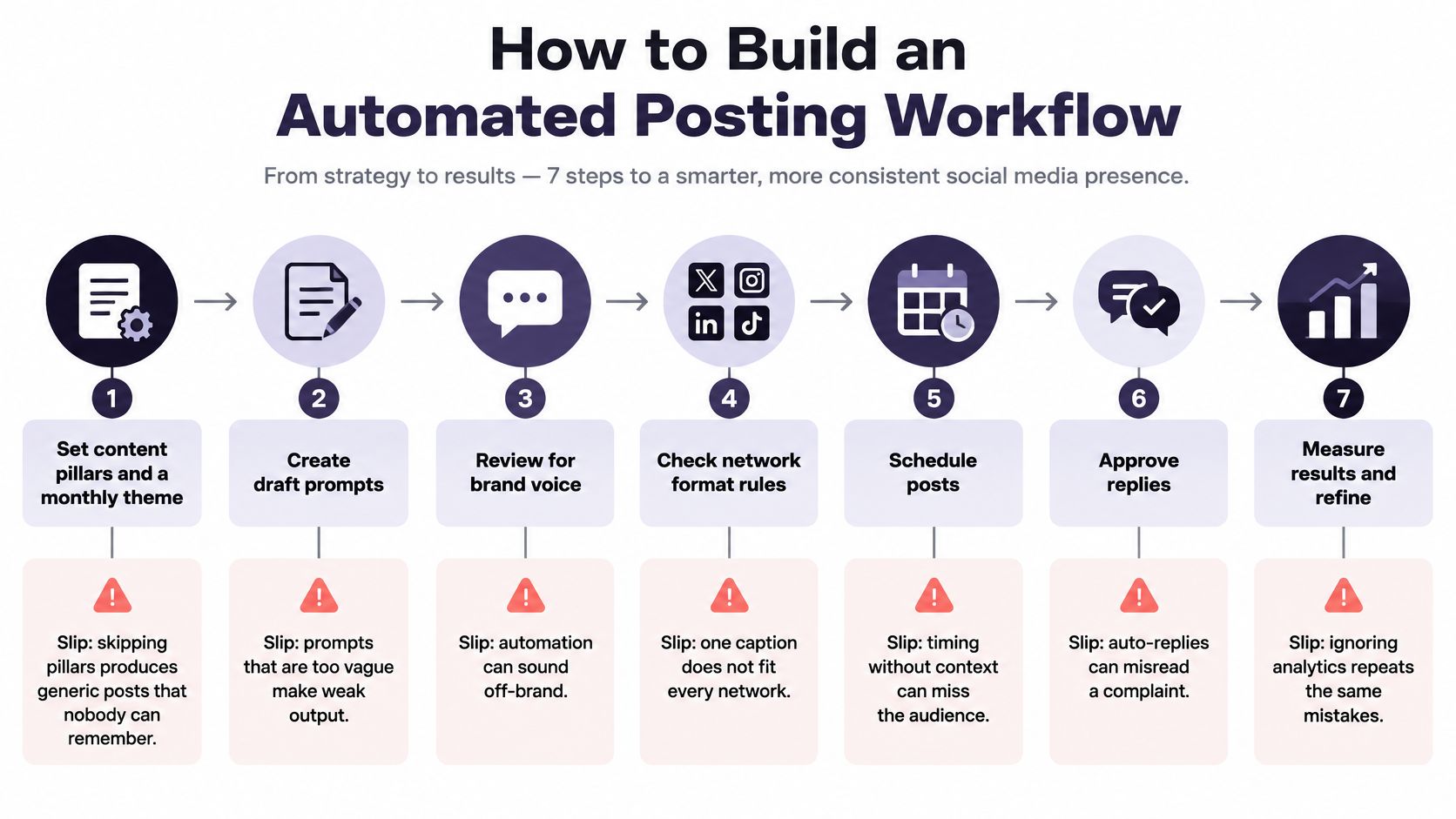
The workflow should make ownership visible. A scheduler can help assemble posts across networks, but the reviewer needs to know what they're approving, which source supports a claim, and how to stop a post if circumstances change. Before publishing, iHatePosting's scheduler asks seven questions: content pillar, intent, platform fit, creative alignment, hashtag strategy, measurement, and campaign context. That sort of check can catch a post that's formatted correctly but doesn't belong in the campaign.
Disclosing AI Use Without Losing Audience Trust
A 2025 audit cited in academic research found that roughly 25% of posts appearing in top results for common non-AI hashtags contained AI-generated content. Fewer than half of those posts were visibly labeled on TikTok, and under one-quarter were labeled on Instagram, according to the academic audit. The gap makes disclosure a practical workflow decision, not a checkbox to tick after publishing.
Start by separating a text edit from a synthetic visual. An AI-assisted caption may still represent a brand's own message, while a realistic generated image or video can change what an audience thinks they're seeing. Platform rules differ: some focus on realistic synthetic media, others on authorship, and enforcement can vary. Don't assume that the same disclosure label works everywhere.
A three-question disclosure check
Before scheduling, ask:
- Did AI write, edit, or generate the visual? Record what it contributed, rather than labeling every tool interaction the same way.
- Does the post make a factual claim? If it does, verify the claim against an approved source and route it for review.
- Does it show a real person or a realistic depiction? If viewers could mistake synthetic media for real footage or a real person, use a clear disclosure and check the platform's current requirements.
For an AI-drafted caption, a brief note such as “Caption drafted with AI and reviewed by our team” makes the process legible without implying the tool is the author of every decision. For a synthetic visual, use a more explicit description, such as “This image was generated with AI.” Adapt the wording to the network, and keep the approval record with the post so the reviewer's responsibility is clear.
Visible automation can support trust when a person remains accountable for the result. Hidden automation creates avoidable reputational risk, even when a post gets attention. The useful standard isn't disclosure for its own sake; it's helping the audience understand what's synthetic and who stands behind the message.
Where Automation Fails and How to Catch It
The most expensive failure is a fluent post that states something false, then reaches multiple accounts before anyone intervenes. AI can produce confident copy that misstates a product detail, sounds right for one network but wrong for another, or replies to a complaint as if it were a routine question. A scheduled promotion can also go live after the offer changes.
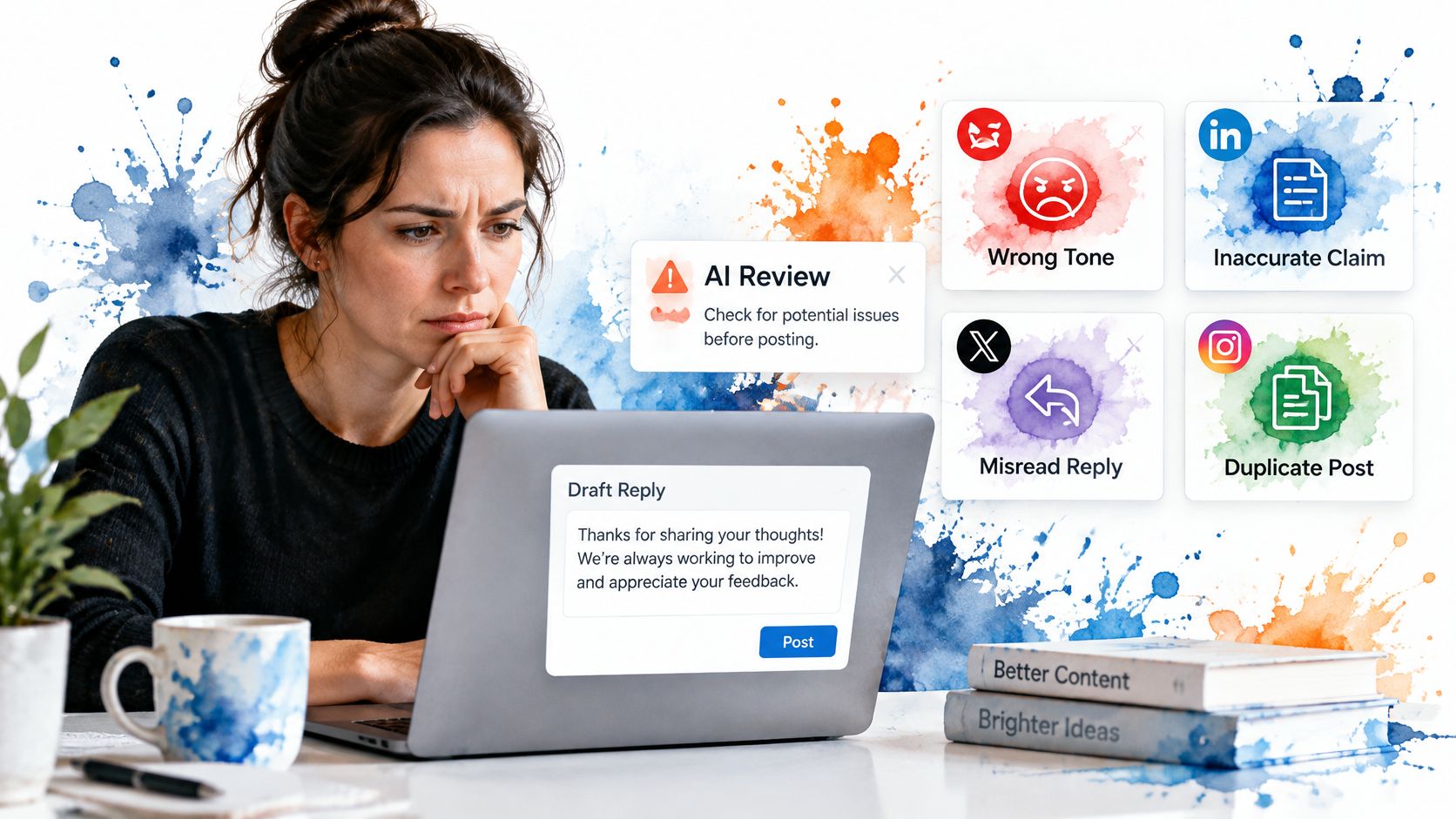
The NIST Generative AI Risk Management Profile recommends clearly distinguishing human and AI responsibilities, documenting oversight, and using human intervention when an AI system can't detect or correct its own errors. For a social team, that means centralizing the audit trail and ability to intervene, not merely centralizing the calendar.
Match each control to a failure
- Unsupported claims: Require a source link for every factual assertion, and check that the source still supports the wording.
- Policy or tone problems: Scan for prohibited terms and review a platform-specific preview before scheduling.
- Unclear approval: Keep an approval log with the post, reviewer, and approval time. Don't let an anonymous status label stand in for a person's decision.
- A change after scheduling: Give a reviewer a way to cancel or roll back a post, and check time-sensitive content before it goes live.
- A problem after publication: Monitor high-risk posts during the first two days, so a correction or escalation doesn't wait for a routine reporting cycle.
- Duplicate or misdirected posts: Check the connected accounts and the preview for each network before confirming a multi-platform schedule.
A central calendar can make an error easier to stop, but only if a person is watching for the signals that require action. Pause scheduled posts if you see a sudden engagement drop, negative replies clustering around one post, a customer pointing out a factual error, or a product change that makes queued copy outdated.
Automation should make correction faster, not make responsibility harder to find.
For a closer look at what an agent can and can't safely do, start with understanding social media agents' limits. Use agent suggestions for drafts and checks, then keep a human decision-maker in the loop where a mistake could damage trust or mislead someone.
To see how risk controls fit into the workflow, watch this overview after reviewing the checks above:
Set Up a Human-Guided Workflow This Week
Keep the first setup small enough that your team will use it. You don't need to automate every task; start with repeatable, low-risk work and make the high-risk approval path explicit.
- Sort last month's posts using the risk table. Mark the tasks that can move through automated checks and the ones that need a reviewer.
- Write one reusable caption template for each network, then choose a disclosure line for AI-assisted content.
- Name one approval owner for high-risk posts and set a monitoring window after each one.
Our social media scheduler brings planning, per-platform captions, and publishing into one workflow across fourteen networks. Connecting an account authorizes it to publish on your behalf, but only what you compose and only when you tell it to; before publishing, it also asks about content pillar, intent, platform fit, creative alignment, hashtag strategy, measurement, and campaign context.
Keep this principle: automation should remove repetition, while a named person owns the judgment on every post that carries risk.
iHatePosting helps you plan, tailor, and schedule posts across fourteen networks, with per-platform captions, previews, and pre-publish checks. Build a human-guided workflow around the tasks you repeat, then visit iHatePosting to try a scheduler designed to keep publishing under your control.