Buffer Pricing vs iHatePosting: Which Tool Saves You Money
16 min readbuffer pricingiHatePostingsocial media toolsSaaS comparison
For one or two channels, Buffer is competitive, but once you manage five or more accounts, iHatePosting's flat-fee structure becomes significantly more economical than Buffer's per-channel volume pricing. Buffer Essentials costs $6 per channel per month and Team costs $12 per channel per month on monthly billing, with lower rates available in higher channel bands.
You may have reached this decision point already. A creator starts with Instagram, adds LinkedIn, opens a second brand page, takes on a client, and eventually manages a collection of accounts from the same publishing calendar. The original subscription still looks inexpensive, but every connected account now affects the bill.
That's why Buffer pricing needs to be evaluated as a unit-cost problem, not an entry-price problem. Buffer is transparent about its per-channel model, which is useful, but transparency doesn't automatically make a pricing structure economical for a multi-brand operator. The relevant question is simple: does the workflow become more valuable as your account count grows, or does each new channel just add another charge?
| Connected channels | Buffer Essentials, monthly billing | Buffer Team, monthly billing | Flat-fee alternative |
|---|---|---|---|
| 3 | $18 per month | $36 per month | Cost stays tied to the selected plan |
| 5 | $30 per month | $60 per month | Cost doesn't rise per channel |
| 10 | $60 per month | $120 per month | Cost remains predictable |
| 25 | $120 per month | $180 per month | Cost doesn't scale linearly |
The Buffer figures above follow the published monthly channel bands and examples in Buffer's pricing documentation. The alternative column describes a flat-fee structure, not a quoted price, so procurement teams should verify the current plan that fits their account allowance.
Table of Contents
- The Hidden Costs of Per-Channel Pricing
- Understanding Buffer's Volume-Based Cost Structure
- iHatePosting vs Buffer Feature Comparison
- Identifying Your Ideal Pricing Strategy
- Making the Final Recommendation
- Common Misconceptions About Social Tool Costs
The Hidden Costs of Per-Channel Pricing
A creator named Maya runs a personal account, a product account, and two client brands. At first, a scheduler priced per connected channel seems sensible. She only pays for the accounts she uses, rather than buying a larger bundle designed for a team she doesn't have.
That logic works while the account list stays small. It becomes less attractive when Maya adds a second client, a newsletter brand, a podcast account, and regional pages. Her publishing work hasn't necessarily become more complex, but the subscription now reflects every connected destination.

The trap is easy to miss because the first account establishes the mental price. A buyer remembers “Buffer costs a few dollars per channel,” then evaluates a ten-account workflow as though each additional account were a small, isolated purchase. In practice, the buyer has created a recurring cost base that grows with every new brand, client, or project.
The first channel is not the real decision
For a solo operator with one or two channels, per-channel billing can align payment with actual use. A small footprint doesn't subsidize unused capacity, and the buyer can avoid paying for seats or features that aren't needed.
The economics change when the operator republishes one campaign across many destinations. The work may be centralized, but Buffer still meters the connected channels individually. That creates a distinction between workflow efficiency and billing efficiency. A tool can reduce manual effort while still becoming more expensive as the publishing footprint expands.
Procurement rule: Judge the subscription against the number of channels you expect to manage after growth, not the number you manage on the day you sign up.
The practical calculation is straightforward. At the first monthly rate, five Essentials channels cost $30 per month, while five Team channels cost $60 per month, based on Buffer's published rates. Ten channels raise those totals to $60 and $120 respectively, before considering any other software used for content production, approvals, reporting, or automation. These figures come from Buffer's official rate card.
Why account growth changes the answer
The problem isn't that Buffer hides its meter. The problem is that buyers often forecast channel growth informally. One new client feels like a small operational change, yet it also creates another connected account, another queue, and another recurring unit of cost.
That matters most for agencies, creators with several projects, and businesses that operate multiple brands. A flat-fee platform can make the incremental cost of adding a channel easier to absorb, provided the plan includes the required accounts and features. A per-channel platform can remain preferable for focused publishing, but its apparent affordability weakens as the channel list broadens.
For a fuller look at the commercial assumptions behind social scheduling subscriptions, compare the discussion in social media management pricing. The central lesson is not that every flat plan is cheaper. It's that the billing unit must match the way the team expands.
Understanding Buffer's Volume-Based Cost Structure
A team connecting three channels pays $18 per month on Essentials or $36 on Team. At five channels, those totals become $30 and $60. At ten, they reach $60 and $120. The same pricing logic makes a 25-channel setup materially more expensive, even though the per-channel rate declines in higher bands. Buffer's paid plans therefore charge by connected channel rather than by seat, with volume discounts applied as the channel count grows.
The published monthly rates are $6 per channel for Essentials and $12 per channel for Team across channels 1 through 10. Essentials then charges $4 for channels 11 through 25, $3 for channels 26 through 50, and $1 for channel 51 onward. Team uses $4, $3, and $2 in those corresponding bands, according to Buffer's published pricing file.
The channel math
The discount applies marginally. Existing channels keep their earlier rates when a new band begins, while only the additional channels receive the lower price. That distinction matters when forecasting the cost of moving from ten to 25 connected channels.
| Channels | Essentials Plan | Team Plan |
|---|---|---|
| 3 | $18 per month | $36 per month |
| 5 | $30 per month | $60 per month |
| 10 | $60 per month | $120 per month |
| 25 | $120 per month | $180 per month |
| 50 | $195 per month | $255 per month |
These figures use the published monthly rates and volume examples in Buffer's support documentation. The three, five, and ten-channel rows apply the first-band rates directly. The 25 and 50-channel rows reflect the published volume-discount examples and rate bands. Annual billing provides a 20% discount, with official annual equivalents of $5 per Essentials channel and $10 per Team channel in the first band, as described in Buffer's transparent pricing overview.
Where the discount helps, and where it doesn't
Higher bands reduce the marginal cost of adding channels, but they do not create a flat subscription. A 25-channel account still costs more than a five-channel account because the invoice remains tied to the number of connected accounts. The discount softens expansion costs without removing them.
That creates the per-channel trap for multi-brand teams. A single brand with three or five channels may find the bill proportionate to its publishing footprint. An agency, creator, or marketing department managing ten or 25 channels must instead evaluate the full account inventory, including channels that share one operator and one content calendar. For a head-to-head look at another flat-priced scheduler, see this Buffer vs Metricool comparison.
Essentials and Team also require separate evaluation. At channels 11 through 50, their published per-channel rates converge in some bands. The remaining financial difference may therefore depend more on whether the team needs Team's collaboration capabilities than on the channel charge itself. Buyers should separate two questions:
- How many channels will be connected?
- Which workflow capabilities justify the plan tier?
A solo creator may not need collaboration features. An agency may value shared work even when the channel rates narrow the apparent gap between plans. Growing account volume alone does not justify Team. Price the channel footprint first, then test the workflow requirement.
Buffer's free plan offers up to three channels and 10 queued posts per channel, according to its official documentation. That tier can help smaller users test whether a queue-based workflow fits before paying. It does not resolve the longer-term cost question for teams planning to add brands, clients, or additional accounts.
iHatePosting vs Buffer Feature Comparison
Price alone can't settle the purchase. A lower recurring bill is only valuable if the platform supports the publishing process that creates that bill in the first place. A team that needs only a queue may prioritize cost and simplicity. A team that adapts one campaign for several networks may care more about platform-specific editing, campaign structure, media handling, and reporting.
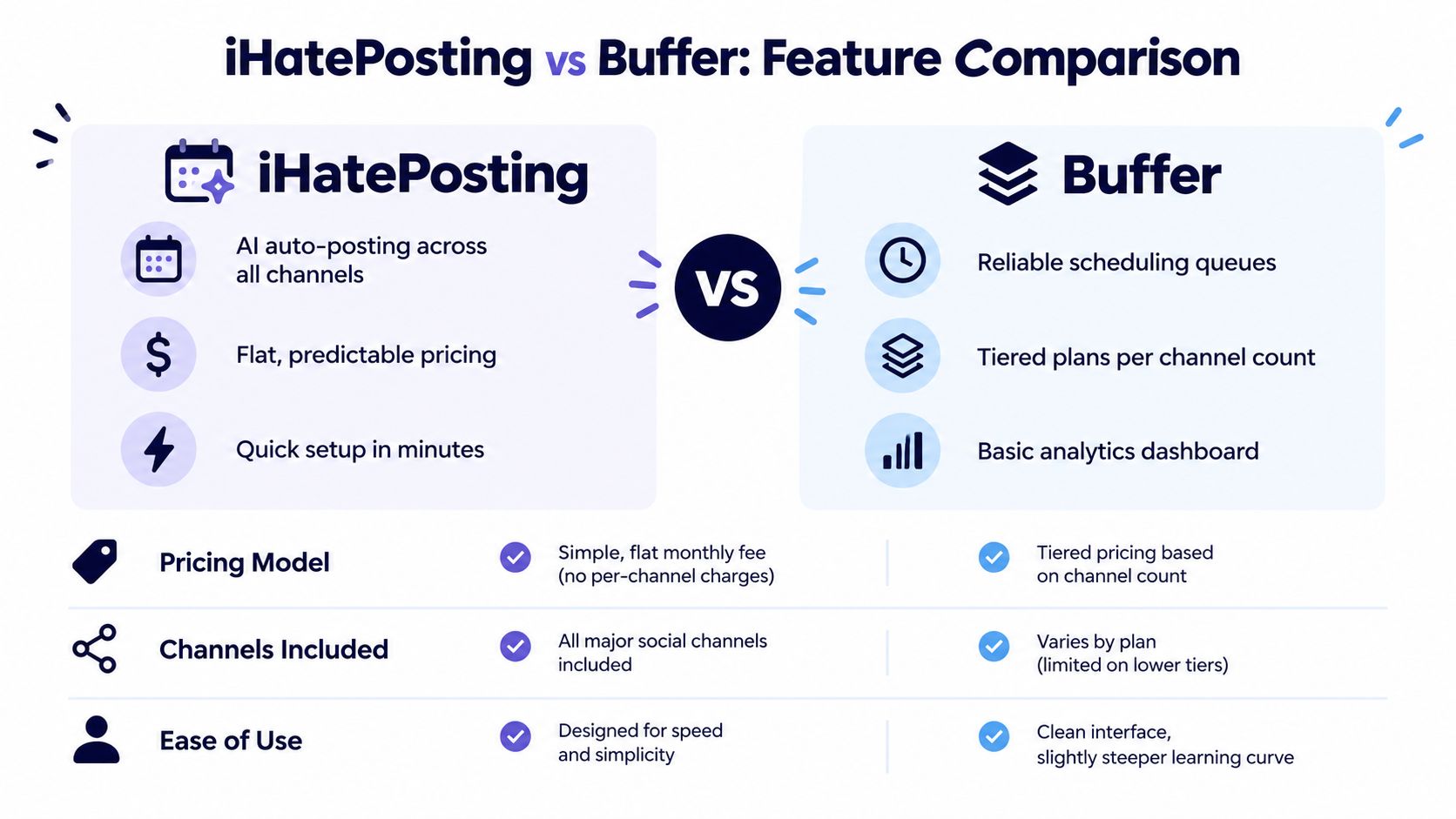
The two tools also approach the pricing unit differently. Buffer charges by connected channel, while iHatePosting uses a flat account-based structure rather than a separate per-channel or per-seat meter. That difference is the foundation of the comparison, not a minor packaging detail.
Pricing model and scaling behavior
Buffer offers granular entry pricing. If you connect only a small number of accounts, you pay for a small number of channels. That can be financially disciplined for a focused creator who has no intention of adding brands or clients.
The trade-off appears when the publishing footprint expands. Five channels, ten channels, and 25 channels each create a larger Buffer bill, even when one person runs the calendar. A flat-fee structure changes the forecast. The buyer still needs to check account limits, plan features, and any network-specific restrictions, but adding another supported account doesn't automatically create another per-channel charge.
That makes iHatePosting relevant for operators who repurpose campaigns broadly. Its product information describes one workflow for planning, tailoring, and publishing across social destinations, with a visual calendar and campaign organization. The commercial advantage comes from predictable account economics, not from assuming that every team needs every available feature.
Publishing workflow
Buffer's strength in this comparison is clarity around the paid unit. A buyer can count connected channels, apply the applicable band, and produce a defensible subscription estimate. That transparency is valuable in procurement, especially when a team wants to prevent unexpected seat-based expansion.
iHatePosting's workflow is organized around a shared composer, platform-specific caption handling, previews, content checks, and campaign grouping. Those functions matter when a team doesn't want to publish identical copy everywhere. A post may originate from one idea, but its final caption, media format, or call to action can require adaptation by network.
The distinction is operational:
- Buffer suits a channel-led calculation, where the team wants a straightforward queue and a bill tied to connected accounts.
- iHatePosting suits a campaign-led calculation, where the team values one organized process for tailoring and distributing content across several destinations.
- Neither pricing model should be judged without testing the actual publishing workflow, including approvals, media formats, analytics, and account connections.
Analytics and automation
The available publisher information describes iHatePosting as including trend analytics, historical reporting, CSV export, best-time recommendations derived from account data, API access, webhooks, and automation integrations. Those features may reduce the need to assemble separate workflow tools, but buyers should validate the exact availability on the plan under consideration.
Buffer's published pricing data establishes the channel model and the free entry point, but it doesn't by itself prove feature parity with another platform. A procurement comparison should therefore create a requirements sheet instead of relying on labels such as “basic analytics” or “advanced automation.”
Use the Buffer alternatives comparison as a starting point for that evaluation. Then test each product against the same sample campaign, the same approval path, and the same set of connected accounts. A tool that costs less but requires manual reformatting may not be cheaper in practice. A tool with more automation may not justify its price if the team never uses it.
Identifying Your Ideal Pricing Strategy
The right pricing model depends on how your account list behaves. A creator with two stable channels has a different cost profile from an agency that adds client accounts throughout the year. Treating both buyers as “small teams” hides the variable that matters most, channel growth.
Start with the current count, then create a realistic operating count. Include brand pages, client accounts, regional profiles, experimental projects, and channels you expect to connect during the next planning cycle. Don't use an optimistic number because dormant accounts aren't active every week. If the platform charges for connected channels, a dormant connection can still affect the bill.
A practical cost test
Use this sequence:
- Count connected destinations. Separate each social account or page that the platform treats as a channel.
- Calculate the present monthly bill. Apply the relevant Buffer band rather than multiplying every channel by the headline rate.
- Model the next expansion point. Check the cost at five, ten, and 25 channels if those counts are plausible for your operation.
- Add workflow software. Include separate tools for creative production, approvals, analytics, link management, and reporting.
- Compare the total operating process. A subscription is only one part of the cost if staff must move content between systems.
For teams evaluating broader commercial decisions, the same discipline appears in strategic pricing for e-commerce. The useful principle is to assess the price against the operating model, not against a single advertised entry point.
A flat fee becomes more attractive when the account list is broad, the same people manage every account, and the platform supports the required networks without additional channel charges. A per-channel plan remains defensible when the list is deliberately narrow or changes frequently enough that paying only for active connections has clear value.
Separate collaboration from channel count
Don't assume more channels automatically require a team tier. Channel expansion and user expansion are different events. A solo operator can manage many accounts, while a small group can manage only a few.
Ask who needs access, who approves content, whether clients need reports, and whether the calendar requires distinct permissions. If collaboration is limited, a lower tier may fit better. If multiple people review and publish, workflow control may justify a higher tier even when the channel count alone doesn't.
For the scheduling requirements themselves, review the criteria in this social media scheduling tool guide. The useful output isn't a generic score. It's a shortlist of must-have functions, such as platform support, media handling, campaign organization, analytics export, and automation connections.
The cheapest platform is the one that removes enough manual work without charging for capacity your workflow doesn't use.
Making the Final Recommendation
The financial conclusion depends on the operating model, not on whether Buffer or a flat-fee alternative has the lower headline price. Buffer can suit a concentrated channel portfolio, particularly when a creator or team manages a limited set of accounts and wants billing tied to connected destinations.
The per-channel trap appears as the portfolio expands. At three channels, the difference may be immaterial if the workflow is simple. At five, the buyer should compare the subscription against the value of one shared system. At 10 or 25, recurring channel charges deserve a full portfolio calculation across brands, clients, and projects. The question is whether each added account creates enough operational value to justify another billing unit.
Solo creators
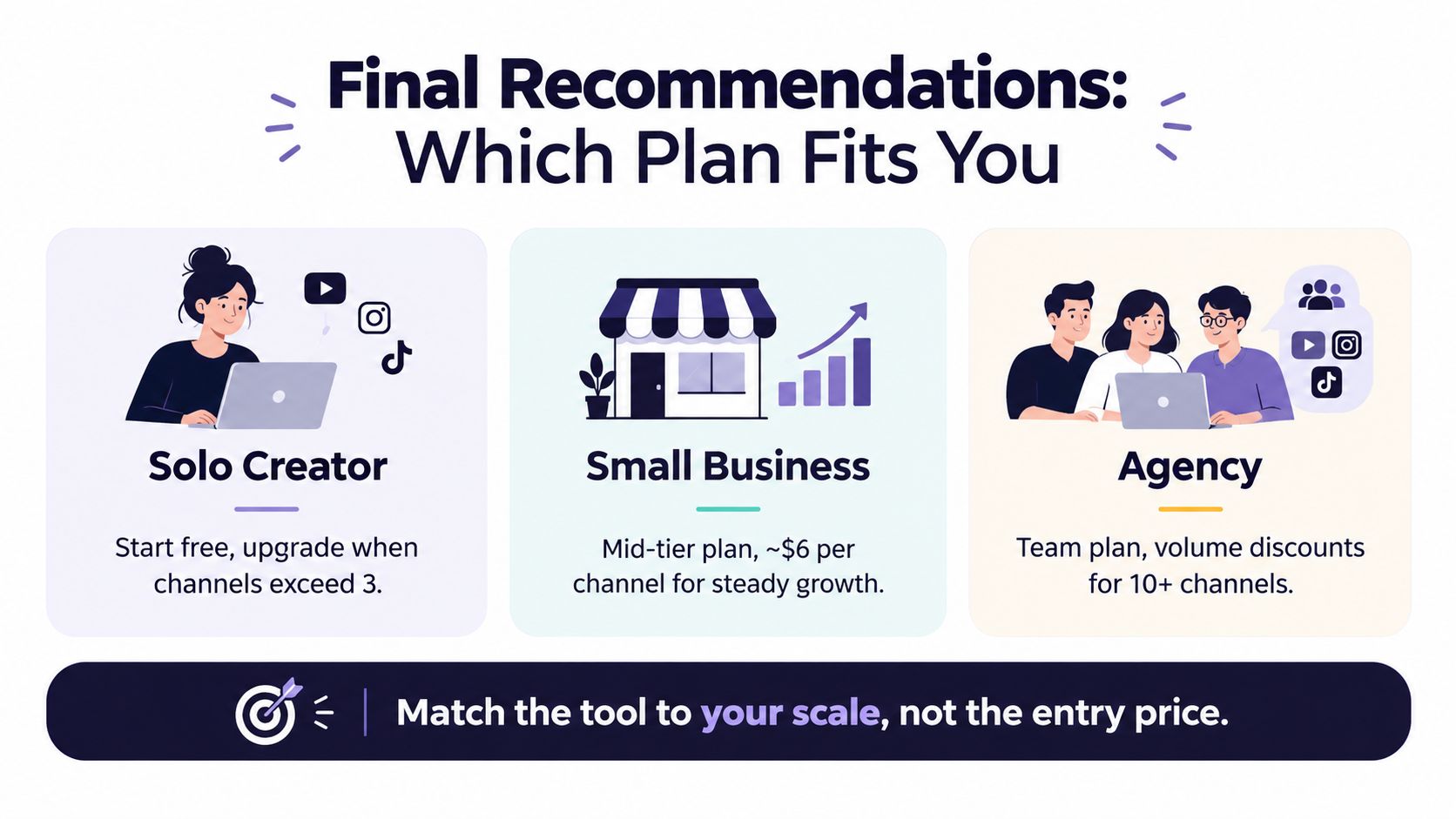
For a solo creator, the question is not whether the free tier exists but whether its three-channel ceiling survives the first side project. The free allowance documented by Buffer's official support team can validate the workflow before paid usage begins, provided the publishing routine stays small and stable.
Buffer remains a reasonable candidate when the creator values channel-specific billing, works with a narrow account set, and does not need a broader multi-brand system. The calculation changes when side projects or client accounts become permanent. Compare the recurring cost of those connected channels with a flat-fee workflow before adding each new account.
Small businesses
A small business should group accounts by brand and function rather than judge each profile separately. A primary brand, founder profile, recruitment page, product line, and community channel may all run through one calendar. Their combined cost should therefore be compared with the value of shared planning, publishing, and reporting.
Buffer Essentials can fit a focused publishing operation with limited collaboration. Team becomes more relevant when several people review or publish content. That upgrade should follow a documented workflow need, such as approvals or distinct access, rather than an assumption that a growing channel list automatically requires more users.
Agencies and freelancers
Agencies face the clearest exposure to per-channel billing because every new client can add connected destinations. Volume discounts may reduce the marginal rate in higher bands, but the total still rises with the account list. Model likely onboarding scenarios at three, five, 10, and 25 channels instead of pricing only the current roster.
A flat-fee platform can make client growth easier to forecast when the same calendar, campaign structure, and account process apply across engagements. It may also reduce repeated internal cost allocation whenever a client joins or leaves. Before switching, verify permissions, reporting, approvals, and network coverage. A lower recurring bill does not offset a workflow that requires parallel tools.
Enterprise teams
Large organizations should evaluate governance and consolidation before optimizing the channel rate. Missing approval controls, incomplete reporting, or weak data export can create manual work that outweighs a lower subscription price. The account model, user model, integration requirements, export needs, and support terms should be assessed together.
Buffer can make sense when channel-based allocation matches a narrow scheduling requirement. A broader platform may fit better when procurement aims to consolidate several tools or standardize work across brands. Use the iHatePosting pricing page to check current flat-fee plans and account allowances, then compare that result with Buffer's channel calculation. Choose the billing unit that remains sensible as the account portfolio changes.
Common Misconceptions About Social Tool Costs
A free plan isn't automatically the best long-term value. It may be the correct choice for a small, stable publishing routine, but it can become restrictive when the team needs more channels, more queue capacity, or collaboration. Buffer's documented free allowance is useful, yet it doesn't make the paid structure irrelevant.
The opposite assumption is just as weak: enterprise features aren't automatically valuable to a small team. Paying for permissions, reporting, or governance that nobody uses adds cost without improving the workflow.

The better test is total operating fit. Count channels, identify users, list required networks, and price the manual work that remains outside the platform. If the goal is to monetize your social presence, protect the margin by choosing a tool whose billing model won't punish the account growth that creates that opportunity.
iHatePosting offers a flat-fee social scheduling workflow with campaign organization, platform-specific content handling, publishing automation, and analytics features designed for teams managing multiple accounts. Review your real channel count and workflow requirements, compare them with Buffer's per-channel calculation, and visit iHatePosting to evaluate the current plans before you commit.