Crosspost App: Share One Post Across Every Platform
13 min read
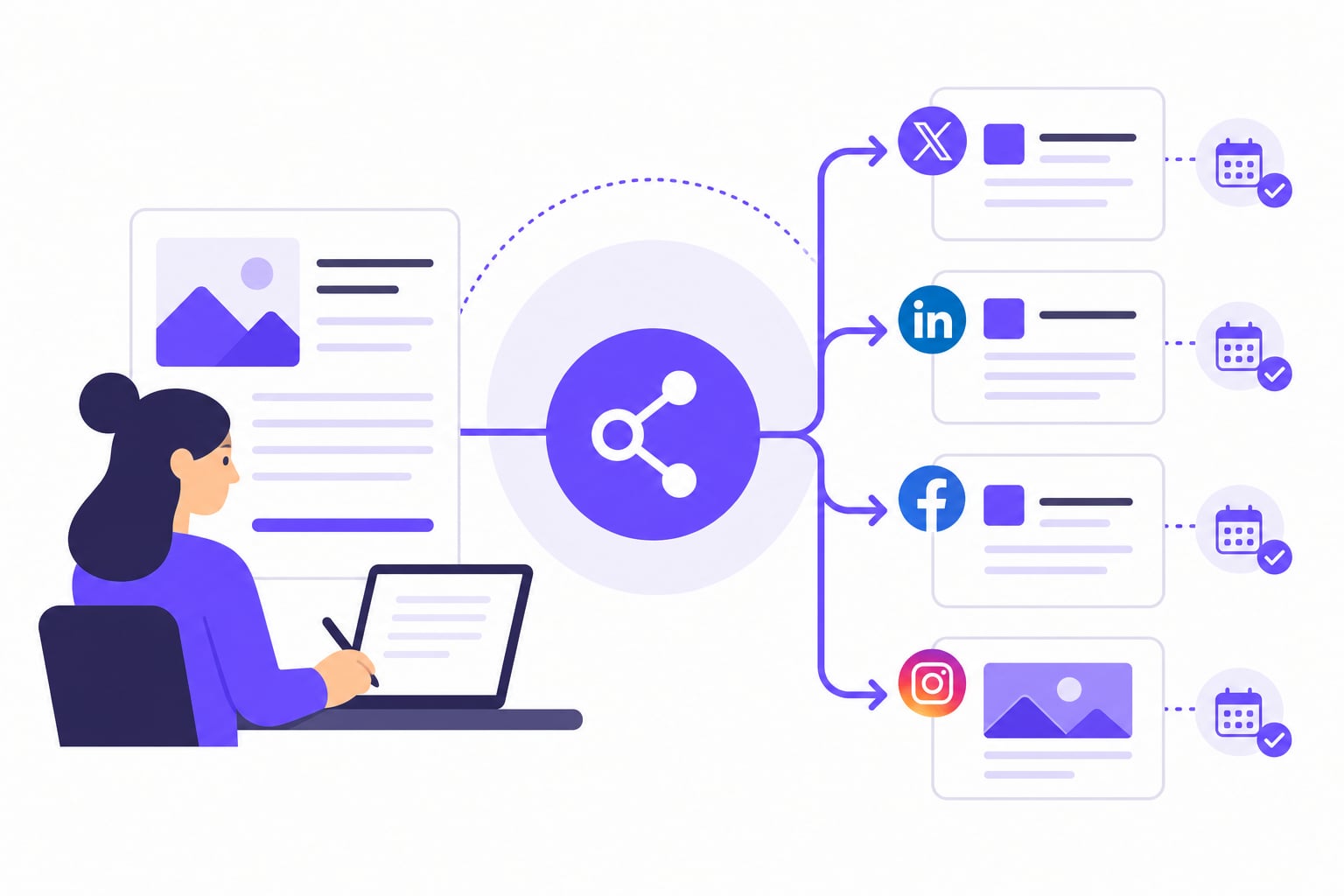
A crosspost app lets you write a post once, adapt it for each platform's format and tone, and publish or schedule it everywhere in a single workflow. The right tool handles character limits, video dimensions, and scheduling automatically, without requiring you to log into every app separately. This guide covers the full workflow, from upload to preview, plus what to watch for with video limits, free tiers, AI tools, and account security.
What a Crosspost App Actually Does
A crosspost app centralizes three tasks that normally eat time: drafting, tailoring, and scheduling. Instead of opening five apps and reformatting the same post each time, you write once inside the scheduler and push to every connected network from a single screen.
Most people assume their followers overlap heavily across platforms and worry that cross-posting means the same person sees the same post twice. According to cross-post.app's 2026 analysis, multiple studies suggest audience overlap between different social media platforms is generally limited to 10 to 20%. The large majority of your audience on any given platform likely never sees what you post on another.
The goal is not to blast identical content everywhere. Adapt one core message to each platform's culture and format, then let the tool handle distribution. A LinkedIn caption is not a TikTok caption, and a crosspost app gives you the space to write both without starting from scratch.
For a closer look at cross-posting across specific newer networks, the guide on cross-posting to X, Threads, and Bluesky covers the platform-specific differences in detail.
How to Crosspost: A Step-by-Step Workflow
The best cross posting app for social media is only useful if your workflow inside it is clean. These five steps apply whether you are using a lightweight tool or a full scheduling suite.
Upload your content once. Add your image, video, or text to the composer. A good cross platform posting app stores the asset centrally so you never re-upload the same file to each network. Keep your original files at the highest resolution your storage allows. Compression happens at the platform level, not yours.
Adapt the core message for each platform's culture and character limits. Twitter/X caps posts at 280 characters. LinkedIn rewards longer, more professional framing. Instagram captions can run long but the first line carries almost all the weight. Most scheduling tools give you a per-platform caption field. Write a short version, a professional version, and a conversational version of the same message. It takes five minutes and it is the difference between content that fits and content that looks copy-pasted.
Select the specific social networks and accounts for distribution. Not every post belongs on every platform. A product announcement might go to LinkedIn, Instagram, and Facebook. A quick reaction might only suit X and Threads. Choosing networks deliberately also protects you from format mismatches: a 2:3 portrait image that looks fine on Instagram can crop awkwardly on Twitter.
Set a publication schedule or add the post to a content queue. Most tools let you set a different time per network, or drop the post into a pre-built queue that fills your calendar automatically. If you are just starting out, three to five posts per week per active platform is a manageable cadence.
Verify post appearance using platform-specific previews. Check the preview for each network before anything goes live. Look at how the image crops, whether the caption is truncated, and whether links render correctly. Fixing a draft takes thirty seconds; deleting a live post and reposting it costs you engagement.
The workflow above applies to any cross platform posting app. The tool handles steps one, three, four, and five mechanically. Step two, the caption tailoring, is where your judgment still matters.
How Cross-Posting Apps Handle Video Length and File Limits
Video is where cross-posting gets complicated. Each platform enforces its own length and file size rules, and a scheduler cannot override them. If your video does not meet a platform's specs, the post either fails silently or gets rejected at upload.
Per CrossPost Pro's documentation, YouTube Shorts must be 60 seconds or less and Instagram Reels must be 90 seconds or less. TikTok allows longer videos on some account types, but the algorithm still favors shorter clips. Platform rules shift frequently, so treat these as a baseline to verify. The table below shows the key constraints to check before scheduling video content.
| Platform | Max length (check current rules) | Common file format | Notes |
|---|---|---|---|
| YouTube Shorts | 60 sec (per CrossPost Pro docs) | MP4, MOV | Vertical 9:16 preferred |
| Instagram Reels | 90 sec (per CrossPost Pro docs) | MP4, MOV | 9:16 aspect ratio required |
| TikTok | Varies by account type | MP4, MOV | Algorithm favors under 60 sec |
| Facebook Reels | 90 sec | MP4 | Mirrors Instagram Reels limits |
| LinkedIn video | 10 min max | MP4 | Landscape or square performs well |
Before scheduling a video post, trim your file to fit the most restrictive platform you are targeting. If you are posting to both Shorts and Reels, keep the clip under 60 seconds. Most cross-posting apps will flag a file that exceeds a hard limit, but they will not automatically trim or re-encode your video. Export compressed H.264 MP4 files to stay inside file size limits without visible quality loss.
Is There a Free Crosspost App for Multiple Platforms?
Most scheduling tools offer some version of a free tier, but the constraints vary. A typical free plan on an enterprise scheduler connects two or three channels, limits scheduled posts per month, and locks analytics behind a pricier plan. That works for a solo creator testing one platform, but breaks down once you add more accounts. Newer tools sometimes offer more generous free access, but often cap connected accounts or remove per-platform caption tailoring, which undercuts the main reason to use a cross-posting app.
iHatePosting is a multi-platform social media scheduling tool. Every new account gets a full-featured 90-day free trial with no credit card required and no limits on connected accounts or scheduled posts. That is a longer runway than most free tiers on the market, and it includes the full feature set: per-platform caption tailoring, the visual content calendar, hashtag groups, and analytics. Paid plans are described as coming soon, and existing users will be notified before any plan switches over.
The relevant question when comparing free options is whether the free access lets you test the workflow you actually plan to use. If you want to see how free scheduling tools compare more broadly, the roundup of free social media scheduling software covers the field in more detail.
Buffer is one of the better-known options for cross-posting. Its free tier covers a limited number of channels, and its paid plans are structured per channel, which can add up if you manage several accounts.
Can AI Agents Help Automate Your Cross-Posting?
AI tools like ChatGPT and Claude can handle parts of the cross-posting workflow, but they cannot replace a dedicated scheduling tool. Knowing where the boundary sits saves you from building a workflow that breaks at the wrong moment.
What AI agents do well: caption rewriting and tone adaptation. If you have a long LinkedIn post and need a 280-character version for X, a well-prompted AI can produce a usable draft in seconds. The same applies to adjusting formality, swapping hashtags, or generating variations for A/B testing.
What AI agents cannot do on their own: publish. No general-purpose AI assistant has native access to your Instagram, LinkedIn, or TikTok accounts. To post or schedule content, you still need a tool connected to each platform's API. AI can draft; it cannot distribute. Some scheduling tools combine a language model with a publishing backend, letting you describe a post and have the AI generate captions per platform before dropping it into a schedule, but the scheduling infrastructure still does the actual work.
For most creators and small teams, the practical workflow is: use AI to speed up caption adaptation (step two in the workflow above), then hand off to a scheduling tool for everything else. That keeps the two jobs separate and lets you swap either component without rebuilding the whole system. If you want to see how AI agents fit into a broader social media publishing setup, the guide on posting to social media from AI agents covers the architecture in more detail.
Privacy and Account Security When Using a Crosspost App
When you connect a social account to a third-party scheduling tool, you are granting that tool permission to act on your behalf. Understanding exactly what that means helps you make an informed decision before you hand over access.
Most reputable scheduling tools connect via official API integrations. Each major platform provides a developer API that lets authorized apps publish content on your behalf. When you go through the official OAuth flow, you see a permissions screen listing exactly what the app is requesting, and you can revoke those permissions at any time from each platform's connected apps settings.
Avoid any tool that asks for your social media password directly. Browser-session-based access, where a tool stores your credentials or session cookies, violates the terms of service of most major platforms and exposes your login details if the tool's servers are compromised.
Before connecting any cross-posting app: confirm it uses OAuth, review the permission scope and decline anything broader than publishing, and audit your connected apps list on each platform every few months to remove tools you no longer use.
Most platform APIs restrict publishing access to business or creator accounts. Personal accounts on Instagram and TikTok typically cannot be connected to third-party schedulers through the official API. If you need to post to a personal account, you will usually receive a mobile push notification to approve the post manually rather than having it publish automatically.
Does Cross-Posting Hurt Your Reach or Engagement?
Cross-posting does not hurt your reach when you tailor content for each platform. Platforms optimize for engagement signals within their own ecosystem: a post that performs well on LinkedIn is ranked by LinkedIn's signals, not by whether the same text appeared on X. There is no cross-platform penalty.
On the audience side, the overlap concern is smaller than most people assume. According to cross-post.app's 2026 analysis, multiple studies suggest audience overlap between different social media platforms is generally limited to 10 to 20%. Posting the same core message on Instagram and LinkedIn likely reaches a mostly different group of people on each.
The real risk is identical cross-posting: the same caption, same hashtags, same tone, pasted without adjustment. A caption written for TikTok reads oddly on LinkedIn. That mismatch can suppress engagement, but the cause is the lack of adaptation, not the act of cross-posting. Adapt the message, keep the core idea, and the algorithm question largely takes care of itself.
Crosspost App for iPhone and Mobile: What to Look For
Mobile cross-posting is a different use case than desktop scheduling. You are likely working from a camera roll or reviewing a queue on the go, not building a full content calendar. Look for these capabilities when evaluating a crosspost app for iPhone:
- Direct media upload from your camera roll. The app should pull images and video from your phone's library without requiring a separate upload step or a desktop transfer.
- Per-platform caption editing on mobile. A mobile composer that forces one caption for all platforms removes the most important part of a good cross-posting workflow. Check that you can write separate captions per network from the phone interface.
- Push notifications for scheduled posts. Some platforms require a manual approval tap before a post goes live. The app should notify you in time to approve it, not after the scheduled window has passed.
- A content calendar view. Seeing what is already scheduled before you add a new post prevents gaps and duplicates. A visual calendar on mobile is harder to build than on desktop, but the better apps include it.
- Stable iOS support with recent updates. An app that has not been updated in six months may break when a platform changes its API or when iOS updates ship.
Crosspost, a social media tool built specifically for iPhone and iPad (iOS 17.0 or later), consolidates posting for videos, stories, photos, and text across platforms including Instagram, TikTok, and LinkedIn. Per mwm.ai, it includes a unified grid to track all content and a morphing feature that lets you view individual platform performance directly in the app. It runs on a paid plan. For community-sourced comparisons and real-world feedback on mobile scheduling tools, Reddit threads on r/socialmedia and r/entrepreneur are a practical starting point for what people are actually using day to day.
Prices and plan limits verified as of October 2026.
FAQs
Can I crosspost to Reddit automatically using a scheduling app?
Reddit is one of the harder platforms to automate. Its API has become more restrictive, and most mainstream scheduling tools do not support Reddit publishing. A few niche tools have added Reddit support, but subreddit rules vary widely, and many communities explicitly ban promotional or cross-posted content. Check the rules of any subreddit you plan to post in before attempting automated scheduling there.
What happens if a platform changes its API and my crosspost app stops working?
Platform API changes are the most common reason scheduling tools break without warning. A reputable tool will notify users and push an update quickly, but there is usually a gap. Keep your login credentials accessible for each platform so you can post manually during any outage, and follow your scheduling tool's status page or changelog for notices about platform changes.
Can I customize the posting time for each platform separately?
Yes, most scheduling tools let you set a different publication time per network. This matters because peak engagement windows differ across platforms. You might schedule a LinkedIn post for Tuesday morning and the same adapted message on Instagram for that evening. If a tool only lets you set one time for all platforms, that is a meaningful limitation worth checking before you commit to it.
How many social media accounts can I connect to a crosspost app?
It depends on the tool and the plan. Entry-level free tiers on enterprise schedulers typically cap connections at two or three accounts. More capable tools allow more. iHatePosting's 90-day free trial places no limits on connected accounts or scheduled posts, which makes it easier to test a full multi-platform setup before any paid plan is required.
Is cross-posting the same as syndicating content?
Not exactly. Cross-posting means publishing the same core content, usually adapted per platform, to multiple social networks at the same time. Syndication typically refers to republishing full articles or long-form content on third-party sites like Medium or LinkedIn Articles, often with a canonical link pointing back to the original. The mechanics overlap, but syndication usually involves longer content and SEO considerations that social cross-posting does not.
Conclusion
A crosspost app removes the manual repetition from multi-platform publishing. You write the core message once, adapt it for each platform's format and audience, and let the tool handle scheduling and distribution. Audience overlap between platforms is small enough that cross-posting extends your reach rather than showing the same people the same post twice.
Before choosing a tool, test it against your actual workflow: check whether it supports per-platform captions, handles the video formats you use, connects to every network you post on, and works on mobile if you need it to. Start with one platform, build a two-week schedule, and measure whether your reach grows before expanding to more networks.